Skip to content
videodb
VideoDB Documentation
  • Pages
    • Welcome to VideoDB Docs
    • Quick Start Guide
      • Video Indexing Guide
      • Semantic Search
      • How Accurate is Your Search?
      • Collections
      • Public Collections
      • Callback Details
      • Ref: Subtitle Styles
      • Language Support
      • Guide: Subtitles
    • Examples and Tutorials
      • Dubbing - Replace Soundtrack with New Audio
      • VideoDB x TwelveLabs: Real-Time Video Understanding
      • Beep curse words in real-time
      • Remove Unwanted Content from videos
      • Instant Clips of Your Favorite Characters
      • Insert Dynamic Ads in real-time
      • Adding Brand Elements with VideoDB
      • Eleven Labs x VideoDB: Adding AI Generated voiceovers to silent footage
      • Elevating Trailers with Automated Narration
      • Add Intro/Outro to Videos
      • Audio overlay + Video + Timeline
      • Building Dynamic Video Streams with VideoDB: Integrating Custom Data and APIs
      • AI Generated Ad Films for Product Videography: Wellsaid, Open AI & VideoDB
      • Fun with Keyword Search
      • AWS Rekognition and VideoDB - Effortlessly Remove Inappropriate Content from Video
      • Overlay a Word-Counter on Video Stream
      • Generate Automated Video Outputs with Text Prompts | DALL-E + ElevenLabs + OpenAI + VideoDB
    • Visual Search and Indexing
      • Scene Extraction Algorithms
      • Custom Annotations
      • Scene-Level Metadata: Smarter Video Search & Retrieval
      • Advanced Visual Search Pipelines
      • Playground for Scene Extractions
      • Deep Dive into Prompt Engineering : Mastering Video Scene Indexing
    • Multimodal Search
      • Multimodal Search: Quickstart
      • Conference Slide Scraper with VideoDB
    • Real‑Time Video Pipeline
    • Meeting Recording SDK
    • Generative Media Quickstart
      • Generative Media Pricing
    • Realtime Video Editor SDK
      • Fit & Position: Aspect Ratio Control
      • Trimming vs Timing: Two Independent Timelines
      • Advanced Clip Control: The Composition Layer
      • Caption & Subtitles: Auto-Generated Speech Synchronization
      • Notebooks
    • Transcoding Quickstart
    • director-light
      Director - Video Agent Framework
      • Agent Creation Playbook
      • icon picker
        How I Built a CRM-integrated Sales Assistant Agent in 1 Hour
      • Make Your Video Sound Studio Quality with Voice Cloning
      • Setup Director Locally
    • github
      Open Source Tools
      • llama
        LlamaIndex VideoDB Retriever
      • PromptClip: Use Power of LLM to Create Clips
      • StreamRAG: Connect ChatGPT to VideoDB
    • zapier
      Zapier Integration
      • Auto-Dub Videos & Save to Google Drive
      • Create & Add Intelligent Video Highlights to Notion
      • Create GenAI Video Engine - Notion Ideas to Youtube
      • Automatically Detect Profanity in Videos with AI - Update on Slack
      • Generate and Store YouTube Video Summaries in Notion
      • Automate Subtitle Generation for Video Libraries
      • Solve customers queries with Video Answers
    • n8n
      N8N Workflows
      • AI-Powered Meeting Intelligence: Recording to Insights Automation
      • AI Powered Dubbing Workflow for Video Content
      • Automate Subtitle Generation for Video Libraries
      • Automate Interview Evaluations with AI
      • Turn Meeting Recordings into Actionable Summaries
      • Auto-Sync Sales Calls to HubSpot CRM with AI
      • Instant Notion Summaries for Your Youtube Playlist
    • mcp
      VideoDB MCP Server
    • Edge of Knowledge
      • Building Intelligent Machines
        • Part 1 - Define Intelligence
        • Part 2 - Observe and Respond
        • Part 3 - Training a Model
      • Society of Machines
        • Society of Machines
        • Autonomy - Do we have the choice?
        • Emergence - An Intelligence of the collective
      • From Language Models to World Models: The Next Frontier in AI
      • The Future Series
      • How VideoDB Solves Complex Visual Analysis Tasks
    • videodb
      Building World's First Video Database
      • Multimedia: From MP3/MP4 to the Future with VideoDB
      • Dynamic Video Streams
      • Why do we need a Video Database Now?
      • What's a Video Database ?
      • Enhancing AI-Driven Multimedia Applications
      • Misalignment of Today's Web
      • Beyond Traditional Video Infrastructure
      • Research Grants
    • Customer Love
    • Team
      • videodb
        Internship: Build the Future of AI-Powered Video Infrastructure
      • Ashutosh Trivedi
        • Playlists
        • Talks - Solving Logical Puzzles with Natural Language Processing - PyCon India 2015
      • Ashish
      • Shivani Desai
      • Gaurav Tyagi
      • Rohit Garg
      • VideoDB Acquires Devzery: Expanding Our AI Infra Stack with Developer-First Testing Automation

How I Built a CRM-integrated Sales Assistant Agent in 1 Hour

Sales calls contain critical deal information, but manually reviewing and updating CRM records can be tedious. What if you could automate this entire process?
With VideoDB, you can upload sales call recordings, instantly generate accurate transcripts and much more without any significant added effort. By leveraging AI, we can take this further by automatically analysing transcripts and populating CRM systems like HubSpot with relevant deal information.
In this blog, I’ll walk you through how to build a Sales Assistant Agent in under 1 hour using VideoDB & Director, an open-source framework for building AI-powered video agents.

🎯 Game Plan for the Sales Assistant Agent

The process is straightforward:
Upload the meeting recording – The user uploads a sales call recording along with any relevant details.
Generate a Transcript – VideoDB processes the video and creates an accurate transcript.
Extract Key Insights – A structured sales summary is generated from the transcript.
Update HubSpot CRM – The extracted insights are automatically added to the with the help of Composio (an integration platform).
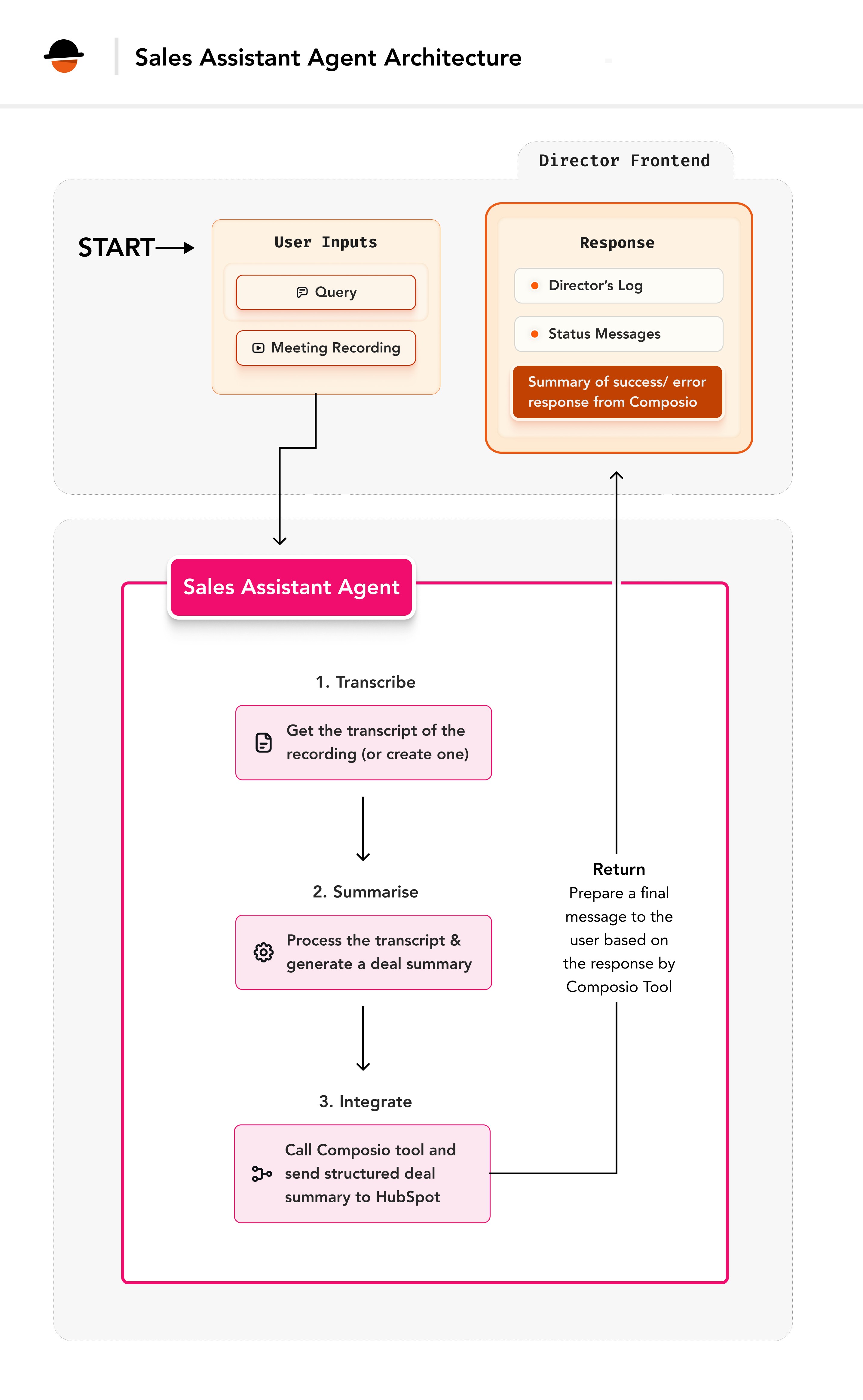
image.png

⭕️ Core Architecture

The Sales Assistant Agent is built on Director's extensible framework, leveraging its session management and state tracking capabilities while integrating seamless transcript analysis and CRM updates.

Tech Stack

VideoDB Director: An open-source framework to build AI video agents that can reason through complex video tasks & instantly stream the results.
Composio: An integration platform we will use to integrate HubSpot CRM function.

Key Components

Transcript Generator – Extract transcript from sales call recordings using VideoDB.
Insight Extractor – Analyses transcripts and extracts key sales insights.
HubSpot Integration – Automatically updates the HubSpot Deals table with structured insights using Composio.
Session Manager – Tracks progress and maintains state across operations.

⚒️ Base Setup

Step 1: VideoDB and Director Setup

Get your API key from . Install the latest SDK
Follow instructions mentioned at

Step 2: HubSpot Configuration

HubSpot is a CRM platform we’ll use to store the user data
Follow these steps:
Log into your HubSpot account (or )
Go to Settings → Integrations → Private Apps
Click "Create a private app"
Name your app (e.g., "Sales Assistant")
Under Scopes, select crm.objects.deals.write
This permission lets us create/update deal records
Create app and copy the API token

Step 3: Composio Configuration

Sign up or log in to and get the API key. Composio enables us to create deal entries in HubSpot.

Step 4: Environment Configuration

In the backend folder, update the .env file with the following credentials:

🔗 Setting up Composio Integration

To integrate Composio, we need a function that takes a task description and makes the appropriate API call to HubSpot.
In VideoDB Director, the existing tools/composio_tool.py file handles Composio interactions. You can modify this file to support the HUBSPOT_CREATE_CRM_OBJECT_WITH_PROPERTIES action.
Here’s what the function implementation looks like after the modifications:
import os
import json
from director.llm.openai import OpenAIChatModel
from enum import Enum

class ToolsType(str, Enum):
apps = "apps"
actions = "actions"

def composio_tool(task: str, auth_data: dict = None, tools_type:ToolsType=ToolsType.apps):
"""
Tool for making API calls to Composio actions.
Args:
task (str): Description of the task to perform
auth_data (dict): Authentication details for the target platform
tools_type (ToolsType): Type of Composio tools to use
"""
from composio_openai import ComposioToolSet
from openai import OpenAI

# Get OpenAI key
key = os.getenv("OPENAI_API_KEY")
base_url = "https://api.openai.com/v1"

if not key:
key = os.getenv("VIDEO_DB_API_KEY")
base_url = os.getenv("VIDEO_DB_BASE_URL", "https://api.videodb.io")

# Initialize OpenAI client
openai_client = OpenAI(api_key=key, base_url=base_url)

# Set up Composio toolset
toolset = ComposioToolSet(api_key=os.getenv("COMPOSIO_API_KEY"))

# Add authentication if provided
if auth_data and "name" in auth_data and "token" in auth_data:
toolset.add_auth(
app=auth_data["name"].upper(),
parameters=[
{
"name": "Authorization",
"in_": "header",
"value": f"Bearer {auth_data['token']}"
}
]
)

# Get appropriate tools based on type
if tools_type == ToolsType.apps:
tools = toolset.get_tools(apps=json.loads(os.getenv("COMPOSIO_APPS")))
elif tools_type == ToolsType.actions:
tools = toolset.get_tools(actions=json.loads(os.getenv("COMPOSIO_ACTIONS")))

# Make the API call
response = openai_client.chat.completions.create(
model=OpenAIChatModel.GPT4o,
tools=tools,
messages=[
{"role": "system", "content": "You are a helpful assistant."},
{"role": "user", "content": task},
],
)

# Handle response
composio_response = toolset.handle_tool_calls(response=response)
if composio_response:
return composio_response
else:
return response.choices[0].message.content or ""

This is what the HubSpot integration flow looks like:
Our agent extracts deal information from video transcripts
This information needs to reach HubSpot's CRM
Composio acts as our middleware, providing the HUBSPOT_CREATE_CRM_OBJECT_WITH_PROPERTIES action
This action automatically formats and sends our data to HubSpot
Here is an example for it:
composio_prompt = f"""
Create a new deal in HubSpot with the following details:
---
dealname: Acme Corp Deal
dealstage: qualifiedtobuy
budget: $50,000 annual contract
---
Use the HUBSPOT_CREATE_CRM_OBJECT_WITH_PROPERTIES action.
"""

composio_response = composio_tool(
task=composio_prompt,
auth_data={
"name": "HUBSPOT", # Tells Composio we're sending the HubSpot auth token
"token": HUBSPOT_ACCESS_TOKEN # Uses our HubSpot token
},
tools_type=ToolsType.actions # Specifies we're using Composio actions
)

🤖 Building the Agent

1. Import required components

Create a sales_assistant.py file inside the /backend/director/agents folder and add all our imports to it. These imports give us access to:
Director's agent framework
Video processing capabilities
AI/LLM integration
CRM connectivity
Error handling and logging

2. Define the Agent Parameters

The following parameters will be needed for the agent:
Parameter
Type of parameter
Description
video_id
The unique ID of the video stored in VideoDB.
collection_id
The ID of the collection where the video is stored.
prompt
Additional instructions or context for generating the sales summary.
There are no rows in this table
💡 The collection_id parameter represents the ID of a VideoDB collection where the meeting video is stored. Each video gets a unique video_id, which is automatically generated when the user uploads a video. To learn more about collections, explore .
Create a JSON schema for these parameters.

3. Prepare a Deal Analysis prompt

With the help of LLM, you can extract all the necessary information from the transcript which you may require to populate the CRM tables. The prompt can look something like this:

4. Implement Agent Class

This is a fundamental step while creating an agent. The parameters set here ( self.agent_name, self.description and the self.parameters) determine the way this agent interacts with the reasoning engine and works within the Director framework.

5. Implement the core logic

1. Declare a run method.
We will need to implement a run method in the agent’s class. This is the heart of the agent as this is the method that runs when the agent is called.
In the run method, define the required parameters which will be used to implement the agent.
2. Check for Hubspot Access Token
First, we need to validate HubSpot access and set up progress tracking:
💡 To communicate the steps that the agent is taking, we can use the
self.output_message.actions and the self.output_message.push_update methods to send the updates to the client. This allows us to communicate with the user about what the agent is achieving at a particular time.
3. Get the Video Transcript:
Now, let’s retrieve the transcript from the video. If the transcript is not present, we will trigger the indexing process to get the transcript.
4. Generate Deal Summary
Next, process the transcript using LLM to extract structured information:

5. Use Composio to update HubSpot CRM
Now, let’s make a Composio tool call with the generated deal summary.
6. Send the final message
Let’s prepare the final message from the generated composio_response.
7. Send the Final Success AgentResponse
Now that the agent is implemented, return the final success AgentResponse.
8. Error handling
Ensure robust error handling to manage failures gracefully.

6. Register the agent

To use the agent, add the agent in the self.agents list in the ChatHandler.
Go inside the backend/director/handler.py and import the agent.
And that’s it! That’s how simple it is to integrate Composio and generate deal summaries with an LLM-powered Sales Assistant. Now, you can try this out with the Director locally, refine the workflow, and automate your sales process like never before. Give it a go and see how much time you can save! 🚀

🚀 Using the agent

Visit the frontend at and refresh the page to see the agent available in the options for use.

💡 Conclusion

The Sales Assistant Agent showcases how the Director’s agent framework can streamline sales processes by integrating LLMs, Composio, and CRM tools like Salesforce and HubSpot. With automated transcription, intelligent deal summaries, and seamless CRM updates, this agent enhances efficiency and reduces manual work.
Key Takeaways:
Effortless agent creation with Director's intuitive framework and pre-built tools
Effortless transcript extraction using VideoDB
Seamless communication with Composio and CRM platforms
Robust error handling for reliable performance
Building an agent in VideoDB Director is fast and flexible, allowing you to create powerful, tailored solutions with minimal effort. What will you build next? 🚀

🔮 Further Exploration

Now that we've built this agent, there are many ways to enhance and extend its functionality, making it even more dynamic and useful.
Highlight Reels for Executive Reviews: Beyond just summarising text, you can leverage VideoDB and generate highlight reels from video content, providing quick, impactful insights for executive reviews or presentations.
Automated Client Communications: With Composio's email integration, you can set up automation to send summaries or action points from meetings directly to clients, ensuring efficient communication and follow-ups.
Video Analysis for Deeper Insights: Incorporate video analysis tools to assess emotions, tone, and unease in speaker interactions. This could provide valuable data on the engagement or sentiment of the meeting, allowing you to act on those insights for improved decision-making.
Want to print your doc?
This is not the way.
Try clicking the ⋯ next to your doc name or using a keyboard shortcut (
CtrlP
) instead.