

- How to plan and structure an effective agent
- Best practices for development and integration
- Techniques for handling user communication and errors
- Ways to leverage Director’s powerful video processing capabilities
Understanding the Architecture
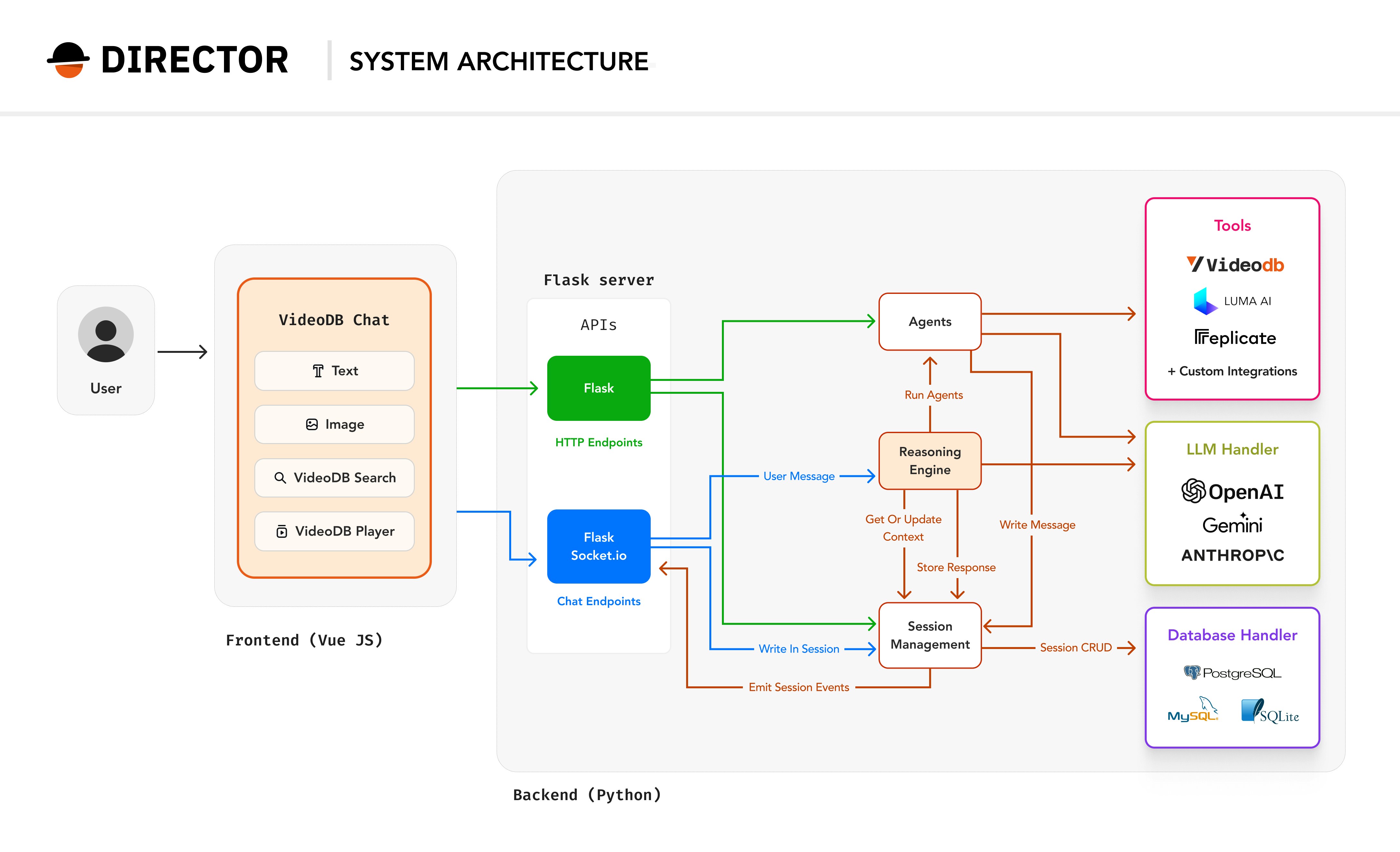
Before diving into agent creation, let’s understand how Director works as a system. Director follows a modular architecture that enables seamless interaction between users and AI-powered video processing capabilities.System Overview
Director’s architecture is designed around three core principles:- Modularity: Each component has a specific responsibility and can be developed or modified independently
- Scalability: The system can handle multiple requests and complex video operations efficiently
- Extensibility: New agents and tools can be easily added to expand functionality
Understanding the Director Framework
Director consists of several key components working together:Reasoning Engine
The brain of the system that interprets natural language commands, coordinates multiple agents, maintains conversation context, and manages workflows and decision-making.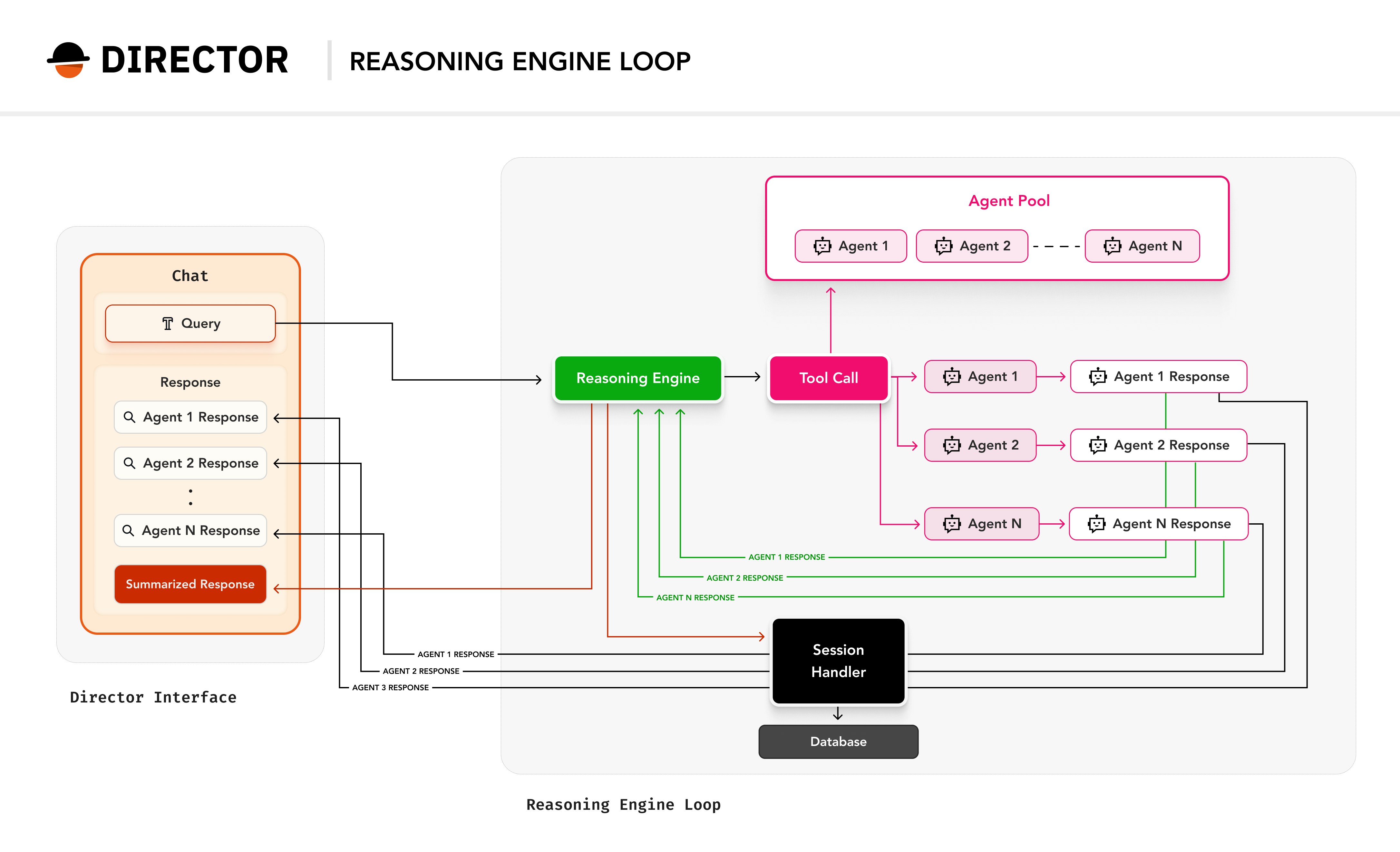
Agents
Specialized workers that handle specific tasks. Agents collaborate to complete complex video operations.SearchAgent
Finds specific content within videos using semantic search
ThumbnailAgent
Generates preview images and thumbnails
UploadAgent
Handles media uploads to VideoDB
View All Agents
Explore the complete collection of built-in agents in the repository
Tools
Reusable functions that agents can leverage to perform their tasks:VideoDB Tool
Core video database operations and queries
AI Model Integrations
OpenAI, Anthropic, and other LLM providers
External Connections
Slack, Composio, ElevenLabs, and more
Session Management
Handles state and context across interactions, ensuring consistent conversation flow and data persistence.The Reasoning Engine in Detail
The Reasoning Engine is the orchestrator of all agent activities. It performs four critical functions:Processes User Input
Understands natural language requests, maintains conversation history and context, and determines required actions and sequence
Orchestrates Agents
Selects appropriate agents from the pool, coordinates multiple agents for complex tasks, and manages dependencies between operations
Handles Communication
Provides real-time progress updates, manages error scenarios, and returns formatted responses to the user
Maintains State
Tracks ongoing operations, manages session data, and ensures context persistence across interactions
Bringing It All Together
The architecture enables powerful workflows like:- A user requests a
video summarythrough the chat interface - The Flask server processes this request and routes it to the Reasoning Engine
- The Reasoning Engine coordinates multiple agents to analyze and process the video
- Real-time updates flow back through WebSocket connections
- The final result is presented in the video player
Planning Phase
The success of an agent heavily depends on thorough planning and requirements gathering. Before writing any code:- Question Everything
- Compile a comprehensive list of questions across all aspects
- Include edge cases and potential future requirements
- Consider integration points with other agents/systems
- Categorize Requirements
- Define Constraints
- Prevents scope creep during development
- Ensures clear alignment with team expectations
- Makes code structure more maintainable
- Helps predict potential issues before they arise
- Creates clear testing boundaries
- Provides systematic upgrade paths for future versions
Remember: It’s easier to adjust plans than refactor code. Take time to ask questions and challenge assumptions before implementation begins.
Pre-Development Checklist
1. Purpose
Define a clear, single-responsibility purpose. Study these examples from the codebase:SearchAgent
Finds and retrieves specific content within videos
ThumbnailAgent
Generates preview images from video frames
UploadAgent
Handles media uploads with format validation and processing
2. Background Check
Review the director/agents/ directory for similar functionality- Consider extending existing agents by:
- Optimizing core functionality or improving performance
- Adding new capabilities
- Enhancing integration points (adding support for better tools, platforms or models)
3. Agent architecture
The I/O Contract defines how your agent interacts with the system, including the expected inputs, outputs, and how they are structured. It ensures consistency and clarity in communication between the agent, the system, and the end user. This contract is critical for integrating your agent with the infrastructure and enabling seamless interaction with other components. Input Contract The input contract specifies the parameters your agent expects to receive. These parameters can be simple (e.g., a string or number) or complex (e.g., a nested JSON object). The input contract is defined in two parts:I/O Contract
- Function Signature: The
runmethod of your agent defines the expected parameters. - JSON Schema: For complex inputs, a JSON schema is used to describe the structure and constraints of the input data.
run method. Here’s an example for a Slack agent:
- The
promptfield is a required string. - The
configfield is an optional object with nested properties (durationandstyle). - The
requiredkeyword ensures mandatory fields are validated.
- AgentResponse: A standardized response format for success or failure.
- Progress Updates: Real-time updates using the
output_messageobject. - Frontend Content Handling: Structured content for rendering in the frontend (e.g., text, video, images).
AgentResponse object is used to return the result of the agent’s execution. It includes:
status: Indicates success (AgentStatus.SUCCESS) or failure (AgentStatus.ERROR).message: A human-readable message describing the result.data: Additional data returned by the agent (e.g., generated content).
output_message object to provide real-time updates during the agent’s execution. For example:
output_message.content list. Each content type is represented by a specific model (e.g., TextContent, VideoContent). Example:
Plan and fix the steps to go from input → output. Keep the following factors in mind:Workflow Definition
- Input validation & preprocessing
- Resource initialization
- Core processing steps
- Progress updates
- Result formatting & cleanup
Look for composition opportunities with existing agents or toolsAgent & Tool Composition
- Example 1: ComparisonAgent leveraging VideoGenerationAgent
- Example 2: AudioGenerationAgent using ElevenLabs tool
4. Session Management
- The
sessionparameter is crucial for maintaining context across multiple interactions, preventing the agent from handling requests without retaining state. - Assigning a unique name and description aids in debugging and log analysis, making it easier to track agent behavior
- Flexible parameter handling: Your agent can either get its settings on-the-fly from user input (dynamic parameters), or use pre-defined parameters that you specify upfront. Simple agents often work best with dynamic parameters, while complex agents usually need pre-defined configurations.
Note: Parameter handling self.parameters changes based on the complexity of the parameters required for the agent:
Think of this like a progress bar or status updates you see when installing software. It tells users what’s happening behind the scenes.Director’s Log (Showing Steps)
This handles the actual content (videos, images, text) and its current state. Think of this like when you upload a file to Google Drive - you see both the file and its upload status.Progress Updates (Showing Content Responses)
- A video player
- A loading indicator
- A message saying “Your video is being generated…”
When the agent finishes, it returns three things:Final Cut (Returning Results)
status:Did it work? (success/error)message:What happened? (user-friendly explanation)data:The actual results (video URLs, text, etc.)
5. Error Handling
Clear error responses help the reasoning engine interpret failures, guide users effectively, and determine the next appropriate actions in the workflow.Best Practices
- Clear Agent & Parameter Descriptions
- Agent definitions help Reasoning Engine select the appropriate agent
- Parameter definitions guide RE in providing correct instructions
- Use explicit status updates
- Resource Management
- Validate inputs early:
- Use appropriate content [response] types:
Further Resources and Next Steps
Ready to build your first agent? Start with our sample agents in thedirector/agents/ directory or check out these resources:
Director Documentation
Comprehensive guides and API references for the Director framework
Sample Agents Repository
Real-world examples and implementations of custom agents
OpenAI Function Schema Guide
Learn about parameter schema design and function calling
Discord Community
Connect with other agent developers and get support