Sales calls contain critical deal information, but manually reviewing and updating CRM records can be tedious. What if you could automate this entire process? With VideoDB, you can upload sales call recordings, instantly generate accurate transcripts and much more without any significant added effort. By leveraging AI, we can take this further by automatically analysing transcripts and populating CRM systems like HubSpot with relevant deal information. In this blog, I’ll walk you through how to build a Sales Assistant Agent in under 1 hour using VideoDB & Director, an open-source framework for building AI-powered video agents.

Game Plan for the Sales Assistant Agent

The process is straightforward:
  1. Upload the meeting recording – The user uploads a sales call recording along with any relevant details.
  2. Generate a Transcript – VideoDB processes the video and creates an accurate transcript.
  3. Extract Key Insights – A structured sales summary is generated from the transcript.
  4. Update HubSpot CRM – The extracted insights are automatically added to the HubSpot Deals table with the help of Composio (an integration platform).
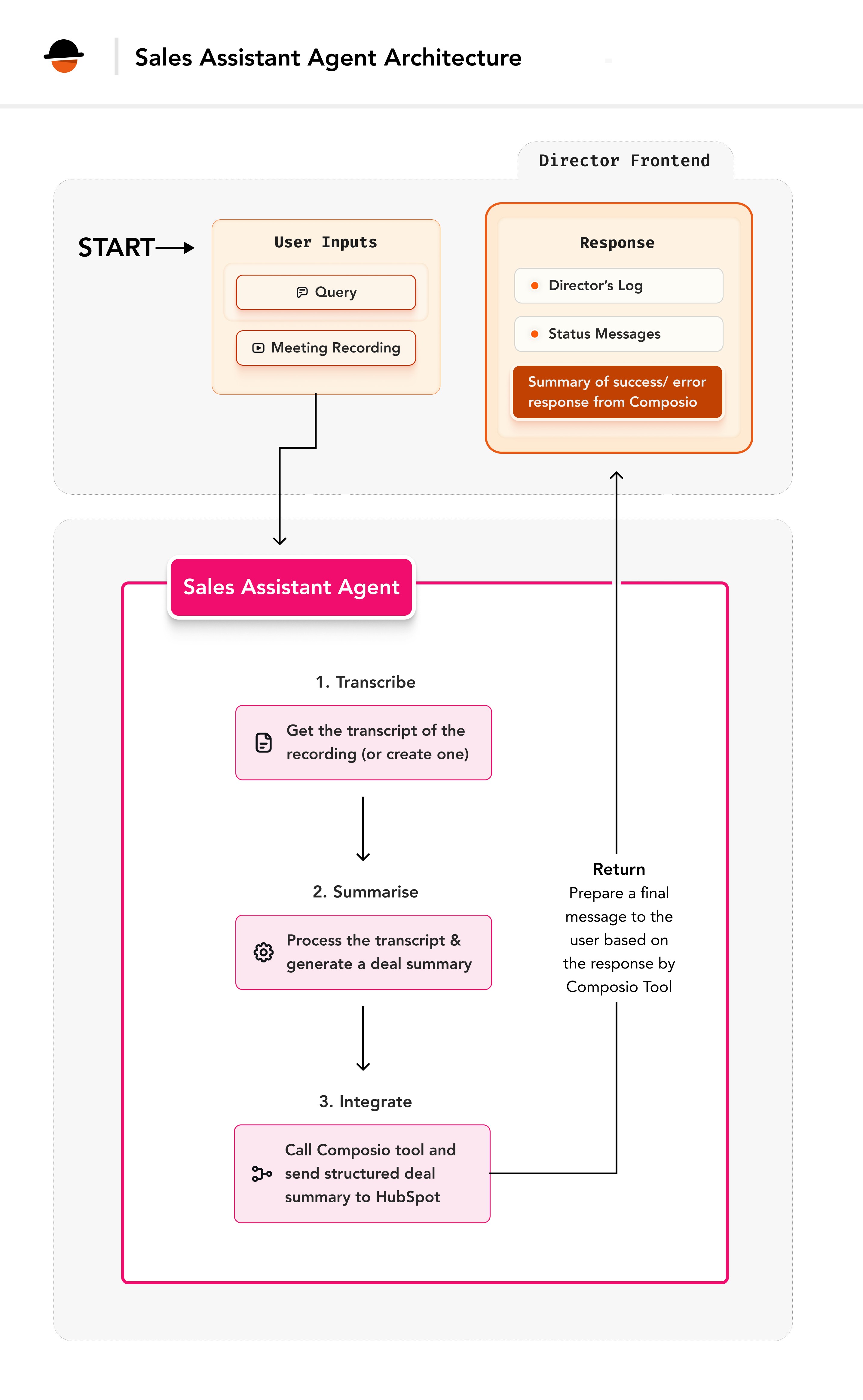
Sales assistant agent workflow showing meeting upload, transcript generation, insights extraction, and CRM update

Core Architecture

The Sales Assistant Agent is built on Director’s extensible framework, leveraging its session management and state tracking capabilities while integrating seamless transcript analysis and CRM updates.

Tech Stack

  1. VideoDB Director: An open-source framework to build AI video agents that can reason through complex video tasks & instantly stream the results.
  2. Composio: An integration platform we will use to integrate HubSpot CRM function.

Key Components

  • Transcript Generator – Extract transcript from sales call recordings using VideoDB.
  • Insight Extractor – Analyses transcripts and extracts key sales insights.
  • HubSpot Integration – Automatically updates the HubSpot Deals table with structured insights using Composio.
  • Session Manager – Tracks progress and maintains state across operations.

⚒️ Base Setup

Step 1: VideoDB and Director Setup

Get your API key from VideoDB Console. Install the latest SDK
pip install videodb

Setup Director Locally

Complete installation and configuration guide for Director framework

Step 2: HubSpot Configuration

HubSpot is a CRM platform we’ll use to store the user data
  • Follow these steps:
  1. Log into your HubSpot account (or create one)
  2. Go to Settings → Integrations → Private Apps
  3. Click “Create a private app”
  4. Name your app (e.g., “Sales Assistant”)
  5. Under Scopes, select **crm.objects.deals.write**
  • This permission lets us create/update deal records
  1. Create app and copy the API token

Step 3: Composio Configuration

Sign up or log in to Composio and get the API key. Composio enables us to create deal entries in HubSpot.

Step 4: Environment Configuration

In the backend folder, update the .env file with the following credentials:
# VideoDB access
VIDEO_DB_API_KEY="your-videodb-key"

# HubSpot integration
HUBSPOT_ACCESS_TOKEN="your-hubspot-token"

# Composio configuration
COMPOSIO_API_KEY="your-composio-key"
COMPOSIO_ACTIONS=["HUBSPOT_CREATE_CRM_OBJECT_WITH_PROPERTIES"]

Setting up Composio Integration

To integrate Composio, we need a function that takes a task description and makes the appropriate API call to HubSpot. In VideoDB Director, the existing tools/composio_tool.py file handles Composio interactions. You can modify this file to support the HUBSPOT_CREATE_CRM_OBJECT_WITH_PROPERTIES action. Here’s what the function implementation looks like after the modifications:
Python
import os
import json
from director.llm.openai import OpenAIChatModel
from enum import Enum

class ToolsType(str, Enum):
    apps = "apps"
    actions = "actions"

def composio_tool(task: str, auth_data: dict = None, tools_type:ToolsType=ToolsType.apps):
    """
    Tool for making API calls to Composio actions.
    
    Args:
        task (str): Description of the task to perform
        auth_data (dict): Authentication details for the target platform
        tools_type (ToolsType): Type of Composio tools to use
    """
    from composio_openai import ComposioToolSet
    from openai import OpenAI

    # Get OpenAI key
    key = os.getenv("OPENAI_API_KEY")
    base_url = "https://api.openai.com/v1"

    if not key:
        key = os.getenv("VIDEO_DB_API_KEY")
        base_url = os.getenv("VIDEO_DB_BASE_URL", "https://api.videodb.io")

    # Initialize OpenAI client
    openai_client = OpenAI(api_key=key, base_url=base_url)

    # Set up Composio toolset
    toolset = ComposioToolSet(api_key=os.getenv("COMPOSIO_API_KEY"))

    # Add authentication if provided
    if auth_data and "name" in auth_data and "token" in auth_data:
        toolset.add_auth(
            app=auth_data["name"].upper(),
            parameters=[
                {
                    "name": "Authorization",
                    "in_": "header",
                    "value": f"Bearer {auth_data['token']}"
                }
            ])

    # Get appropriate tools based on type
    if tools_type == ToolsType.apps:
        tools = toolset.get_tools(apps=json.loads(os.getenv("COMPOSIO_APPS")))
    elif tools_type == ToolsType.actions:
        tools = toolset.get_tools(actions=json.loads(os.getenv("COMPOSIO_ACTIONS")))

    # Make the API call
    response = openai_client.chat.completions.create(
        model=OpenAIChatModel.GPT4o,
        tools=tools,
        messages=[
            {"role": "system", "content": "You are a helpful assistant."},
            {"role": "user", "content": task},
        ],)

    # Handle response
    composio_response = toolset.handle_tool_calls(response=response)
    if composio_response:
        return composio_response
    else:
        return response.choices[0].message.content or ""
This is what the HubSpot integration flow looks like:
  1. Our agent extracts deal information from video transcripts
  2. This information needs to reach HubSpot’s CRM
  3. Composio acts as our middleware, providing the HUBSPOT_CREATE_CRM_OBJECT_WITH_PROPERTIES action
  4. This action automatically formats and sends our data to HubSpot
Here is an example for it:
Python
composio_prompt = f"""
    Create a new deal in HubSpot with the following details:
    ---
    dealname: Acme Corp Deal
    dealstage: qualifiedtobuy
    budget: $50,000 annual contract
    ---
    Use the HUBSPOT_CREATE_CRM_OBJECT_WITH_PROPERTIES action.
"""

composio_response = composio_tool(
    task=composio_prompt,
    auth_data={
        "name": "HUBSPOT",  # Tells Composio we're sending the HubSpot auth token
        "token": HUBSPOT_ACCESS_TOKEN  # Uses our HubSpot token
    },
    tools_type=ToolsType.actions  # Specifies we're using Composio actions
)

Building the Agent

1. Import required components

Create a sales_assistant.py file inside the /backend/director/agents folder and add all our imports to it. These imports give us access to:
  • Director’s agent framework
  • Video processing capabilities
  • AI/LLM integration
  • CRM connectivity
  • Error handling and logging
Python
import logging
import json
import os

# Base agent functionality
from director.agents.base import BaseAgent, AgentResponse, AgentStatus

# Session management and messaging
from director.core.session import (
    Session, 
    MsgStatus, 
    TextContent,
    ContextMessage,
    RoleTypes)

# LLM (AI) capabilities
from director.llm import get_default_llm
from director.llm.base import LLMResponseStatus

# Integration tools
from director.tools.videodb_tool import VideoDBTool  # For video processing
from director.tools.composio_tool import composio_tool, ToolsType  # For HubSpot integration

# For logging errors and debug info
logger = logging.getLogger(__name__)

2. Define the Agent Parameters

The following parameters will be needed for the agent:
ParameterType of parameterDescription
video_idstringThe unique ID of the video stored in VideoDB.
collection_idstringThe ID of the collection where the video is stored.
promptstringAdditional instructions or context for generating the sales summary.
The collection_id parameter represents the ID of a VideoDB collection where the meeting video is stored. Each video gets a unique video_id, which is automatically generated when the user uploads a video. To learn more about collections, explore VideoDB Collections.
Create a JSON schema for these parameters.
Python
SALES_ASSISTANT_PARAMETER = {
    "type": "object",
    "properties": {
        "video_id": {
            "type": "string",
            "description": "The ID of the sales call video",
        },
        "collection_id": {
            "type": "string",
            "description": "The ID of the collection which the video belongs to"
        },
        "prompt": {
            "type": "string",
            "description": "Additional information/query given by the user to make the appropriate action to take place"
        }
    },
    "required": ["video_id", "collection_id"]
}

3. Prepare a Deal Analysis prompt

With the help of LLM, you can extract all the necessary information from the transcript which you may require to populate the CRM tables. The prompt can look something like this:
Python
SALES_ASSISTANT_PROMPT = """
    Under "transcript", transcript of a sales call video is present.
    Under "user prompt", the user has given additional context or information.
    Generate a sales summary from it and extract answers for the following properties from the transcript.

    Below are the properties for which you need to find answers, along with their field type definitions and possible values.
    
    Each field may have a predefined format or set of possible values and can also have **default** property which needs to be used if a field is missing in transcript and user prompt:

    #### **Fields & Expected Answers**  
    Field: dealname
    description: (The company or individuals name with whom we are making a deal with)
    type: text (which says the name of person we are dealing with or the company)

    Field: dealstage
    Possible Answers: appointmentscheduled, qualifiedtobuy, presentationscheduled, decisionmakerboughtin, contractsent, closedwon, closedlost
    default: appointmentscheduled

    # Additional fields here...
"""

4. Implement Agent Class

This is a fundamental step while creating an agent. The parameters set here ( self.agent_name, self.description and the self.parameters) determine the way this agent interacts with the reasoning engine and works within the Director framework.
Python
class SalesAssistantAgent(BaseAgent):
    def __init__(self, session: Session, **kwargs):
        self.agent_name = "sales_assistant"
        self.description = "This agent will transcribe, study and analyse sales calls, automatically create deal summaries & update CRM software like Hubspot"
        self.parameters = SALES_ASSISTANT_PARAMETER
        self.llm = get_default_llm()
        super().__init__(session=session, **kwargs)

    def _generate_prompt(self, transcript: str, prompt: str):
        final_prompt = SALES_ASSISTANT_PROMPT
        final_prompt += f"""
            "transcript":
            {transcript}

            "user prompt":
            {prompt}
        """
        return final_prompt

5. Implement the core logic

1. Declare a run method. We will need to implement a run method in the agent’s class. This is the heart of the agent as this is the method that runs when the agent is called. In the run method, define the required parameters which will be used to implement the agent.
Python
def run(self, 
        video_id:str,
        collection_id:str,
        prompt="",
        *args, 
        **kwargs) -> AgentResponse:
        """
        Create deal summaries and update the users CRM software

        :param str video_id: The sales call video ID
        :param str collection_id: The videos collection ID
        :param str prompt: Additional context or query given by the user for the task
        :param args: Additional positional arguments.
        :param kwargs: Additional keyword arguments.
        :return: The response containing information about the sample processing operation.
        :rtype: AgentResponse
        """
2. Check for Hubspot Access Token First, we need to validate HubSpot access and set up progress tracking:
Python
# Inside the run method:
try:
    # check for the access token
    HUBSPOT_ACCESS_TOKEN = os.getenv("HUBSPOT_ACCESS_TOKEN")

    if not HUBSPOT_ACCESS_TOKEN:
        return AgentResponse(
            status=AgentStatus.ERROR,
            message="Hubspot token not present")

    # Proceed with progress tracking
    text_content = TextContent(
        agent_name=self.agent_name,
        status=MsgStatus.progress,
        status_message="Making magic happen with VideoDB Director...")

    self.output_message.content.append(text_content)
    self.output_message.push_update()
    # ... (rest of the implementation)
except Exception as e:
    pass  # See error handling section below
To communicate the steps that the agent is taking, we can use the self.output_message.actions and the self.output_message.push_update methods to send the updates to the client. This allows us to communicate with the user about what the agent is achieving at a particular time.
3. Get the Video Transcript: Now, let’s retrieve the transcript from the video. If the transcript is not present, we will trigger the indexing process to get the transcript.
Python
videodb_tool = VideoDBTool(collection_id=collection_id)

self.output_message.actions.append("Extracting the transcript")
self.output_message.push_update()

try:
  transcript_text = videodb_tool.get_transcript_text(video_id)
except Exception:
  logger.error("Transcript not found. Indexing spoken words..")
  self.output_message.actions.append("Indexing spoken words..")
  self.output_message.push_update()
  videodb_tool.index_spoken_words(video_id)
  transcript_text = videodb_tool.get_transcript_text(video_id)

4. Generate Deal Summary Next, process the transcript using LLM to extract structured information:
Python
sales_assist_llm_prompt = self._generate_prompt(
    transcript=transcript_text, 
    prompt=prompt)
sales_assist_llm_message = ContextMessage(
    content=sales_assist_llm_prompt,
    role=RoleTypes.user)
llm_response = self.llm.chat_completions(
    [sales_assist_llm_message.to_llm_msg()])

if not llm_response.status:
    logger.error(f"LLM failed with {llm_response}")
    text_content.status = MsgStatus.error
    text_content.status_message = "Failed to generate the response."
    self.output_message.publish()
    return AgentResponse(
        status=AgentStatus.ERROR,
        message="Sales assistant failed due to LLM error.",)
5. Use Composio to update HubSpot CRM Now, let’s make a Composio tool call with the generated deal summary.
Python
composio_prompt = f"""
    Create a new deal in HubSpot with the following details:

    ---
    {llm_response.content}
    ---

    Use the HUBSPOT_CREATE_CRM_OBJECT_WITH_PROPERTIES action to accomplish this.
"""
            
self.output_message.actions.append("Adding it into the Hubspot CRM")
self.output_message.push_update()
            
composio_response = composio_tool(
    task=composio_prompt,
    auth_data={
        "name": "HUBSPOT",
        "token": HUBSPOT_ACCESS_TOKEN
    },
    tools_type=ToolsType.actions)

6. Send the final message Let’s prepare the final message from the generated composio_response.
Python
llm_prompt = (
    f"User has asked to run a task: {composio_prompt} in Composio. \n"
    "Dont mention the action name directly as is"
    "Comment on the fact whether the composio call was sucessful or not"
    "Make this message short and crisp"
    f"{json.dumps(composio_response)}"
    "If there are any errors or if it was not successful, do tell about that as well"
    "If the response is successful, Show the details given to create a new deal in a markdown table format")

final_message = ContextMessage(content=llm_prompt, role=RoleTypes.user)

# generate a message for the user
llm_response = self.llm.chat_completions([final_message.to_llm_msg()])

if llm_response.status == LLMResponseStatus.ERROR:
    raise Exception(f"LLM failed with error {llm_response.content}")

# publish the final message
text_content.text = llm_response.content
text_content.status = MsgStatus.success
text_content.status_message = "Here's the response from your sales assistant"
self.output_message.publish()
7. Send the Final Success AgentResponse Now that the agent is implemented, return the final success AgentResponse.
Python
return AgentResponse(
    status=AgentStatus.SUCCESS,
    message=f"Agent {self.name} completed successfully.",
    data={})
8. Error handling Ensure robust error handling to manage failures gracefully.
Python
# Exception handler for the try block above:
try:
    pass  # See implementation in previous sections
except Exception as e:
    logger.exception(f"Error in {self.agent_name}")
    text_content.status = MsgStatus.error
    text_content.status_message = "Error in sales assistant"
    self.output_message.publish()
    error_message = f"Agent failed with error {e}"
    return AgentResponse(status=AgentStatus.ERROR, message=error_message)

6. Register the agent

To use the agent, add the agent in the self.agents list in the ChatHandler. Go inside the backend/director/handler.py and import the agent.
Python
from director.agents.sales_assistant import SalesAssistantAgent

class ChatHandler:
    def __init__(self, db, **kwargs):
        self.db = db

        # Register the agents here
        self.agents = [
            # other agents
            SalesAssistantAgent
        ]
And that’s it! That’s how simple it is to integrate Composio and generate deal summaries with an LLM-powered Sales Assistant. Now, you can try this out with the Director locally, refine the workflow, and automate your sales process like never before. Give it a go and see how much time you can save!

Using the agent

Visit the frontend at http://localhost:8080 and refresh the page to see the agent available in the options for use.

Conclusion

The Sales Assistant Agent showcases how the Director’s agent framework can streamline sales processes by integrating LLMs, Composio, and CRM tools like Salesforce and HubSpot. With automated transcription, intelligent deal summaries, and seamless CRM updates, this agent enhances efficiency and reduces manual work. Key Takeaways:
  • Effortless agent creation with Director’s intuitive framework and pre-built tools
  • Effortless transcript extraction using VideoDB
  • Seamless communication with Composio and CRM platforms
  • Robust error handling for reliable performance
Building an agent in VideoDB Director is fast and flexible, allowing you to create powerful, tailored solutions with minimal effort. What will you build next?

Further Exploration

Now that we’ve built this agent, there are many ways to enhance and extend its functionality, making it even more dynamic and useful.

Highlight Reels for Executives

Generate highlight reels from video content for quick, impactful insights for executive reviews or presentations beyond just summarizing text.

Automated Client Communications

Set up automation with Composio’s email integration to send summaries and action points from meetings directly to clients for efficient follow-ups.

Video Analysis for Sentiment

Assess emotions, tone, and engagement in speaker interactions to provide valuable data on meeting sentiment and improve decision-making.

Meeting App Integration

Integrate with Google Meet or Zoom to automatically trigger processing after meetings end, generating summaries without manual intervention.

Resources

Ready to build your own AI agents? Join our community and start exploring what’s possible with Director!
Need help? Reach out to our community or open an issue on GitHub. Happy building!