Skip to content
videodb
VideoDB Documentation
  • Pages
    • Welcome to VideoDB Docs
    • Quick Start Guide
      • Video Indexing Guide
      • Semantic Search
      • How Accurate is Your Search?
      • Collections
      • Public Collections
      • Callback Details
      • Ref: Subtitle Styles
      • Language Support
      • Guide: Subtitles
    • Examples and Tutorials
      • Dubbing - Replace Soundtrack with New Audio
      • VideoDB x TwelveLabs: Real-Time Video Understanding
      • Beep curse words in real-time
      • Remove Unwanted Content from videos
      • Instant Clips of Your Favorite Characters
      • Insert Dynamic Ads in real-time
      • Adding Brand Elements with VideoDB
      • Eleven Labs x VideoDB: Adding AI Generated voiceovers to silent footage
      • Elevating Trailers with Automated Narration
      • Add Intro/Outro to Videos
      • Audio overlay + Video + Timeline
      • Building Dynamic Video Streams with VideoDB: Integrating Custom Data and APIs
      • AI Generated Ad Films for Product Videography: Wellsaid, Open AI & VideoDB
      • Fun with Keyword Search
      • AWS Rekognition and VideoDB - Effortlessly Remove Inappropriate Content from Video
      • Overlay a Word-Counter on Video Stream
      • Generate Automated Video Outputs with Text Prompts | DALL-E + ElevenLabs + OpenAI + VideoDB
    • Visual Search and Indexing
      • Scene Extraction Algorithms
      • Custom Annotations
      • Scene-Level Metadata: Smarter Video Search & Retrieval
      • Advanced Visual Search Pipelines
      • Playground for Scene Extractions
      • Deep Dive into Prompt Engineering : Mastering Video Scene Indexing
    • Multimodal Search
      • Multimodal Search: Quickstart
      • Conference Slide Scraper with VideoDB
    • Real‑Time Video Pipeline
      • icon picker
        Automated Traffic Violation Reporter
    • Meeting Recording SDK
    • Generative Media Quickstart
      • Generative Media Pricing
    • AI Video Editing Automation SDK
      • Fit & Position: Aspect Ratio Control
      • Trimming vs Timing: Two Independent Timelines
      • Advanced Clip Control: The Composition Layer
      • Caption & Subtitles: Auto-Generated Speech Synchronization
      • Notebooks
    • Transcoding Quickstart
    • director-light
      Director - Video Agent Framework
      • Agent Creation Playbook
      • How I Built a CRM-integrated Sales Assistant Agent in 1 Hour
      • Make Your Video Sound Studio Quality with Voice Cloning
      • Setup Director Locally
    • github
      Open Source Tools
      • llama
        LlamaIndex VideoDB Retriever
      • PromptClip: Use Power of LLM to Create Clips
      • StreamRAG: Connect ChatGPT to VideoDB
    • zapier
      Zapier Integration
      • Auto-Dub Videos & Save to Google Drive
      • Create & Add Intelligent Video Highlights to Notion
      • Create GenAI Video Engine - Notion Ideas to Youtube
      • Automatically Detect Profanity in Videos with AI - Update on Slack
      • Generate and Store YouTube Video Summaries in Notion
      • Automate Subtitle Generation for Video Libraries
      • Solve customers queries with Video Answers
    • n8n
      N8N Workflows
      • AI-Powered Meeting Intelligence: Recording to Insights Automation
      • AI Powered Dubbing Workflow for Video Content
      • Automate Subtitle Generation for Video Libraries
      • Automate Interview Evaluations with AI
      • Turn Meeting Recordings into Actionable Summaries
      • Auto-Sync Sales Calls to HubSpot CRM with AI
      • Instant Notion Summaries for Your Youtube Playlist
    • mcp
      VideoDB MCP Server
    • Edge of Knowledge
      • Building Intelligent Machines
        • Part 1 - Define Intelligence
        • Part 2 - Observe and Respond
        • Part 3 - Training a Model
      • Society of Machines
        • Society of Machines
        • Autonomy - Do we have the choice?
        • Emergence - An Intelligence of the collective
      • From Language Models to World Models: The Next Frontier in AI
      • The Future Series
      • How VideoDB Solves Complex Visual Analysis Tasks
    • videodb
      Building World's First Video Database
      • Multimedia: From MP3/MP4 to the Future with VideoDB
      • Dynamic Video Streams
      • Why do we need a Video Database Now?
      • What's a Video Database ?
      • Enhancing AI-Driven Multimedia Applications
      • Misalignment of Today's Web
      • Beyond Traditional Video Infrastructure
      • Research Grants
    • Customer Love
    • Team
      • videodb
        Internship: Build the Future of AI-Powered Video Infrastructure
      • Ashutosh Trivedi
        • Playlists
        • Talks - Solving Logical Puzzles with Natural Language Processing - PyCon India 2015
      • Ashish
      • Shivani Desai
      • Gaurav Tyagi
      • Rohit Garg
      • VideoDB Acquires Devzery: Expanding Our AI Infra Stack with Developer-First Testing Automation

Automated Traffic Violation Reporter

The Viral Inspiration

You’ve seen the post. A guy got so fed up with daily traffic chaos that he automated his helmet camera to snap violations and send them straight to the traffic police - no manual intervention needed.

The internet loved it. And we thought - why not make this accessible to everyone?
With VideoDB RTStream, you can do exactly this. Connect your dashcam or helmet cam, let AI monitor for violations, and auto-report them. Let’s see how it works.

How It Works

📹 Helmet Cam / Dashcam
🔗 RTSP Stream → VideoDB RTStream
🤖 AI Scene Analysis (every 5 sec, 5 frames)
🚨 Violation Detected? → Webhook Alert
📧 n8n Workflow → Email to Traffic Police
Simple pipeline. Powerful impact.

The Setup

1. Connect Your Stream

import videodb

conn = videodb.connect()
coll = conn.get_collection()

rtsp_url = "rtsp://your-camera-stream-url"
roadcam_stream = coll.connect_rtstream(
name="RoadCam Violation Stream",
url=rtsp_url,
)

2. Create the Violation Detection Index

This is where the magic happens. We tell the AI exactly what to look for:
from videodb import SceneExtractionType

violation_prompt = """
Focus on vehicles visible on the road and monitor them for the following traffic rule violations:

1. NO HELMET: Two-wheeler rider or pillion not wearing a helmet
2. MOBILE PHONE USE: Driver using mobile phone while operating the vehicle
3. WRONG SIDE DRIVING: Vehicle traveling against the designated traffic flow
4. RED LIGHT VIOLATION: Vehicle crossing when traffic signal is red
5. TRIPLE RIDING: More than two people on a single two-wheeler
6. NO SEATBELT: Driver or front passenger not wearing seatbelt

If you detect a violation, respond in this format:

Traffic Rule Violated
Vehicle: [vehicle type and color]
Plate Number: [license plate if visible, otherwise "Not Visible"]
Violation: [specific violation from the list]
Description: [brief description]

If NO violation is detected, respond ONLY with:
No Traffic Rule Violation Detected
"""

violation_scene_index = roadcam_stream.index_scenes(
extraction_type=SceneExtractionType.time_based,
extraction_config={
"time": 5,
"frame_count": 5,
},
prompt=violation_prompt,
name="Traffic_Violation_Index"
)

3. Set Up Event & Alert

# Create the violation event
violation_event_id = conn.create_event(
event_prompt="""
Detect when a traffic rule violation occurs, such as no helmet, mobile phone use, wrong side driving, red light violation, triple riding, or no seatbelt.
Your 'explanation' should not include any commentary, and should clearly mention the following things:
Traffic Rule Violated
Vehicle: [vehicle type and color, e.g., "Black motorcycle", "White sedan"]
Plate Number: [license plate number if visible, otherwise "Not Visible"]
Violation: [specific violation(s) from the list above]
Description: [brief description of what you observed]
""",
label="traffic_violation"
)

# Attach webhook alert
violation_alert_id = violation_scene_index.create_alert(
violation_event_id,
callback_url="https://your-webhook-url.com"
)

What You Get

When a violation is caught, your webhook receives:
{
"event_id": "event-3fd4174feceb6162",
"label": "traffic_violation",
"confidence": 0.95,
"explanation": """
Traffic Rule Violated: NO HELMET
Vehicle: Orange scooter
Plate Number: DL 3S CW 4952
Violation: NO HELMET
Description: The rider and the pillion rider on the orange scooter are not wearing helmets.
""",
"timestamp": "2026-01-07T04:57:44.081850+00:00",
"start_time": "2026-01-07T10:27:20.432151+05:30",
"end_time": "2026-01-07T10:27:27.742309+05:30",
"stream_url": "https://rt.stream.videodb.io/manifests/rts-019b929e-e004-72b0-94d6-b7582510934f/1767761840000000-1767761848000000.m3u8",
"player_url": "https://console.videodb.io/player?url=https://rt.stream.videodb.io/manifests/rts-019b929e-e004-72b0-94d6-b7582510934f/1767761840000000-1767761848000000.m3u8"
}
The stream_url is a direct link to the violation clip - ready to attach to your report.

🚦 Automated Enforcement Pipeline: From Video to Inbox

This n8n workflow acts as the Digital Dispatch Center, transforming raw AI detections into professional traffic reports in real-time.
Webhook Trigger: Receives the raw event payload from the VideoDB Safety Agent immediately upon violation detection.
AI Data Extraction: A dedicated VideoDB node parses the unstructured explanation string into a structured JSON object containing the License Plate, Vehicle Description, and Violation Type.
Report Formatting: A code node generates a high-contrast, professional HTML email template that maps the AI observations to a formal report structure.
Official Delivery: The finalized report - complete with the dynamic subject line and a direct link to the video evidence - is dispatched instantly via the Gmail node to the Traffic Control Room.
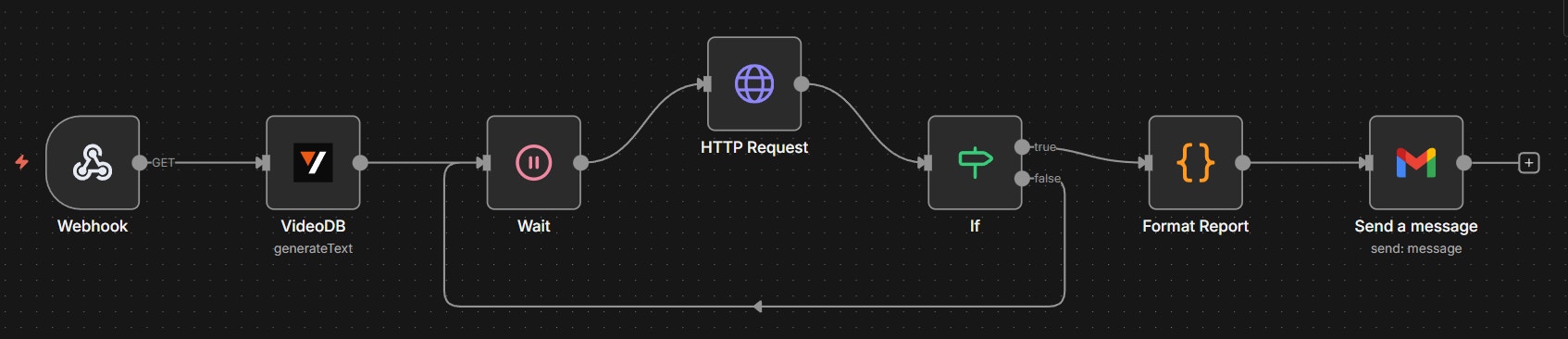
image.png
No more manual reporting. Just set it and forget it.

Email received via N8N Automation

image.png

Try It Yourself

N8N workflow JSON attached below, simply copy the code and paste in your N8N instance, and set up the credentials to get the automation running!
JSON125 lines
Want to print your doc?
This is not the way.
Try clicking the ··· in the right corner or using a keyboard shortcut (
CtrlP
) instead.