

Desktop capture currently supports macOS and Windows.
1. Backend Setup
Install
Create a Capture Session
Your backend creates a session and generates a short-lived token for the desktop client:2. Client Setup
Install
Start Capture
The desktop client uses the token to stream screen and audio:3. Backend Starts AI
When capture begins, your backend receives a webhook and starts AI processing:Mapping Capture channel categories to RTStream IDs is not yet a supported released-SDK contract, so this backend lookup example is deferred.
4. What You Get
Capture SDK types guarantee client events. Backend RTStream payload fields depend on the pipeline and are not a fixed Capture SDK envelope; inspect the events your integration receives. Build with these:- Screen-aware AI agents
- Live meeting copilots
- In-call assistance
- Semantic search and replay
Architecture
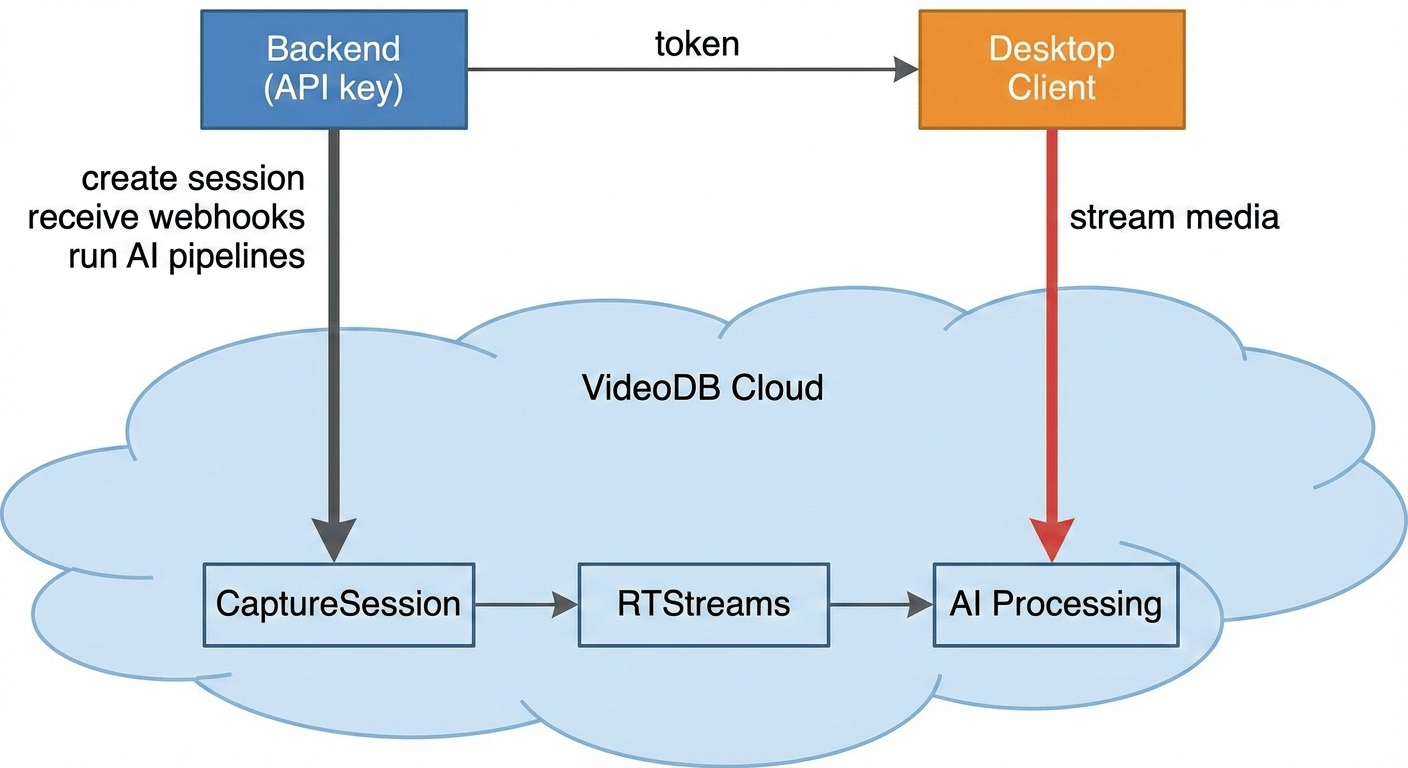
- Backend creates a CaptureSession and mints a short-lived token
- Desktop client uses the token to stream screen + audio (never sees API key)
- VideoDB creates RTStreams (one per channel) when capture starts
- Backend receives the lifecycle webhook and, once it has a supported RTStream ID, starts an RTStream understanding and indexing pipeline
- AI events flow back via WebSocket (real-time) or can be polled
Two Runtimes
5. Example Applications
Claude Pair Programmer
AI coding assistant with screen and audio context
Bloom
Local-first screen recorder with AI indexing
Focusd
AI-powered productivity tracking
Call.md
Real-time meeting intelligence
6. Core Concepts
CaptureSession (cap-xxx)
The lifecycle container for one capture run. Created by backend, activated by desktop client. States:created → starting → active → stopping → stopped → exported
RTStream (rts-xxx)
A real-time media stream, one per captured channel. This is where you run AI:The helpers in this example are RTStream helper APIs. For descriptor-backed V2 understanding and indexing, see Understand & Index RTStreams.
Channel
A recordable source on the desktop:Multi-Screen Capture
When multiple monitors are connected, each appears as a separatedisplay:N channel. Use cap.displays on the backend to inspect available video channels:
Python
cap.displays returns a list of video channel objects. Set a selected display’s is_primary field before capture starts to mark it as primary.
To capture multiple screens, pass all desired display channels to the desktop client:
Python
Explore More
View All Examples on GitHub
Complete source code with quickstart guides, example apps, and implementation patterns
Real-time Context
Events you receive from capture
Storage & Search
Optional persistence and semantic search