Quick Wins

  1. Use specific prompts during indexing
  2. Choose the right search type (semantic vs keyword)
  3. Tune thresholds based on your use case
  4. Combine multiple indexes for layered search

Understanding Precision and Recall

MetricDefinitionGoal
Precision% of returned results that are relevantFewer false positives
Recall% of relevant content that was returnedFewer missed results
The trade-off: Higher precision often means lower recall, and vice versa. Tune based on your priority.

Indexing for Accuracy

Specific Prompts Beat Generic Ones

# Too generic - low precision
video.index_scenes(prompt="Describe the scene")

# Better - focused on what matters
video.index_scenes(prompt="Identify all vehicles with their color, make, and model")

# Best - structured for your search needs
video.index_scenes(prompt="""
Describe this scene with:
- People: count, actions, clothing colors
- Vehicles: type, color, direction of travel
- Environment: indoor/outdoor, time of day
""")

Match Extraction to Content Type

ContentExtractionReasoning
Static shots1 frame/sceneSingle frame captures all info
Action/motion3-5 frames/sceneNeed temporal context
Quick cutsShot-basedRespect natural boundaries
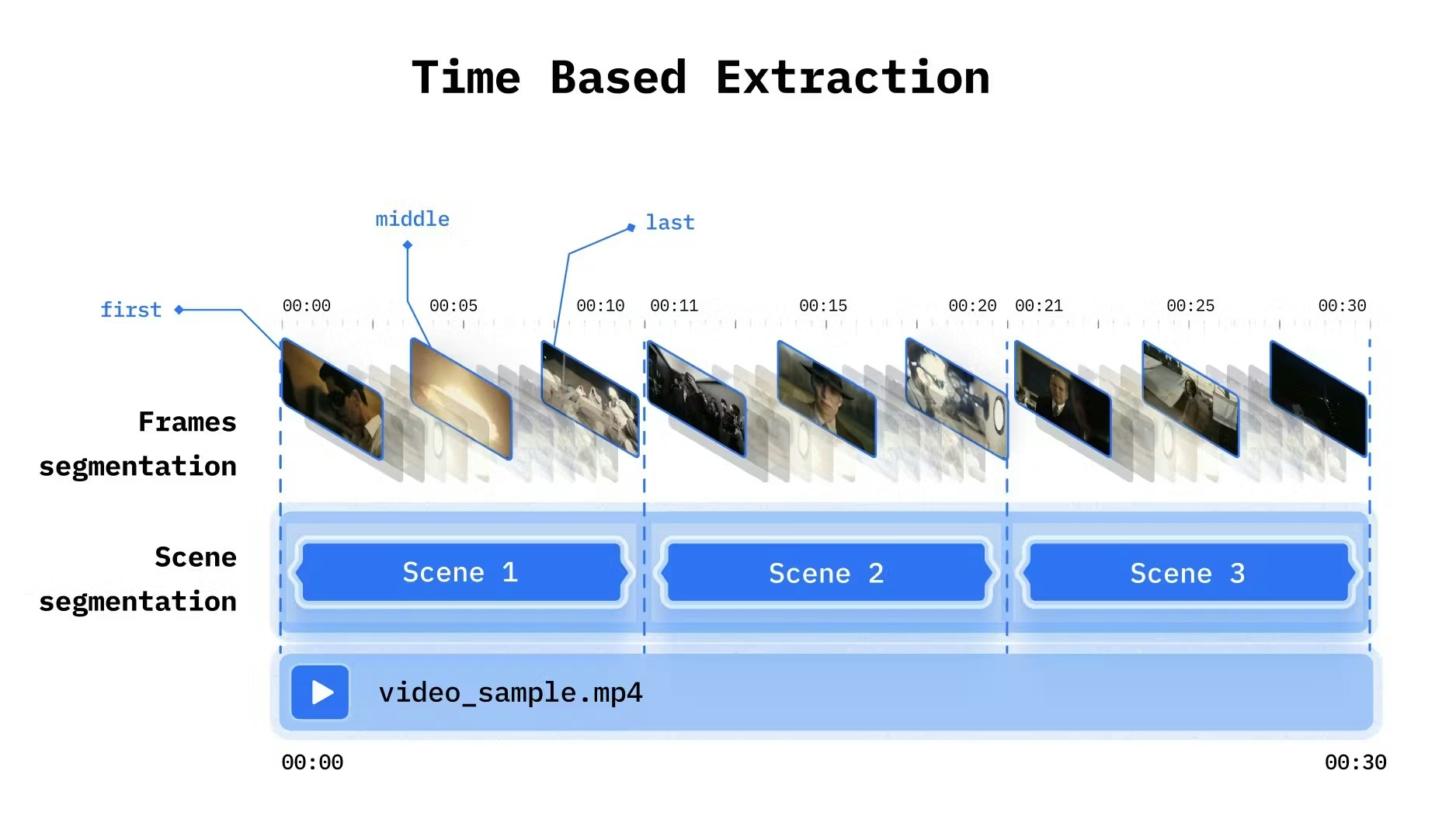
ContinuousTime-based, short intervalsCapture changes
Time-based extraction example showing consistent frame sampling at regular intervals
from videodb import SceneExtractionType

# For interviews (mostly static)
video.index_scenes(
    extraction_type=SceneExtractionType.time_based,
    extraction_config={"time": 30, "frame_count": 1},
    prompt="Describe the speaker and topic"
)

# For action content (need motion)
video.index_scenes(
    extraction_type=SceneExtractionType.time_based,
    extraction_config={"time": 5, "frame_count": 4},
    prompt="Describe the activity and movements"
)

Query Strategies

Query TypeUse SemanticUse Keyword
Questions✓ “How does the engine work?”
Concepts✓ “explains machine learning”
Exact terms✓ “API”
Technical names✓ “TensorFlow”
Numbers✓ “2024”
from videodb import SearchType

# Semantic for conceptual queries
results = video.search(
    query="explains the benefits",
    search_type=SearchType.semantic
)

# Keyword for exact matches
results = video.search(
    query="quarterly earnings",
    search_type=SearchType.keyword
)

Threshold Tuning

ParameterHigher ValueLower Value
score_threshold↑ Precision, ↓ Recall↓ Precision, ↑ Recall
result_thresholdMore resultsFewer results
dynamic_score_percentageStricter filteringMore inclusive
# High precision (strict)
results = video.search(
    query="CEO announcement",
    score_threshold=0.5,
    result_threshold=3
)

# High recall (inclusive)
results = video.search(
    query="CEO announcement",
    score_threshold=0.1,
    result_threshold=20
)

Evaluating Search Quality

Set Up Ground Truth

Create test queries with known correct answers:
test_cases = [
    {
        "query": "six",
        "expected_timestamps": [(4.0, 5.0), (14.0, 15.0), (24.0, 25.0)]
    },
    {
        "query": "introduction",
        "expected_timestamps": [(0.0, 30.0)]
    }
]

Measure Precision and Recall

def evaluate_search(results, expected):
    """Calculate precision and recall"""
    returned = set((s.start, s.end) for s in results.get_shots())
    expected_set = set(expected)

    true_positives = len(returned & expected_set)
    false_positives = len(returned - expected_set)
    false_negatives = len(expected_set - returned)

    precision = true_positives / (true_positives + false_positives) if returned else 0
    recall = true_positives / (true_positives + false_negatives) if expected_set else 0

    return {"precision": precision, "recall": recall}

# Evaluate
results = video.search("six")
metrics = evaluate_search(results, [(4.0, 5.0), (14.0, 15.0), (24.0, 25.0)])
print(f"Precision: {metrics['precision']:.2f}, Recall: {metrics['recall']:.2f}")

Advanced Techniques

Layer indexes for precise filtering:
# Search vehicles index
vehicle_results = video.search(
    "red car",
    index_type=IndexType.scene,
    index_id=vehicle_index
)

# Search motion index
motion_results = video.search(
    "speeding",
    index_type=IndexType.scene,
    index_id=motion_index
)

# Intersect for high precision
final_results = intersect(vehicle_results, motion_results)

Metadata Filtering

Pre-filter before semantic search:
# Narrow search space with metadata
results = coll.search(
    query="product demo",
    filter=[{"category": "marketing"}],
    index_type=IndexType.scene
)

Post-Processing with LLMs

For complex queries, use an LLM to refine results:
# Get broad results first
results = video.search(
    query="numbers",
    score_threshold=0.1  # Low threshold for high recall
)

# Refine with LLM
refined = llm.filter(
    results,
    criteria="Keep only results showing numbers greater than 10"
)

Common Pitfalls

ProblemCauseFix
Missing relevant resultsThreshold too highLower score_threshold
Too many irrelevant resultsThreshold too lowRaise score_threshold
Semantic search misses exact termsWrong search typeUse keyword search
Poor visual search resultsGeneric promptUse specific, structured prompts
Inconsistent resultsWrong extraction configMatch extraction to content type

Iterative Improvement

  1. Start broad - Low thresholds, high recall
  2. Evaluate - Check precision on sample queries
  3. Refine - Adjust thresholds, improve prompts
  4. Test - Validate against ground truth
  5. Repeat - Iterate until satisfied

Next Steps