

Quick Example
Python
from videodb import IndexType

# Create two indexes with different focus
car_index = video.index_scenes(
    prompt="Identify the color and model of each vehicle",
    name="vehicle_identification"
)

motion_index = video.index_scenes(
    prompt="Describe the movement pattern - speeding, stopping, turning",
    name="motion_analysis"
)

# Search each index separately
car_results = video.search(
    query="red sedan",
    index_type=IndexType.scene,
    index_id=car_index
)

motion_results = video.search(
    query="driving recklessly",
    index_type=IndexType.scene,
    index_id=motion_index
)
Why Multiple Indexes?
Different prompts extract different information. A single index optimized for one use case may miss details relevant to another.| Index Focus | Prompt Example | Use Case |
|---|---|---|
| Objects | ”Identify all objects and their colors” | Inventory, cataloging |
| Actions | ”Describe activities and movements” | Activity detection |
| People | ”Describe people, clothing, expressions” | Person identification |
| Environment | ”Describe the setting and location” | Scene classification |
| Text | ”Read any visible text or signage” | OCR, document extraction |
Creating Focused Indexes
Same Video, Different Perspectives
from videodb import SceneExtractionType

# Environment index
env_index = video.index_scenes(
    prompt="Describe the environment - indoor/outdoor, lighting, weather",
    name="environment"
)

# People index
people_index = video.index_scenes(
    prompt="Describe the people - count, clothing, actions",
    name="people"
)

# Object index
object_index = video.index_scenes(
    prompt="List all visible objects and their positions",
    name="objects"
)
// Environment index
const envIndex = await video.indexScenes({
    prompt: "Describe the environment - indoor/outdoor, lighting, weather",
    name: "environment"
});

// People index
const peopleIndex = await video.indexScenes({
    prompt: "Describe the people - count, clothing, actions",
    name: "people"
});

// Object index
const objectIndex = await video.indexScenes({
    prompt: "List all visible objects and their positions",
    name: "objects"
});
Different Extraction Configs
from videodb import SceneExtractionType

# Fast sampling for color detection (1 frame per second)
color_index = video.index_scenes(
    extraction_type=SceneExtractionType.time_based,
    extraction_config={"time": 1, "frame_count": 1},
    prompt="Identify vehicle colors",
    name="colors"
)

# Slower sampling for motion analysis (5 frames over 4 seconds)
motion_index = video.index_scenes(
    extraction_type=SceneExtractionType.time_based,
    extraction_config={"time": 4, "frame_count": 5},
    prompt="Describe vehicle movement patterns",
    name="motion"
)
// Fast sampling for color detection (1 frame per second)
const colorIndex = await video.indexScenes({
    extractionType: 'time',
    extractionConfig: { time: 1, frame_count: 1 },
    prompt: "Identify vehicle colors",
    name: "colors"
});

// Slower sampling for motion analysis (5 frames over 4 seconds)
const motionIndex = await video.indexScenes({
    extractionType: 'time',
    extractionConfig: { time: 4, frame_count: 5 },
    prompt: "Describe vehicle movement patterns",
    name: "motion"
});
Combining Search Results
Search multiple indexes and combine results for precise retrieval.Intersection (AND)
Find segments that match criteria in both indexes: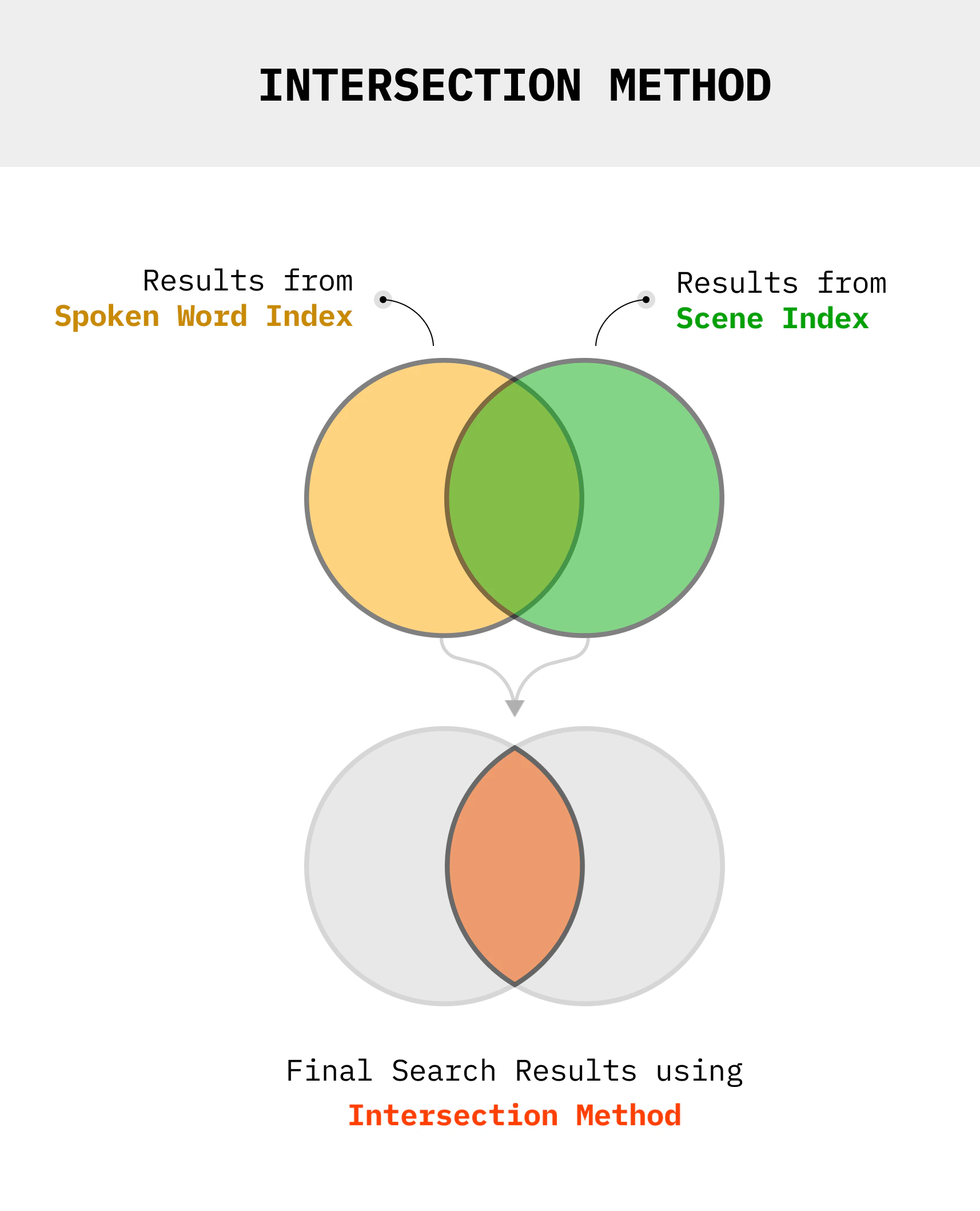
Python
def get_intersection(results1, results2):
    """Find overlapping timestamps from two search results"""
    shots1 = [(s.start, s.end) for s in results1.get_shots()]
    shots2 = [(s.start, s.end) for s in results2.get_shots()]

    intersection = []
    for s1 in shots1:
        for s2 in shots2:
            start = max(s1[0], s2[0])
            end = min(s1[1], s2[1])
            if start < end:
                intersection.append((start, end))

    return intersection

# Find "red sedan" that is "driving recklessly"
car_results = video.search("red sedan", index_type=IndexType.scene, index_id=car_index)
motion_results = video.search("reckless driving", index_type=IndexType.scene, index_id=motion_index)

combined = get_intersection(car_results, motion_results)
stream_url = video.generate_stream(combined)
Union (OR)
Find segments that match criteria in either index: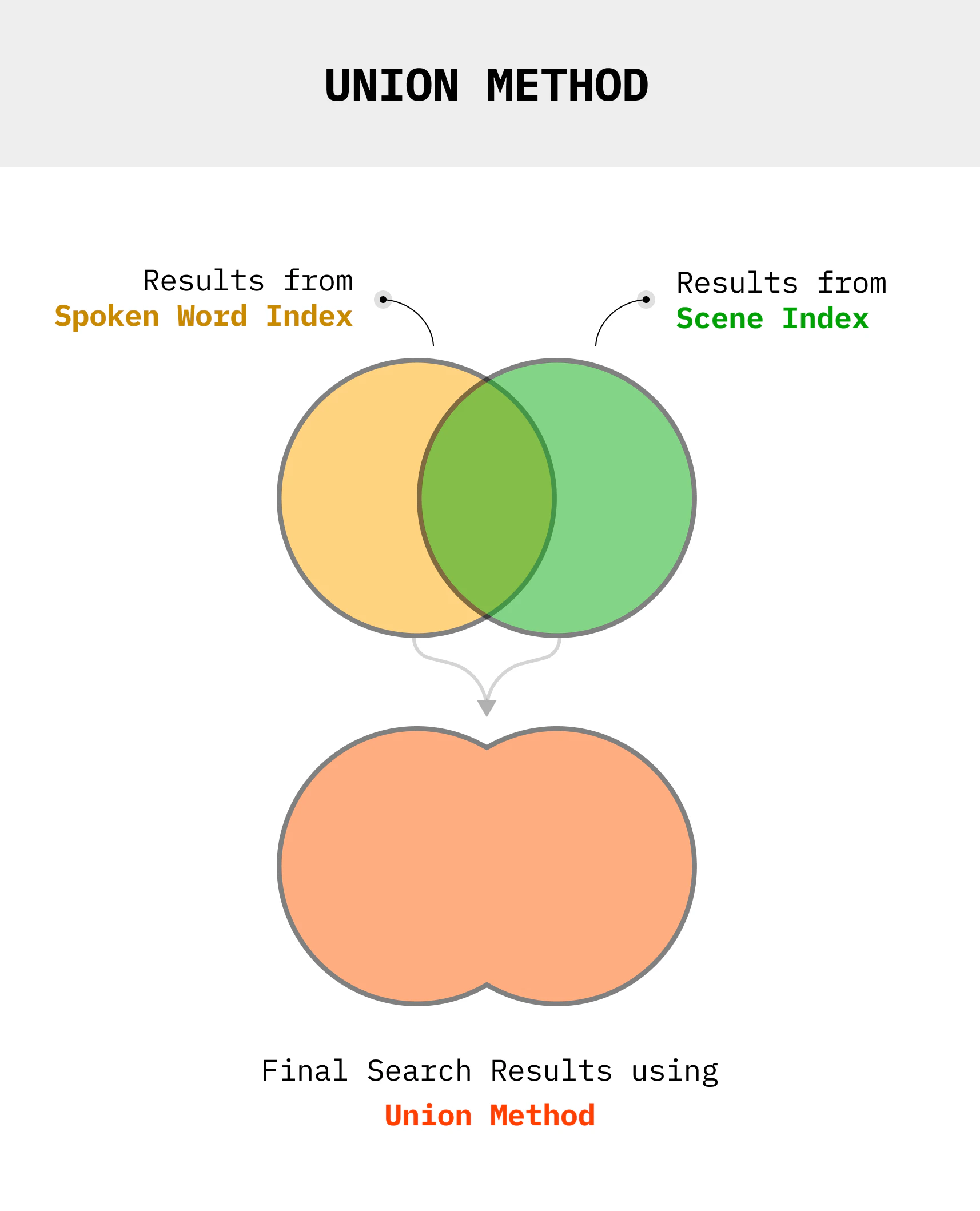
Python
def get_union(results1, results2):
    """Merge timestamps from two search results"""
    all_shots = [(s.start, s.end) for s in results1.get_shots()]
    all_shots += [(s.start, s.end) for s in results2.get_shots()]

    # Sort and merge overlapping intervals
    all_shots.sort()
    merged = []
    for start, end in all_shots:
        if merged and start <= merged[-1][1]:
            merged[-1] = (merged[-1][0], max(merged[-1][1], end))
        else:
            merged.append((start, end))

    return merged

# Find any scene with "red sedan" OR "motorcycle"
car_results = video.search("red sedan", index_type=IndexType.scene, index_id=car_index)
bike_results = video.search("motorcycle", index_type=IndexType.scene, index_id=car_index)

combined = get_union(car_results, bike_results)
Custom Annotations
Bring your own scene descriptions from external pipelines or manual tagging.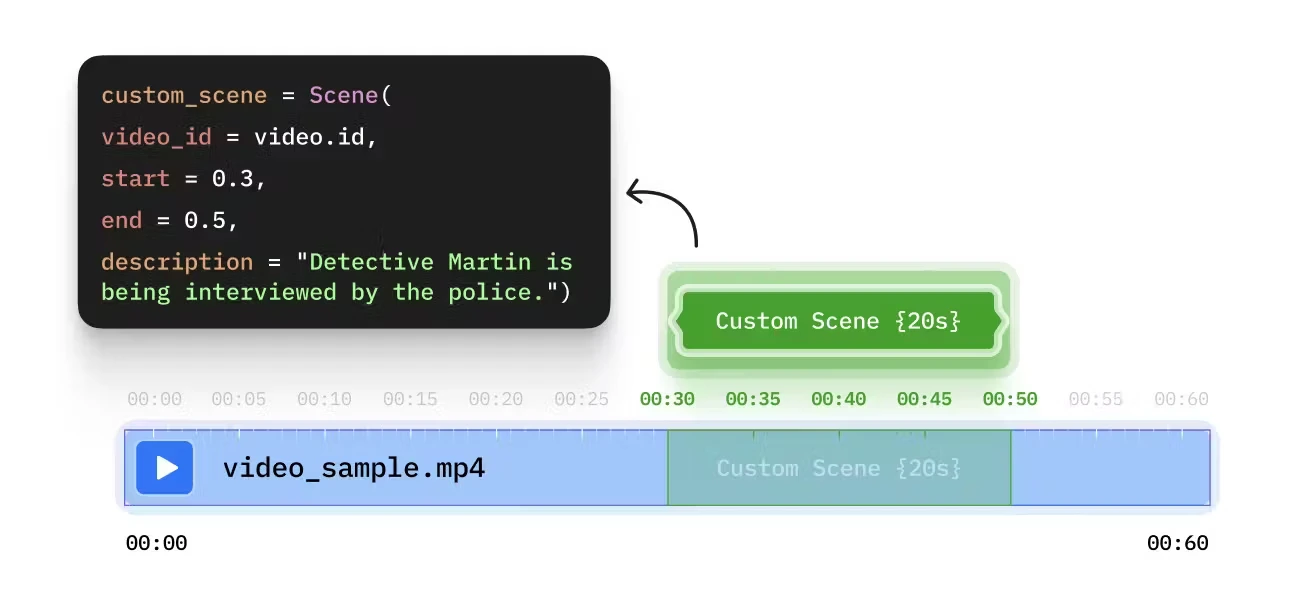
Python
from videodb.scene import Scene

# Create scenes with custom descriptions
scenes = [
    Scene(
        video_id=video.id,
        start=0,
        end=60,
        description="Opening credits with cityscape aerial shot"
    ),
    Scene(
        video_id=video.id,
        start=60,
        end=180,
        description="Interview with CEO discussing Q4 results"
    ),
    Scene(
        video_id=video.id,
        start=180,
        end=300,
        description="Product demo showing new features"
    )
]

# Index custom scenes
custom_index = video.index_scenes(scenes=scenes, name="manual_chapters")

# Search the custom index
results = video.search(
    query="product demo",
    index_type=IndexType.scene,
    index_id=custom_index
)
External Vision Pipeline
Integrate descriptions from your own models:# Extract scenes
scene_collection = video.extract_scenes(
extraction_type=SceneExtractionType.time_based,
extraction_config={"time": 10, "select_frames": ["middle"]}
)
# Process with your own model
for scene in scene_collection.scenes:
for frame in scene.frames:
# Call your custom vision model
frame.description = your_model.describe(frame.url)
# Aggregate frame descriptions into scene description
scene.description = aggregate_descriptions(scene.frames)
# Index the processed scenes
custom_index = video.index_scenes(
scenes=scene_collection.scenes,
name="custom_model_index"
)
// Extract scenes
const sceneCollection = await video.extractScenes({
    extractionType: 'time',
    extractionConfig: { time: 10, select_frames: ["middle"] }
});

// Process with your own model
for (const scene of sceneCollection.scenes) {
    for (const frame of scene.frames) {
        // Call your custom vision model
        frame.description = await yourModel.describe(frame.url);
    }

    // Aggregate frame descriptions into scene description
    scene.description = aggregateDescriptions(scene.frames);
}

// Index the processed scenes
const customIndex = await video.indexScenes({
    scenes: sceneCollection.scenes,
    name: "custom_model_index"
});
Use Cases
Investigation Workflow
# Index 1: Vehicle identification
vehicle_index = video.index_scenes(prompt="Identify vehicle make, model, color")

# Index 2: Person detection
person_index = video.index_scenes(prompt="Describe people - clothing, actions")

# Index 3: Location context
location_index = video.index_scenes(prompt="Identify location markers, signs, landmarks")

# Query: "Person in red jacket near blue Toyota"
person_results = video.search("red jacket", index_id=person_index)
vehicle_results = video.search("blue Toyota", index_id=vehicle_index)
combined = get_intersection(person_results, vehicle_results)
Sports Highlights
# Index 1: Player actions
player_index = video.index_scenes(prompt="Describe player actions and jersey numbers")

# Index 2: Game events
event_index = video.index_scenes(prompt="Identify goals, fouls, penalties, celebrations")

# Query: "Player #10 scoring"
player_results = video.search("player 10", index_id=player_index)
event_results = video.search("goal", index_id=event_index)
combined = get_intersection(player_results, event_results)
Next Steps
Natural Language Query
Search your indexes with plain English
Accuracy Tips
Improve precision and recall