> ## Documentation Index
> Fetch the complete documentation index at: https://docs.videodb.io/llms.txt
> Use this file to discover all available pages before exploring further.
# Natural Language Query
> Search videos using plain English questions and get relevant results
Ask questions in plain English. VideoDB uses semantic search to understand intent and return relevant video segments.
## Quick Example
```python Python theme={null}
import videodb
conn = videodb.connect()
coll = conn.get_collection()
video = coll.get_video("m-xxx")
# Natural language query
results = video.search("when does the speaker discuss climate change?")
# Play matching segments
results.play()
```
```javascript Node.js theme={null}
import { connect } from 'videodb';
const conn = connect();
const coll = await conn.getCollection();
const video = await coll.getVideo("m-xxx");
// Natural language query
const results = await video.search("when does the speaker discuss climate change?");
// Get stream URL
const streamUrl = await results.compile();
console.log(streamUrl);
```
***
## How It Works
1. **Query Understanding** - Your query is transformed into a vector embedding
2. **Similarity Matching** - Embeddings are compared against indexed content
3. **Relevance Scoring** - Results are ranked by semantic similarity
4. **Timestamp Retrieval** - Matching segments are returned with timestamps
***
## Search Types
### Semantic Search (Default)
Understands meaning and intent, not just keywords.
```python Python theme={null}
from videodb import SearchType
# Semantic search (default)
results = video.search("How do I fix a leaky faucet?")
# Explicit semantic search
results = video.search(
query="How do I fix a leaky faucet?",
search_type=SearchType.semantic
)
```
```javascript Node.js theme={null}
import { SearchTypeValues } from 'videodb';
// Semantic search (default)
const results = await video.search("How do I fix a leaky faucet?");
// Explicit semantic search
const results = await video.search(
"How do I fix a leaky faucet?",
SearchTypeValues.semantic
);
```
**Best for:**
* Questions ("What causes...?", "How do you...?")
* Conceptual queries ("explain the theory")
* Fuzzy matching ("something about cars")
### Keyword Search
Exact substring matching. Finds literal occurrences.
```python Python theme={null}
from videodb import SearchType
results = video.search(
query="API",
search_type=SearchType.keyword
)
```
```javascript Node.js theme={null}
import { SearchTypeValues } from 'videodb';
const results = await video.search(
"API",
SearchTypeValues.keyword
);
```
**Best for:**
* Technical terms
* Proper nouns
* Exact phrases
### Comparison
| Feature | Semantic Search | Keyword Search |
| :------- | :------------------------- | :---------------- |
| Query | Natural language | Exact terms |
| Matching | By meaning | By substring |
| Example | "How to repair pipes?" | "plumbing repair" |
| Scope | Single video or collection | Single video only |
***
## Index Types
Specify which index to search.
```python Python theme={null}
from videodb import IndexType
# Search spoken content (default)
results = video.search(
query="discusses machine learning",
index_type=IndexType.spoken_word
)
# Search visual content
results = video.search(
query="person running through a park",
index_type=IndexType.scene
)
# Search specific scene index
results = video.search(
query="red car",
index_type=IndexType.scene,
index_id="scene-index-xxx"
)
```
```javascript Node.js theme={null}
import { IndexTypeValues, SearchTypeValues } from 'videodb';
// Search spoken content (default)
const results = await video.search(
"discusses machine learning",
SearchTypeValues.semantic,
IndexTypeValues.spoken
);
// Search visual content
const results = await video.search(
"person running through a park",
SearchTypeValues.semantic,
IndexTypeValues.scene
);
// Search specific scene index
const results = await video.search(
"red car",
SearchTypeValues.semantic,
IndexTypeValues.scene,
null, // resultThreshold
null, // scoreThreshold
null, // dynamicScorePercentage
null, // filter
null, // namespace
"scene-index-xxx" // sceneIndexId
);
```
***
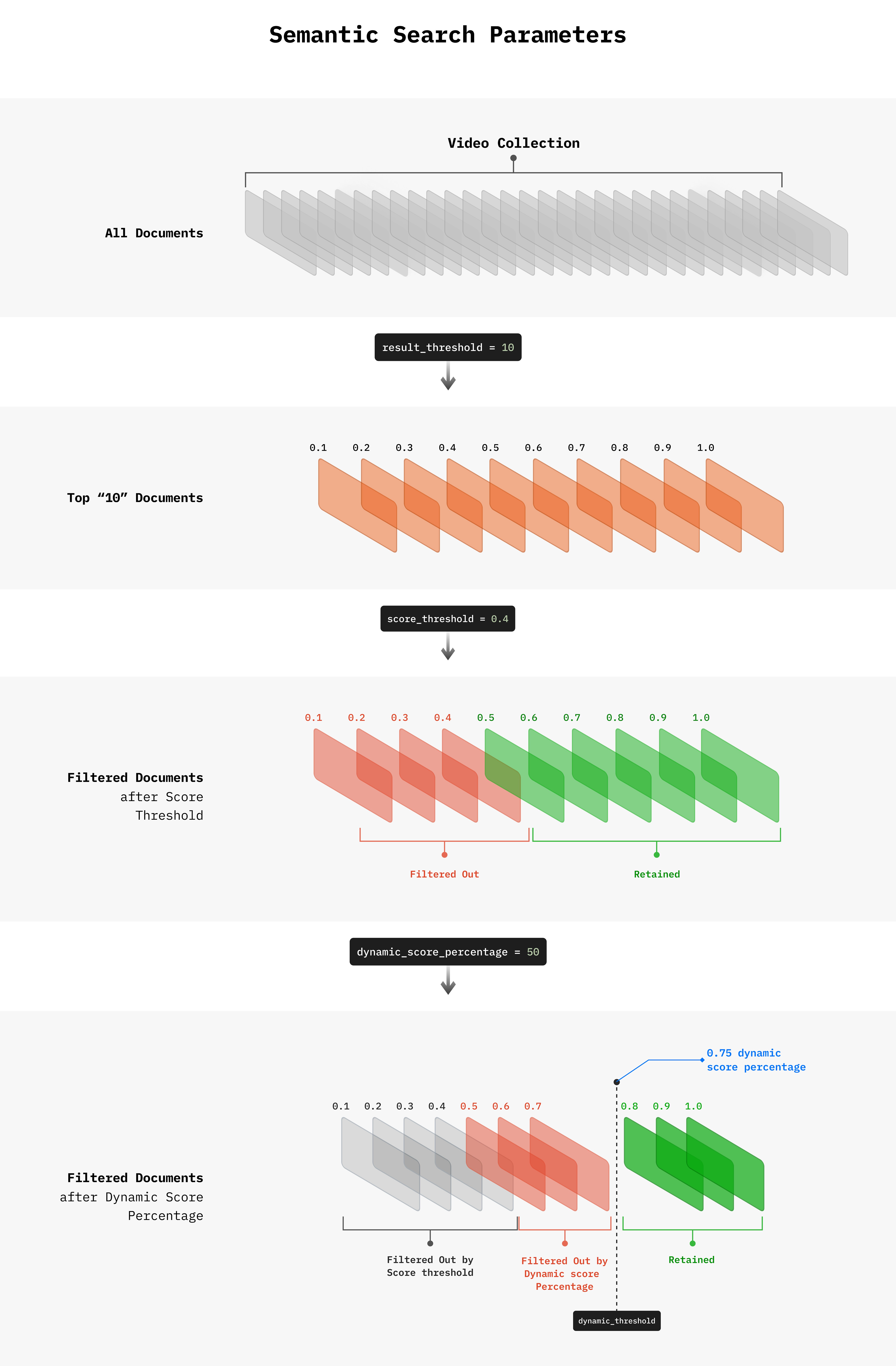
## Tuning Results
### Result Threshold
Limit the number of results returned:
```python Python theme={null}
results = video.search(
query="funny moments",
result_threshold=10 # Return top 10 matches
)
```
```javascript Node.js theme={null}
const results = await video.search(
"funny moments",
SearchTypeValues.semantic,
IndexTypeValues.spoken,
10 // resultThreshold - Return top 10 matches
);
```
### Score Threshold
Filter out low-relevance results:
```python Python theme={null}
results = video.search(
query="product demo",
score_threshold=0.3 # Only results with score >= 0.3
)
```
```javascript Node.js theme={null}
const results = await video.search(
"product demo",
SearchTypeValues.semantic,
IndexTypeValues.spoken,
null, // resultThreshold
0.3 // scoreThreshold - Only results with score >= 0.3
);
```
### Dynamic Score Percentage
Adaptive filtering based on score distribution:
```python Python theme={null}
results = video.search(
query="key insights",
dynamic_score_percentage=50 # Keep top 50% of score range
)
```
```javascript Node.js theme={null}
const results = await video.search(
"key insights",
SearchTypeValues.semantic,
IndexTypeValues.spoken,
null, // resultThreshold
null, // scoreThreshold
50 // dynamicScorePercentage - Keep top 50% of score range
);
```
The dynamic threshold is calculated as:
```
dynamic_threshold = max_score - (range × percentage)
```
***
## Search Parameters Reference
| Parameter | Type | Default | Description |
| :------------------------- | :--------- | :----------- | :---------------------------------------------------------------------- |
| `query` | str | required | Natural language query |
| `search_type` | SearchType | semantic | `semantic` or `keyword` |
| `index_type` | IndexType | spoken\_word | `spoken_word` or `scene` |
| `result_threshold` | int | 5 | Max results to return |
| `score_threshold` | float | 0.2 | Minimum relevance score |
| `dynamic_score_percentage` | float | 20 | Adaptive score filter |
| `index_id` | str | None | Specific scene index ID |
| `sort_docs_on` | str | `"score"` | Sort results by `"score"` (relevance, default) or `"start"` (timestamp) |
 ***
## Query Examples
### Sort by Timestamp
```python Python theme={null}
# Sort results by timestamp instead of relevance
results = coll.search(query="morning sunlight", sort_docs_on="start")
```
```javascript Node.js theme={null}
// Sort results by timestamp instead of relevance
const results = await coll.search({ query: "morning sunlight", sortDocsOn: "start" });
```
### Spoken Content Queries
```python theme={null}
# Question format
video.search("What are the main benefits of solar energy?")
# Topic lookup
video.search("discussion about renewable energy")
# Speaker search
video.search("when the CEO mentions revenue")
```
### Visual Content Queries
```python theme={null}
# Object detection
video.search("red car on the highway", index_type=IndexType.scene)
# Action detection
video.search("person running", index_type=IndexType.scene)
# Scene description
video.search("sunset over the ocean", index_type=IndexType.scene)
```
### Multimodal Queries
Combine spoken and visual search for precise results:
```python Python theme={null}
from videodb import IndexType
# Search spoken content
spoken_results = video.search(
query="talks about the solar system",
index_type=IndexType.spoken_word
)
# Search visual content
visual_results = video.search(
query="shows planets or galaxies",
index_type=IndexType.scene
)
# Find intersection (both conditions met)
spoken_times = [(s.start, s.end) for s in spoken_results.get_shots()]
visual_times = [(s.start, s.end) for s in visual_results.get_shots()]
```
```javascript Node.js theme={null}
import { IndexTypeValues, SearchTypeValues } from 'videodb';
// Search spoken content
const spokenResults = await video.search(
"talks about the solar system",
SearchTypeValues.semantic,
IndexTypeValues.spoken
);
// Search visual content
const visualResults = await video.search(
"shows planets or galaxies",
SearchTypeValues.semantic,
IndexTypeValues.scene
);
// Find intersection (both conditions met)
const spokenTimes = spokenResults.shots.map(s => [s.start, s.end]);
const visualTimes = visualResults.shots.map(s => [s.start, s.end]);
```
***
## What You Can Build
Create highlight reels from specific keywords or phrases
Combine spoken and visual search for precise results
Extract clips featuring specific people using search
***
## Next Steps
What you get back from search
Search across your entire library
***
## Query Examples
### Sort by Timestamp
```python Python theme={null}
# Sort results by timestamp instead of relevance
results = coll.search(query="morning sunlight", sort_docs_on="start")
```
```javascript Node.js theme={null}
// Sort results by timestamp instead of relevance
const results = await coll.search({ query: "morning sunlight", sortDocsOn: "start" });
```
### Spoken Content Queries
```python theme={null}
# Question format
video.search("What are the main benefits of solar energy?")
# Topic lookup
video.search("discussion about renewable energy")
# Speaker search
video.search("when the CEO mentions revenue")
```
### Visual Content Queries
```python theme={null}
# Object detection
video.search("red car on the highway", index_type=IndexType.scene)
# Action detection
video.search("person running", index_type=IndexType.scene)
# Scene description
video.search("sunset over the ocean", index_type=IndexType.scene)
```
### Multimodal Queries
Combine spoken and visual search for precise results:
```python Python theme={null}
from videodb import IndexType
# Search spoken content
spoken_results = video.search(
query="talks about the solar system",
index_type=IndexType.spoken_word
)
# Search visual content
visual_results = video.search(
query="shows planets or galaxies",
index_type=IndexType.scene
)
# Find intersection (both conditions met)
spoken_times = [(s.start, s.end) for s in spoken_results.get_shots()]
visual_times = [(s.start, s.end) for s in visual_results.get_shots()]
```
```javascript Node.js theme={null}
import { IndexTypeValues, SearchTypeValues } from 'videodb';
// Search spoken content
const spokenResults = await video.search(
"talks about the solar system",
SearchTypeValues.semantic,
IndexTypeValues.spoken
);
// Search visual content
const visualResults = await video.search(
"shows planets or galaxies",
SearchTypeValues.semantic,
IndexTypeValues.scene
);
// Find intersection (both conditions met)
const spokenTimes = spokenResults.shots.map(s => [s.start, s.end]);
const visualTimes = visualResults.shots.map(s => [s.start, s.end]);
```
***
## What You Can Build
Create highlight reels from specific keywords or phrases
Combine spoken and visual search for precise results
Extract clips featuring specific people using search
***
## Next Steps
What you get back from search
Search across your entire library