> ## Documentation Index
> Fetch the complete documentation index at: https://docs.videodb.io/llms.txt
> Use this file to discover all available pages before exploring further.
# Accuracy Tips
> Better search results come from better indexing and smarter queries. This guide covers techniques to improve precision and recall.
## Quick Wins
1. **Use specific prompts** during indexing
2. **Choose the right search type** (semantic vs keyword)
3. **Tune thresholds** based on your use case
4. **Combine multiple indexes** for layered search
***
## Understanding Precision and Recall
| Metric | Definition | Goal |
| :------------ | :-------------------------------------- | :-------------------- |
| **Precision** | % of returned results that are relevant | Fewer false positives |
| **Recall** | % of relevant content that was returned | Fewer missed results |
**The trade-off:** Higher precision often means lower recall, and vice versa. Tune based on your priority.
***
## Indexing for Accuracy
### Specific Prompts Beat Generic Ones
```python Python theme={null}
# Too generic - low precision
video.index_scenes(prompt="Describe the scene")
# Better - focused on what matters
video.index_scenes(prompt="Identify all vehicles with their color, make, and model")
# Best - structured for your search needs
video.index_scenes(prompt="""
Describe this scene with:
- People: count, actions, clothing colors
- Vehicles: type, color, direction of travel
- Environment: indoor/outdoor, time of day
""")
```
```javascript Node.js theme={null}
// Too generic - low precision
await video.indexScenes({ prompt: "Describe the scene" });
// Better - focused on what matters
await video.indexScenes({
prompt: "Identify all vehicles with their color, make, and model"
});
// Best - structured for your search needs
await video.indexScenes({
prompt: `Describe this scene with:
- People: count, actions, clothing colors
- Vehicles: type, color, direction of travel
- Environment: indoor/outdoor, time of day`
});
```
### Match Extraction to Content Type
| Content | Extraction | Reasoning |
| :------------ | :-------------------------- | :----------------------------- |
| Static shots | 1 frame/scene | Single frame captures all info |
| Action/motion | 3-5 frames/scene | Need temporal context |
| Quick cuts | Shot-based | Respect natural boundaries |
| Continuous | Time-based, short intervals | Capture changes |
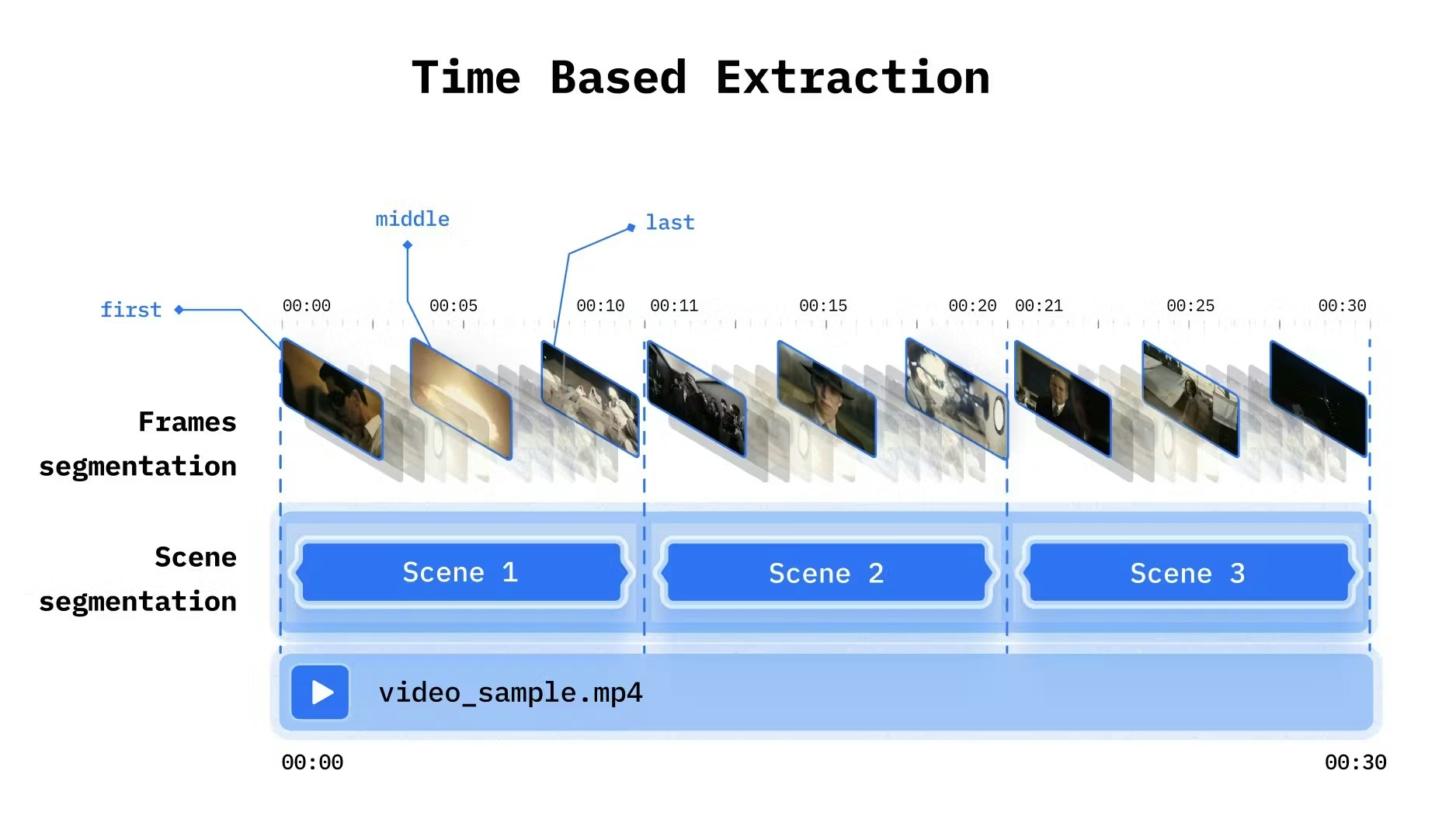 ```python Python theme={null}
from videodb import SceneExtractionType
# For interviews (mostly static)
video.index_scenes(
extraction_type=SceneExtractionType.time_based,
extraction_config={"time": 30, "frame_count": 1},
prompt="Describe the speaker and topic"
)
# For action content (need motion)
video.index_scenes(
extraction_type=SceneExtractionType.time_based,
extraction_config={"time": 5, "frame_count": 4},
prompt="Describe the activity and movements"
)
```
```javascript Node.js theme={null}
// For interviews (mostly static)
await video.indexScenes({
extractionType: 'time',
extractionConfig: { time: 30, frame_count: 1 },
prompt: "Describe the speaker and topic"
});
// For action content (need motion)
await video.indexScenes({
extractionType: 'time',
extractionConfig: { time: 5, frame_count: 4 },
prompt: "Describe the activity and movements"
});
```
***
## Query Strategies
### Semantic vs Keyword Search
| Query Type | Use Semantic | Use Keyword |
| :-------------- | :---------------------------- | :------------- |
| Questions | ✓ "How does the engine work?" | |
| Concepts | ✓ "explains machine learning" | |
| Exact terms | | ✓ "API" |
| Technical names | | ✓ "TensorFlow" |
| Numbers | | ✓ "2024" |
```python Python theme={null}
from videodb import SearchType
# Semantic for conceptual queries
results = video.search(
query="explains the benefits",
search_type=SearchType.semantic
)
# Keyword for exact matches
results = video.search(
query="quarterly earnings",
search_type=SearchType.keyword
)
```
```javascript Node.js theme={null}
import { SearchTypeValues } from 'videodb';
// Semantic for conceptual queries
const results = await video.search(
"explains the benefits",
SearchTypeValues.semantic
);
// Keyword for exact matches
const results = await video.search(
"quarterly earnings",
SearchTypeValues.keyword
);
```
### Threshold Tuning
| Parameter | Higher Value | Lower Value |
| :------------------------- | :-------------------- | :-------------------- |
| `score_threshold` | ↑ Precision, ↓ Recall | ↓ Precision, ↑ Recall |
| `result_threshold` | More results | Fewer results |
| `dynamic_score_percentage` | Stricter filtering | More inclusive |
```python Python theme={null}
# High precision (strict)
results = video.search(
query="CEO announcement",
score_threshold=0.5,
result_threshold=3
)
# High recall (inclusive)
results = video.search(
query="CEO announcement",
score_threshold=0.1,
result_threshold=20
)
```
```javascript Node.js theme={null}
// High precision (strict)
const results = await video.search(
"CEO announcement",
SearchTypeValues.semantic,
IndexTypeValues.spoken,
3, // result_threshold
0.5 // score_threshold
);
// High recall (inclusive)
const results = await video.search(
"CEO announcement",
SearchTypeValues.semantic,
IndexTypeValues.spoken,
20, // result_threshold
0.1 // score_threshold
);
```
***
## Evaluating Search Quality
### Set Up Ground Truth
Create test queries with known correct answers:
```python theme={null}
test_cases = [
{
"query": "six",
"expected_timestamps": [(4.0, 5.0), (14.0, 15.0), (24.0, 25.0)]
},
{
"query": "introduction",
"expected_timestamps": [(0.0, 30.0)]
}
]
```
### Measure Precision and Recall
```python theme={null}
def evaluate_search(results, expected):
"""Calculate precision and recall"""
returned = set((s.start, s.end) for s in results.get_shots())
expected_set = set(expected)
true_positives = len(returned & expected_set)
false_positives = len(returned - expected_set)
false_negatives = len(expected_set - returned)
precision = true_positives / (true_positives + false_positives) if returned else 0
recall = true_positives / (true_positives + false_negatives) if expected_set else 0
return {"precision": precision, "recall": recall}
# Evaluate
results = video.search("six")
metrics = evaluate_search(results, [(4.0, 5.0), (14.0, 15.0), (24.0, 25.0)])
print(f"Precision: {metrics['precision']:.2f}, Recall: {metrics['recall']:.2f}")
```
***
## Advanced Techniques
### Multi-Index Search
Layer indexes for precise filtering:
```python theme={null}
# Search vehicles index
vehicle_results = video.search(
"red car",
index_type=IndexType.scene,
index_id=vehicle_index
)
# Search motion index
motion_results = video.search(
"speeding",
index_type=IndexType.scene,
index_id=motion_index
)
# Intersect for high precision
final_results = intersect(vehicle_results, motion_results)
```
### Metadata Filtering
Pre-filter before semantic search:
```python theme={null}
# Narrow search space with metadata
results = coll.search(
query="product demo",
filter=[{"category": "marketing"}],
index_type=IndexType.scene
)
```
### Post-Processing with LLMs
For complex queries, use an LLM to refine results:
```python theme={null}
# Get broad results first
results = video.search(
query="numbers",
score_threshold=0.1 # Low threshold for high recall
)
# Refine with LLM
refined = llm.filter(
results,
criteria="Keep only results showing numbers greater than 10"
)
```
***
## Common Pitfalls
| Problem | Cause | Fix |
| :--------------------------------- | :---------------------- | :------------------------------- |
| Missing relevant results | Threshold too high | Lower `score_threshold` |
| Too many irrelevant results | Threshold too low | Raise `score_threshold` |
| Semantic search misses exact terms | Wrong search type | Use keyword search |
| Poor visual search results | Generic prompt | Use specific, structured prompts |
| Inconsistent results | Wrong extraction config | Match extraction to content type |
***
## Iterative Improvement
1. **Start broad** - Low thresholds, high recall
2. **Evaluate** - Check precision on sample queries
3. **Refine** - Adjust thresholds, improve prompts
4. **Test** - Validate against ground truth
5. **Repeat** - Iterate until satisfied
***
## Next Steps
Optimize for speed and efficiency
Better extraction strategies
```python Python theme={null}
from videodb import SceneExtractionType
# For interviews (mostly static)
video.index_scenes(
extraction_type=SceneExtractionType.time_based,
extraction_config={"time": 30, "frame_count": 1},
prompt="Describe the speaker and topic"
)
# For action content (need motion)
video.index_scenes(
extraction_type=SceneExtractionType.time_based,
extraction_config={"time": 5, "frame_count": 4},
prompt="Describe the activity and movements"
)
```
```javascript Node.js theme={null}
// For interviews (mostly static)
await video.indexScenes({
extractionType: 'time',
extractionConfig: { time: 30, frame_count: 1 },
prompt: "Describe the speaker and topic"
});
// For action content (need motion)
await video.indexScenes({
extractionType: 'time',
extractionConfig: { time: 5, frame_count: 4 },
prompt: "Describe the activity and movements"
});
```
***
## Query Strategies
### Semantic vs Keyword Search
| Query Type | Use Semantic | Use Keyword |
| :-------------- | :---------------------------- | :------------- |
| Questions | ✓ "How does the engine work?" | |
| Concepts | ✓ "explains machine learning" | |
| Exact terms | | ✓ "API" |
| Technical names | | ✓ "TensorFlow" |
| Numbers | | ✓ "2024" |
```python Python theme={null}
from videodb import SearchType
# Semantic for conceptual queries
results = video.search(
query="explains the benefits",
search_type=SearchType.semantic
)
# Keyword for exact matches
results = video.search(
query="quarterly earnings",
search_type=SearchType.keyword
)
```
```javascript Node.js theme={null}
import { SearchTypeValues } from 'videodb';
// Semantic for conceptual queries
const results = await video.search(
"explains the benefits",
SearchTypeValues.semantic
);
// Keyword for exact matches
const results = await video.search(
"quarterly earnings",
SearchTypeValues.keyword
);
```
### Threshold Tuning
| Parameter | Higher Value | Lower Value |
| :------------------------- | :-------------------- | :-------------------- |
| `score_threshold` | ↑ Precision, ↓ Recall | ↓ Precision, ↑ Recall |
| `result_threshold` | More results | Fewer results |
| `dynamic_score_percentage` | Stricter filtering | More inclusive |
```python Python theme={null}
# High precision (strict)
results = video.search(
query="CEO announcement",
score_threshold=0.5,
result_threshold=3
)
# High recall (inclusive)
results = video.search(
query="CEO announcement",
score_threshold=0.1,
result_threshold=20
)
```
```javascript Node.js theme={null}
// High precision (strict)
const results = await video.search(
"CEO announcement",
SearchTypeValues.semantic,
IndexTypeValues.spoken,
3, // result_threshold
0.5 // score_threshold
);
// High recall (inclusive)
const results = await video.search(
"CEO announcement",
SearchTypeValues.semantic,
IndexTypeValues.spoken,
20, // result_threshold
0.1 // score_threshold
);
```
***
## Evaluating Search Quality
### Set Up Ground Truth
Create test queries with known correct answers:
```python theme={null}
test_cases = [
{
"query": "six",
"expected_timestamps": [(4.0, 5.0), (14.0, 15.0), (24.0, 25.0)]
},
{
"query": "introduction",
"expected_timestamps": [(0.0, 30.0)]
}
]
```
### Measure Precision and Recall
```python theme={null}
def evaluate_search(results, expected):
"""Calculate precision and recall"""
returned = set((s.start, s.end) for s in results.get_shots())
expected_set = set(expected)
true_positives = len(returned & expected_set)
false_positives = len(returned - expected_set)
false_negatives = len(expected_set - returned)
precision = true_positives / (true_positives + false_positives) if returned else 0
recall = true_positives / (true_positives + false_negatives) if expected_set else 0
return {"precision": precision, "recall": recall}
# Evaluate
results = video.search("six")
metrics = evaluate_search(results, [(4.0, 5.0), (14.0, 15.0), (24.0, 25.0)])
print(f"Precision: {metrics['precision']:.2f}, Recall: {metrics['recall']:.2f}")
```
***
## Advanced Techniques
### Multi-Index Search
Layer indexes for precise filtering:
```python theme={null}
# Search vehicles index
vehicle_results = video.search(
"red car",
index_type=IndexType.scene,
index_id=vehicle_index
)
# Search motion index
motion_results = video.search(
"speeding",
index_type=IndexType.scene,
index_id=motion_index
)
# Intersect for high precision
final_results = intersect(vehicle_results, motion_results)
```
### Metadata Filtering
Pre-filter before semantic search:
```python theme={null}
# Narrow search space with metadata
results = coll.search(
query="product demo",
filter=[{"category": "marketing"}],
index_type=IndexType.scene
)
```
### Post-Processing with LLMs
For complex queries, use an LLM to refine results:
```python theme={null}
# Get broad results first
results = video.search(
query="numbers",
score_threshold=0.1 # Low threshold for high recall
)
# Refine with LLM
refined = llm.filter(
results,
criteria="Keep only results showing numbers greater than 10"
)
```
***
## Common Pitfalls
| Problem | Cause | Fix |
| :--------------------------------- | :---------------------- | :------------------------------- |
| Missing relevant results | Threshold too high | Lower `score_threshold` |
| Too many irrelevant results | Threshold too low | Raise `score_threshold` |
| Semantic search misses exact terms | Wrong search type | Use keyword search |
| Poor visual search results | Generic prompt | Use specific, structured prompts |
| Inconsistent results | Wrong extraction config | Match extraction to content type |
***
## Iterative Improvement
1. **Start broad** - Low thresholds, high recall
2. **Evaluate** - Check precision on sample queries
3. **Refine** - Adjust thresholds, improve prompts
4. **Test** - Validate against ground truth
5. **Repeat** - Iterate until satisfied
***
## Next Steps
Optimize for speed and efficiency
Better extraction strategies