> ## Documentation Index
> Fetch the complete documentation index at: https://docs.videodb.io/llms.txt
> Use this file to discover all available pages before exploring further.
# Multiple Indexes
> Layer different perspectives on the same video for precise retrieval
A single video can have multiple indexes, each capturing a different aspect. Layer them together for precise, multi-dimensional retrieval.
## Quick Example
```python Python theme={null}
from videodb import IndexType
# Create two indexes with different focus
car_index = video.index_scenes(
prompt="Identify the color and model of each vehicle",
name="vehicle_identification"
)
motion_index = video.index_scenes(
prompt="Describe the movement pattern - speeding, stopping, turning",
name="motion_analysis"
)
# Search each index separately
car_results = video.search(
query="red sedan",
index_type=IndexType.scene,
index_id=car_index
)
motion_results = video.search(
query="driving recklessly",
index_type=IndexType.scene,
index_id=motion_index
)
```
```javascript Node.js theme={null}
import { IndexTypeValues } from 'videodb';
// Create two indexes with different focus
const carIndex = await video.indexScenes({
prompt: "Identify the color and model of each vehicle",
name: "vehicle_identification"
});
const motionIndex = await video.indexScenes({
prompt: "Describe the movement pattern - speeding, stopping, turning",
name: "motion_analysis"
});
// Search each index separately
const carResults = await video.search(
"red sedan",
IndexTypeValues.scene,
carIndex
);
const motionResults = await video.search(
"driving recklessly",
IndexTypeValues.scene,
motionIndex
);
```
***
## Why Multiple Indexes?
Different prompts extract different information. A single index optimized for one use case may miss details relevant to another.
| Index Focus | Prompt Example | Use Case |
| :---------- | :--------------------------------------- | :----------------------- |
| Objects | "Identify all objects and their colors" | Inventory, cataloging |
| Actions | "Describe activities and movements" | Activity detection |
| People | "Describe people, clothing, expressions" | Person identification |
| Environment | "Describe the setting and location" | Scene classification |
| Text | "Read any visible text or signage" | OCR, document extraction |
***
## Creating Focused Indexes
### Same Video, Different Perspectives
```python Python theme={null}
from videodb import SceneExtractionType
# Environment index
env_index = video.index_scenes(
prompt="Describe the environment - indoor/outdoor, lighting, weather",
name="environment"
)
# People index
people_index = video.index_scenes(
prompt="Describe the people - count, clothing, actions",
name="people"
)
# Object index
object_index = video.index_scenes(
prompt="List all visible objects and their positions",
name="objects"
)
```
```javascript Node.js theme={null}
// Environment index
const envIndex = await video.indexScenes({
prompt: "Describe the environment - indoor/outdoor, lighting, weather",
name: "environment"
});
// People index
const peopleIndex = await video.indexScenes({
prompt: "Describe the people - count, clothing, actions",
name: "people"
});
// Object index
const objectIndex = await video.indexScenes({
prompt: "List all visible objects and their positions",
name: "objects"
});
```
### Different Extraction Configs
```python Python theme={null}
from videodb import SceneExtractionType
# Fast sampling for color detection (1 frame per second)
color_index = video.index_scenes(
extraction_type=SceneExtractionType.time_based,
extraction_config={"time": 1, "frame_count": 1},
prompt="Identify vehicle colors",
name="colors"
)
# Slower sampling for motion analysis (5 frames over 4 seconds)
motion_index = video.index_scenes(
extraction_type=SceneExtractionType.time_based,
extraction_config={"time": 4, "frame_count": 5},
prompt="Describe vehicle movement patterns",
name="motion"
)
```
```javascript Node.js theme={null}
// Fast sampling for color detection (1 frame per second)
const colorIndex = await video.indexScenes({
extractionType: 'time',
extractionConfig: { time: 1, frame_count: 1 },
prompt: "Identify vehicle colors",
name: "colors"
});
// Slower sampling for motion analysis (5 frames over 4 seconds)
const motionIndex = await video.indexScenes({
extractionType: 'time',
extractionConfig: { time: 4, frame_count: 5 },
prompt: "Describe vehicle movement patterns",
name: "motion"
});
```
***
## Combining Search Results
Search multiple indexes and combine results for precise retrieval.
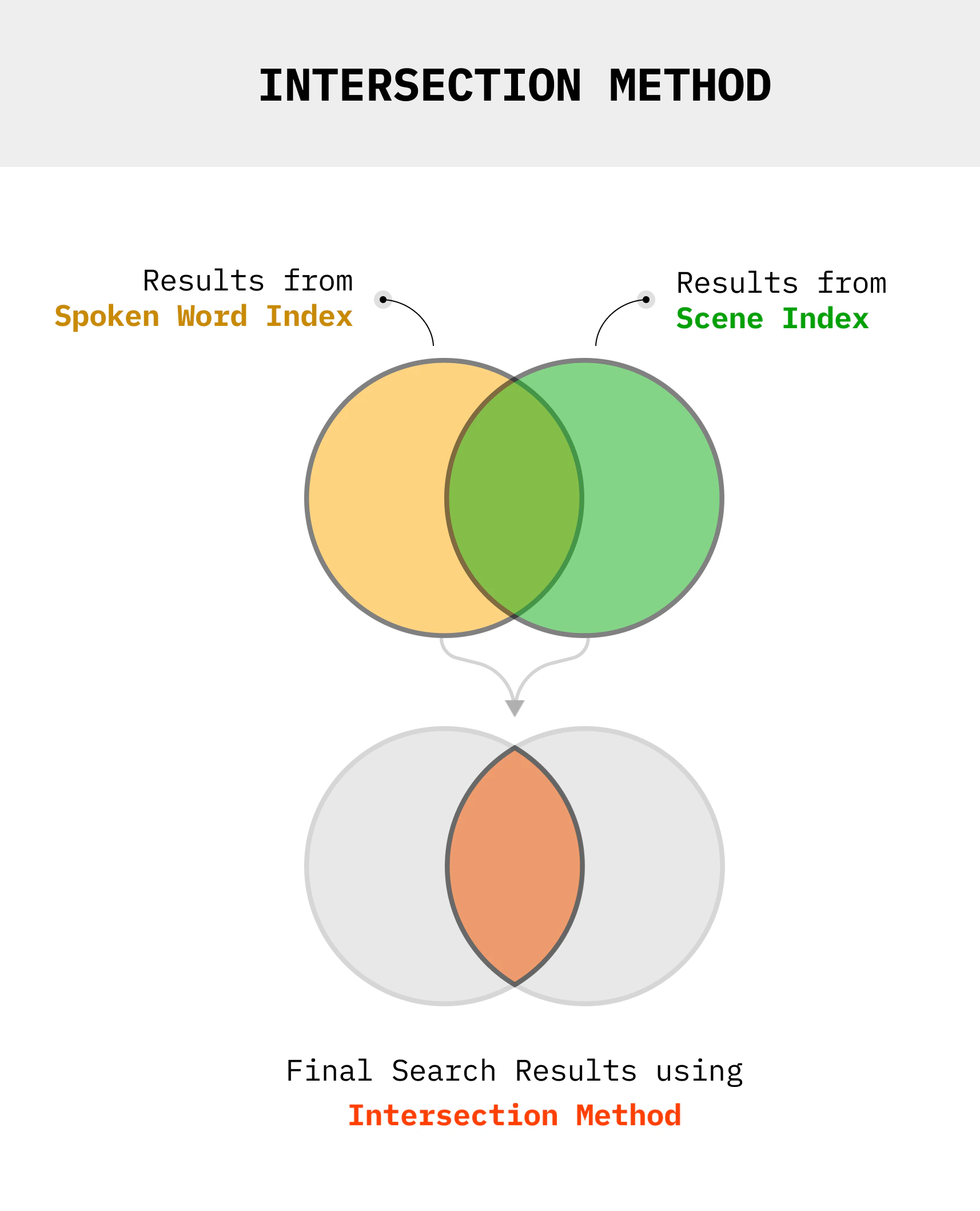
### Intersection (AND)
Find segments that match criteria in both indexes:
 ```python Python theme={null}
def get_intersection(results1, results2):
"""Find overlapping timestamps from two search results"""
shots1 = [(s.start, s.end) for s in results1.get_shots()]
shots2 = [(s.start, s.end) for s in results2.get_shots()]
intersection = []
for s1 in shots1:
for s2 in shots2:
start = max(s1[0], s2[0])
end = min(s1[1], s2[1])
if start < end:
intersection.append((start, end))
return intersection
# Find "red sedan" that is "driving recklessly"
car_results = video.search("red sedan", index_type=IndexType.scene, index_id=car_index)
motion_results = video.search("reckless driving", index_type=IndexType.scene, index_id=motion_index)
combined = get_intersection(car_results, motion_results)
stream_url = video.generate_stream(combined)
```
```javascript Node.js theme={null}
function getIntersection(results1, results2) {
const shots1 = results1.shots.map(s => [s.start, s.end]);
const shots2 = results2.shots.map(s => [s.start, s.end]);
const intersection = [];
for (const s1 of shots1) {
for (const s2 of shots2) {
const start = Math.max(s1[0], s2[0]);
const end = Math.min(s1[1], s2[1]);
if (start < end) {
intersection.push([start, end]);
}
}
}
return intersection;
}
// Find "red sedan" that is "driving recklessly"
const carResults = await video.search("red sedan", IndexTypeValues.scene, carIndex);
const motionResults = await video.search("reckless driving", IndexTypeValues.scene, motionIndex);
const combined = getIntersection(carResults, motionResults);
const streamUrl = await video.generateStream(combined);
```
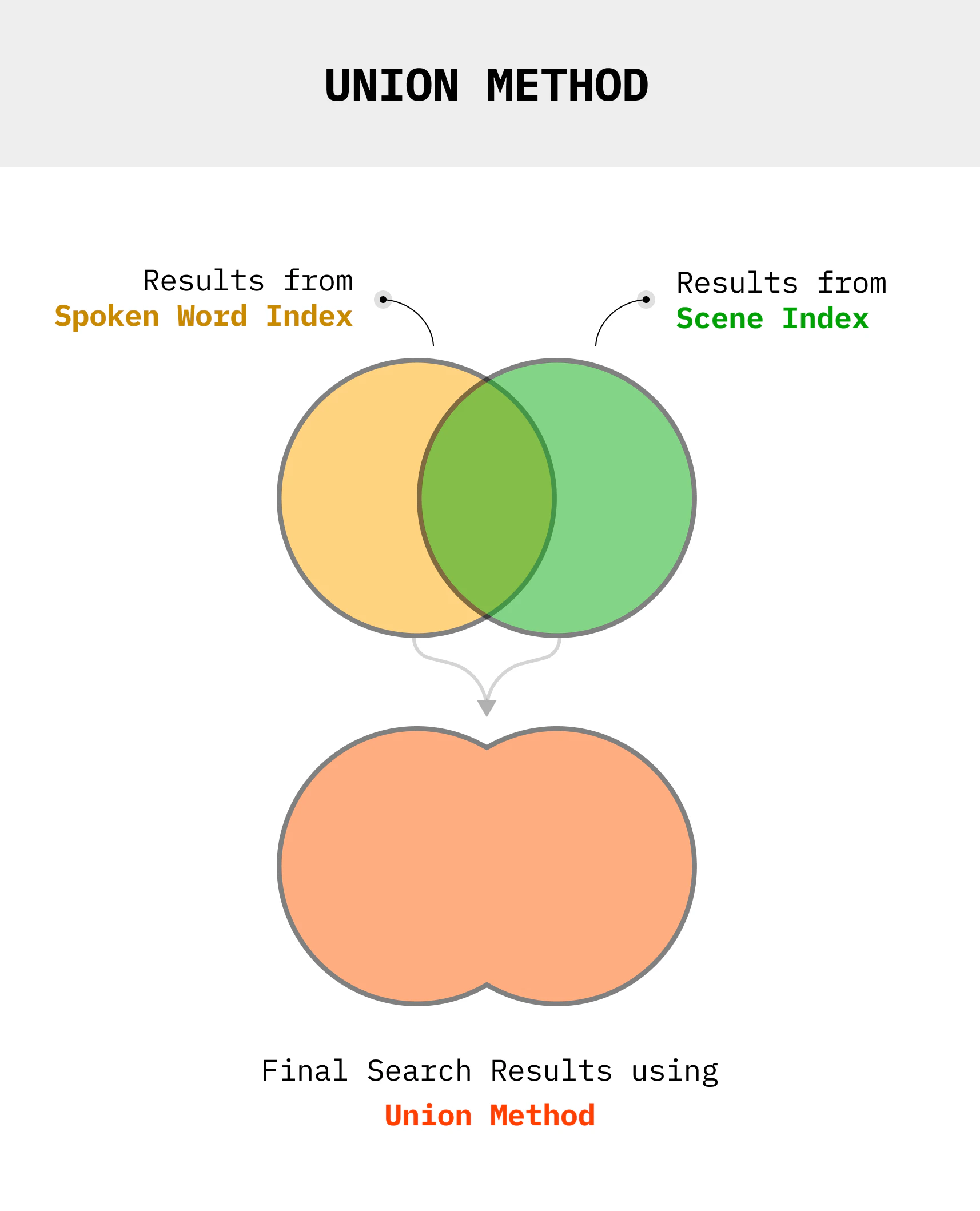
### Union (OR)
Find segments that match criteria in either index:
```python Python theme={null}
def get_intersection(results1, results2):
"""Find overlapping timestamps from two search results"""
shots1 = [(s.start, s.end) for s in results1.get_shots()]
shots2 = [(s.start, s.end) for s in results2.get_shots()]
intersection = []
for s1 in shots1:
for s2 in shots2:
start = max(s1[0], s2[0])
end = min(s1[1], s2[1])
if start < end:
intersection.append((start, end))
return intersection
# Find "red sedan" that is "driving recklessly"
car_results = video.search("red sedan", index_type=IndexType.scene, index_id=car_index)
motion_results = video.search("reckless driving", index_type=IndexType.scene, index_id=motion_index)
combined = get_intersection(car_results, motion_results)
stream_url = video.generate_stream(combined)
```
```javascript Node.js theme={null}
function getIntersection(results1, results2) {
const shots1 = results1.shots.map(s => [s.start, s.end]);
const shots2 = results2.shots.map(s => [s.start, s.end]);
const intersection = [];
for (const s1 of shots1) {
for (const s2 of shots2) {
const start = Math.max(s1[0], s2[0]);
const end = Math.min(s1[1], s2[1]);
if (start < end) {
intersection.push([start, end]);
}
}
}
return intersection;
}
// Find "red sedan" that is "driving recklessly"
const carResults = await video.search("red sedan", IndexTypeValues.scene, carIndex);
const motionResults = await video.search("reckless driving", IndexTypeValues.scene, motionIndex);
const combined = getIntersection(carResults, motionResults);
const streamUrl = await video.generateStream(combined);
```
### Union (OR)
Find segments that match criteria in either index:
 ```python Python theme={null}
def get_union(results1, results2):
"""Merge timestamps from two search results"""
all_shots = [(s.start, s.end) for s in results1.get_shots()]
all_shots += [(s.start, s.end) for s in results2.get_shots()]
# Sort and merge overlapping intervals
all_shots.sort()
merged = []
for start, end in all_shots:
if merged and start <= merged[-1][1]:
merged[-1] = (merged[-1][0], max(merged[-1][1], end))
else:
merged.append((start, end))
return merged
# Find any scene with "red sedan" OR "motorcycle"
car_results = video.search("red sedan", index_type=IndexType.scene, index_id=car_index)
bike_results = video.search("motorcycle", index_type=IndexType.scene, index_id=car_index)
combined = get_union(car_results, bike_results)
```
```javascript Node.js theme={null}
function getUnion(results1, results2) {
let allShots = results1.shots.map(s => [s.start, s.end]);
allShots = allShots.concat(results2.shots.map(s => [s.start, s.end]));
// Sort and merge overlapping intervals
allShots.sort((a, b) => a[0] - b[0]);
const merged = [];
for (const [start, end] of allShots) {
if (merged.length > 0 && start <= merged[merged.length - 1][1]) {
merged[merged.length - 1][1] = Math.max(merged[merged.length - 1][1], end);
} else {
merged.push([start, end]);
}
}
return merged;
}
// Find any scene with "red sedan" OR "motorcycle"
const carResults = await video.search("red sedan", IndexTypeValues.scene, carIndex);
const bikeResults = await video.search("motorcycle", IndexTypeValues.scene, carIndex);
const combined = getUnion(carResults, bikeResults);
```
***
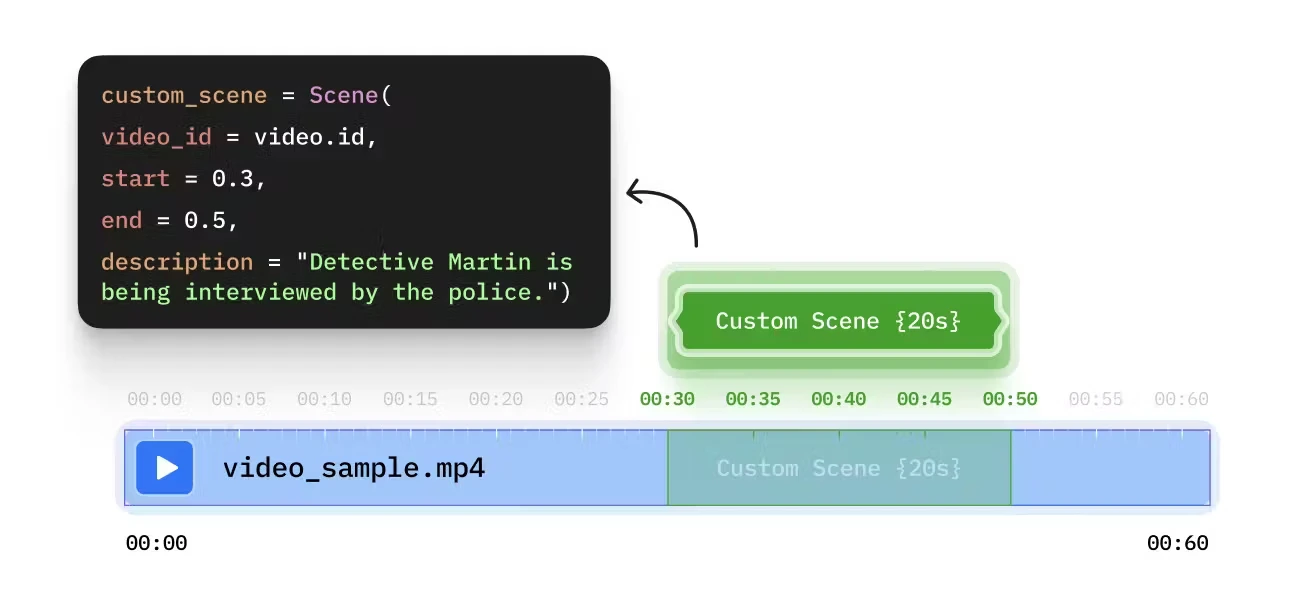
## Custom Annotations
Bring your own scene descriptions from external pipelines or manual tagging.
```python Python theme={null}
def get_union(results1, results2):
"""Merge timestamps from two search results"""
all_shots = [(s.start, s.end) for s in results1.get_shots()]
all_shots += [(s.start, s.end) for s in results2.get_shots()]
# Sort and merge overlapping intervals
all_shots.sort()
merged = []
for start, end in all_shots:
if merged and start <= merged[-1][1]:
merged[-1] = (merged[-1][0], max(merged[-1][1], end))
else:
merged.append((start, end))
return merged
# Find any scene with "red sedan" OR "motorcycle"
car_results = video.search("red sedan", index_type=IndexType.scene, index_id=car_index)
bike_results = video.search("motorcycle", index_type=IndexType.scene, index_id=car_index)
combined = get_union(car_results, bike_results)
```
```javascript Node.js theme={null}
function getUnion(results1, results2) {
let allShots = results1.shots.map(s => [s.start, s.end]);
allShots = allShots.concat(results2.shots.map(s => [s.start, s.end]));
// Sort and merge overlapping intervals
allShots.sort((a, b) => a[0] - b[0]);
const merged = [];
for (const [start, end] of allShots) {
if (merged.length > 0 && start <= merged[merged.length - 1][1]) {
merged[merged.length - 1][1] = Math.max(merged[merged.length - 1][1], end);
} else {
merged.push([start, end]);
}
}
return merged;
}
// Find any scene with "red sedan" OR "motorcycle"
const carResults = await video.search("red sedan", IndexTypeValues.scene, carIndex);
const bikeResults = await video.search("motorcycle", IndexTypeValues.scene, carIndex);
const combined = getUnion(carResults, bikeResults);
```
***
## Custom Annotations
Bring your own scene descriptions from external pipelines or manual tagging.
 ```python Python theme={null}
from videodb.scene import Scene
# Create scenes with custom descriptions
scenes = [
Scene(
video_id=video.id,
start=0,
end=60,
description="Opening credits with cityscape aerial shot"
),
Scene(
video_id=video.id,
start=60,
end=180,
description="Interview with CEO discussing Q4 results"
),
Scene(
video_id=video.id,
start=180,
end=300,
description="Product demo showing new features"
)
]
# Index custom scenes
custom_index = video.index_scenes(scenes=scenes, name="manual_chapters")
# Search the custom index
results = video.search(
query="product demo",
index_type=IndexType.scene,
index_id=custom_index
)
```
```javascript Node.js theme={null}
import { Scene } from 'videodb';
// Create scenes with custom descriptions
const scenes = [
new Scene({
videoId: video.id,
start: 0,
end: 60,
description: "Opening credits with cityscape aerial shot"
}),
new Scene({
videoId: video.id,
start: 60,
end: 180,
description: "Interview with CEO discussing Q4 results"
}),
new Scene({
videoId: video.id,
start: 180,
end: 300,
description: "Product demo showing new features"
})
];
// Index custom scenes
const customIndex = await video.indexScenes({ scenes, name: "manual_chapters" });
// Search the custom index
const results = await video.search(
"product demo",
IndexTypeValues.scene,
customIndex
);
```
### External Vision Pipeline
Integrate descriptions from your own models:
```python Python theme={null}
# Extract scenes
scene_collection = video.extract_scenes(
extraction_type=SceneExtractionType.time_based,
extraction_config={"time": 10, "select_frames": ["middle"]}
)
# Process with your own model
for scene in scene_collection.scenes:
for frame in scene.frames:
# Call your custom vision model
frame.description = your_model.describe(frame.url)
# Aggregate frame descriptions into scene description
scene.description = aggregate_descriptions(scene.frames)
# Index the processed scenes
custom_index = video.index_scenes(
scenes=scene_collection.scenes,
name="custom_model_index"
)
```
```javascript Node.js theme={null}
// Extract scenes
const sceneCollection = await video.extractScenes({
extractionType: 'time',
extractionConfig: { time: 10, select_frames: ["middle"] }
});
// Process with your own model
for (const scene of sceneCollection.scenes) {
for (const frame of scene.frames) {
// Call your custom vision model
frame.description = await yourModel.describe(frame.url);
}
// Aggregate frame descriptions into scene description
scene.description = aggregateDescriptions(scene.frames);
}
// Index the processed scenes
const customIndex = await video.indexScenes({
scenes: sceneCollection.scenes,
name: "custom_model_index"
});
```
***
## Use Cases
### Investigation Workflow
```python theme={null}
# Index 1: Vehicle identification
vehicle_index = video.index_scenes(prompt="Identify vehicle make, model, color")
# Index 2: Person detection
person_index = video.index_scenes(prompt="Describe people - clothing, actions")
# Index 3: Location context
location_index = video.index_scenes(prompt="Identify location markers, signs, landmarks")
# Query: "Person in red jacket near blue Toyota"
person_results = video.search("red jacket", index_id=person_index)
vehicle_results = video.search("blue Toyota", index_id=vehicle_index)
combined = get_intersection(person_results, vehicle_results)
```
### Sports Highlights
```python theme={null}
# Index 1: Player actions
player_index = video.index_scenes(prompt="Describe player actions and jersey numbers")
# Index 2: Game events
event_index = video.index_scenes(prompt="Identify goals, fouls, penalties, celebrations")
# Query: "Player #10 scoring"
player_results = video.search("player 10", index_id=player_index)
event_results = video.search("goal", index_id=event_index)
combined = get_intersection(player_results, event_results)
```
***
## Next Steps
Search your indexes with plain English
Improve precision and recall
```python Python theme={null}
from videodb.scene import Scene
# Create scenes with custom descriptions
scenes = [
Scene(
video_id=video.id,
start=0,
end=60,
description="Opening credits with cityscape aerial shot"
),
Scene(
video_id=video.id,
start=60,
end=180,
description="Interview with CEO discussing Q4 results"
),
Scene(
video_id=video.id,
start=180,
end=300,
description="Product demo showing new features"
)
]
# Index custom scenes
custom_index = video.index_scenes(scenes=scenes, name="manual_chapters")
# Search the custom index
results = video.search(
query="product demo",
index_type=IndexType.scene,
index_id=custom_index
)
```
```javascript Node.js theme={null}
import { Scene } from 'videodb';
// Create scenes with custom descriptions
const scenes = [
new Scene({
videoId: video.id,
start: 0,
end: 60,
description: "Opening credits with cityscape aerial shot"
}),
new Scene({
videoId: video.id,
start: 60,
end: 180,
description: "Interview with CEO discussing Q4 results"
}),
new Scene({
videoId: video.id,
start: 180,
end: 300,
description: "Product demo showing new features"
})
];
// Index custom scenes
const customIndex = await video.indexScenes({ scenes, name: "manual_chapters" });
// Search the custom index
const results = await video.search(
"product demo",
IndexTypeValues.scene,
customIndex
);
```
### External Vision Pipeline
Integrate descriptions from your own models:
```python Python theme={null}
# Extract scenes
scene_collection = video.extract_scenes(
extraction_type=SceneExtractionType.time_based,
extraction_config={"time": 10, "select_frames": ["middle"]}
)
# Process with your own model
for scene in scene_collection.scenes:
for frame in scene.frames:
# Call your custom vision model
frame.description = your_model.describe(frame.url)
# Aggregate frame descriptions into scene description
scene.description = aggregate_descriptions(scene.frames)
# Index the processed scenes
custom_index = video.index_scenes(
scenes=scene_collection.scenes,
name="custom_model_index"
)
```
```javascript Node.js theme={null}
// Extract scenes
const sceneCollection = await video.extractScenes({
extractionType: 'time',
extractionConfig: { time: 10, select_frames: ["middle"] }
});
// Process with your own model
for (const scene of sceneCollection.scenes) {
for (const frame of scene.frames) {
// Call your custom vision model
frame.description = await yourModel.describe(frame.url);
}
// Aggregate frame descriptions into scene description
scene.description = aggregateDescriptions(scene.frames);
}
// Index the processed scenes
const customIndex = await video.indexScenes({
scenes: sceneCollection.scenes,
name: "custom_model_index"
});
```
***
## Use Cases
### Investigation Workflow
```python theme={null}
# Index 1: Vehicle identification
vehicle_index = video.index_scenes(prompt="Identify vehicle make, model, color")
# Index 2: Person detection
person_index = video.index_scenes(prompt="Describe people - clothing, actions")
# Index 3: Location context
location_index = video.index_scenes(prompt="Identify location markers, signs, landmarks")
# Query: "Person in red jacket near blue Toyota"
person_results = video.search("red jacket", index_id=person_index)
vehicle_results = video.search("blue Toyota", index_id=vehicle_index)
combined = get_intersection(person_results, vehicle_results)
```
### Sports Highlights
```python theme={null}
# Index 1: Player actions
player_index = video.index_scenes(prompt="Describe player actions and jersey numbers")
# Index 2: Game events
event_index = video.index_scenes(prompt="Identify goals, fouls, penalties, celebrations")
# Query: "Player #10 scoring"
player_results = video.search("player 10", index_id=player_index)
event_results = video.search("goal", index_id=event_index)
combined = get_intersection(player_results, event_results)
```
***
## Next Steps
Search your indexes with plain English
Improve precision and recall