> ## Documentation Index
> Fetch the complete documentation index at: https://docs.videodb.io/llms.txt
> Use this file to discover all available pages before exploring further.
> Video carries information in multiple modalities: what's said, what's shown, and how it changes over time. Multimodal indexing extracts meaning from all of these through extraction strategies for combining visual and spoken content analysis.
# Frame Processing Primitives
## Quick Example
```python Python theme={null}
from videodb import SceneExtractionType
# Index spoken content
video.index_spoken_words()
# Index visual content with extraction strategy
video.index_scenes(
extraction_type=SceneExtractionType.time_based,
extraction_config={"time": 5, "frame_count": 3},
prompt="Describe the scene, people, and any visible text"
)
```
```javascript Node.js theme={null}
// Index spoken content
await video.indexSpokenWords();
// Index visual content with extraction strategy
await video.indexScenes({
extractionType: 'time',
extractionConfig: { time: 5, frame_count: 3 },
prompt: "Describe the scene, people, and any visible text"
});
```
***
## Extraction Strategies
### Time-Based Extraction
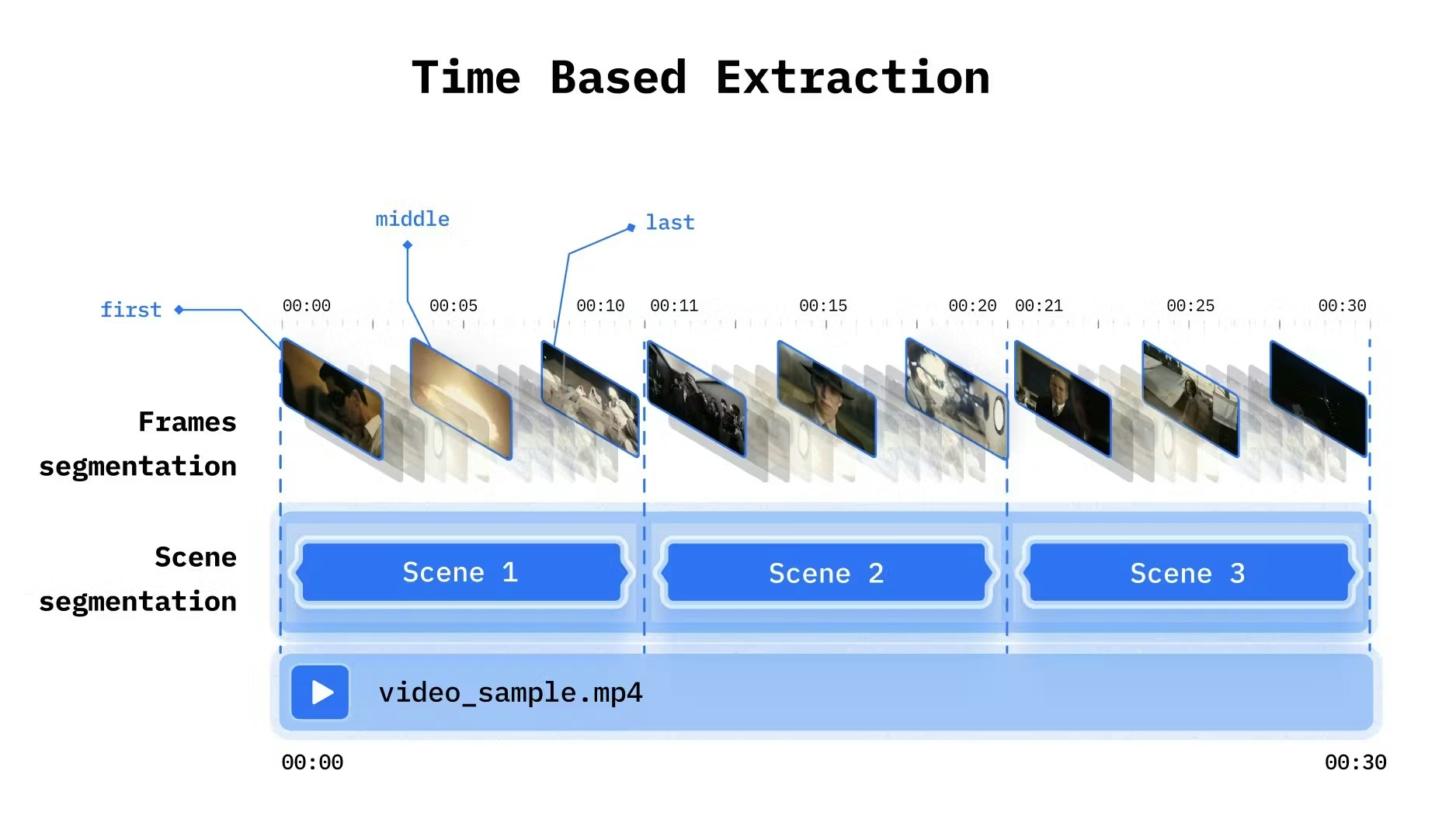
Split video into fixed intervals. Simple and predictable.
 ```python Python theme={null}
from videodb import SceneExtractionType
video.index_scenes(
extraction_type=SceneExtractionType.time_based,
extraction_config={
"time": 10, # Scene length in seconds
"frame_count": 2 # Frames to analyze per scene
},
prompt="Describe what's happening"
)
```
```javascript Node.js theme={null}
await video.indexScenes({
extractionType: 'time',
extractionConfig: {
time: 10, // Scene length in seconds
frame_count: 2 // Frames to analyze per scene
},
prompt: "Describe what's happening"
});
```
| Parameter | Type | Default | Description |
| :-------------- | :--- | :---------- | :-------------------------------------------- |
| `time` | int | 10 | Interval in seconds |
| `frame_count` | int | 1 | Frames per scene |
| `select_frames` | list | `["first"]` | Which frames: `"first"`, `"middle"`, `"last"` |
Use either `frame_count` or `select_frames`, not both.
**Best for:**
* Surveillance and monitoring
* Live streams
* Content with no clear scene boundaries
* Consistent sampling across long videos
### Shot-Based Extraction
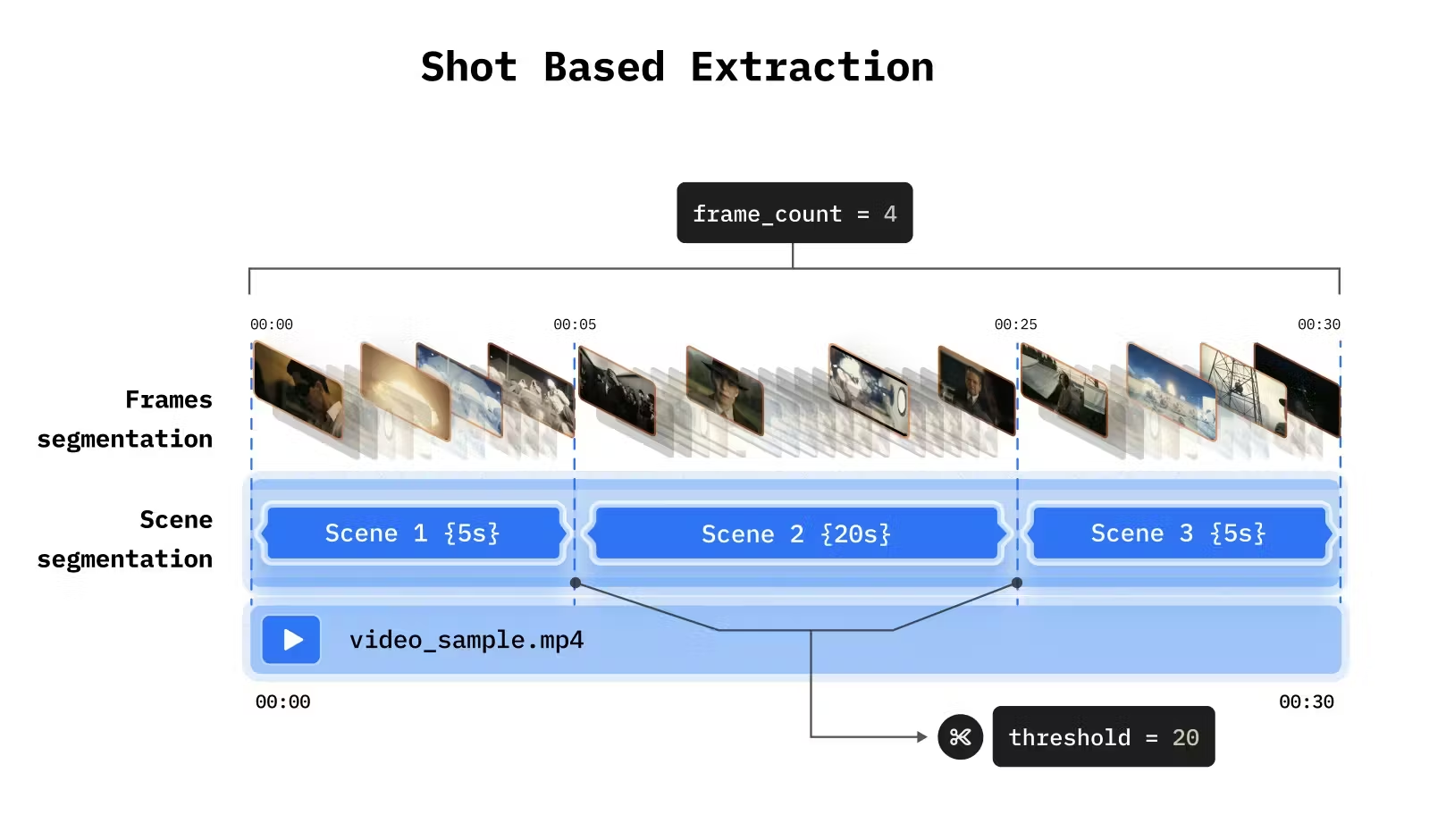
Detect visual transitions (cuts, fades) to identify natural scene boundaries.
```python Python theme={null}
from videodb import SceneExtractionType
video.index_scenes(
extraction_type=SceneExtractionType.time_based,
extraction_config={
"time": 10, # Scene length in seconds
"frame_count": 2 # Frames to analyze per scene
},
prompt="Describe what's happening"
)
```
```javascript Node.js theme={null}
await video.indexScenes({
extractionType: 'time',
extractionConfig: {
time: 10, // Scene length in seconds
frame_count: 2 // Frames to analyze per scene
},
prompt: "Describe what's happening"
});
```
| Parameter | Type | Default | Description |
| :-------------- | :--- | :---------- | :-------------------------------------------- |
| `time` | int | 10 | Interval in seconds |
| `frame_count` | int | 1 | Frames per scene |
| `select_frames` | list | `["first"]` | Which frames: `"first"`, `"middle"`, `"last"` |
Use either `frame_count` or `select_frames`, not both.
**Best for:**
* Surveillance and monitoring
* Live streams
* Content with no clear scene boundaries
* Consistent sampling across long videos
### Shot-Based Extraction
Detect visual transitions (cuts, fades) to identify natural scene boundaries.
 ```python Python theme={null}
from videodb import SceneExtractionType
video.index_scenes(
extraction_type=SceneExtractionType.shot_based,
extraction_config={
"threshold": 20, # Sensitivity (lower = more sensitive)
"frame_count": 1 # Frames per detected shot
},
prompt="Describe the scene"
)
```
```javascript Node.js theme={null}
await video.indexScenes({
extractionType: 'shot',
extractionConfig: {
threshold: 20, // Sensitivity (lower = more sensitive)
frame_count: 1 // Frames per detected shot
},
prompt: "Describe the scene"
});
```
| Parameter | Type | Default | Description |
| :------------ | :--- | :------ | :-------------------- |
| `threshold` | int | 20 | Detection sensitivity |
| `frame_count` | int | 1 | Frames per shot |
**Best for:**
* Movies and TV shows
* Edited content with clear cuts
* Music videos
* Commercials
***
## Prompt Engineering
The prompt shapes what gets extracted. Think of it as telling the vision model what to look for.
### Basic Prompts
```python theme={null}
# General description
prompt = "Describe what's happening in this scene"
# Object-focused
prompt = "Identify all objects and people visible"
# Action-focused
prompt = "Describe the activities and movements"
```
### Domain-Specific Prompts
```python Python theme={null}
# Retail / E-commerce
video.index_scenes(
prompt="Identify products, brands, and pricing visible on screen"
)
# Sports
video.index_scenes(
prompt="Describe the play, players involved, and outcome"
)
# Security
video.index_scenes(
prompt="Identify people, vehicles, and any unusual activity"
)
# Education
video.index_scenes(
prompt="Describe the topic being taught and any diagrams or text shown"
)
```
```javascript Node.js theme={null}
// Retail / E-commerce
await video.indexScenes({
prompt: "Identify products, brands, and pricing visible on screen"
});
// Sports
await video.indexScenes({
prompt: "Describe the play, players involved, and outcome"
});
// Security
await video.indexScenes({
prompt: "Identify people, vehicles, and any unusual activity"
});
// Education
await video.indexScenes({
prompt: "Describe the topic being taught and any diagrams or text shown"
});
```
### Structured Output Prompts
Guide the model to produce consistent, parseable output:
```python theme={null}
prompt = """
Describe this scene with the following structure:
- Setting: Where is this taking place?
- People: Who is present and what are they doing?
- Objects: What notable items are visible?
- Action: What is happening?
"""
```
***
## Frame Selection Strategy
More frames = more detail but higher cost. Choose based on your content.
### Static Content (1 frame)
For content where a single frame captures the scene:
```python Python theme={null}
# One frame is enough for static shots
video.index_scenes(
extraction_type=SceneExtractionType.time_based,
extraction_config={"time": 10, "frame_count": 1},
prompt="Describe the scene"
)
```
```javascript Node.js theme={null}
await video.indexScenes({
extractionType: 'time',
extractionConfig: { time: 10, frame_count: 1 },
prompt: "Describe the scene"
});
```
### Motion and Activity (3-5 frames)
For understanding movement and temporal changes:
```python Python theme={null}
# Multiple frames to capture motion
video.index_scenes(
extraction_type=SceneExtractionType.time_based,
extraction_config={"time": 5, "frame_count": 5},
prompt="Describe the activity and how it progresses"
)
```
```javascript Node.js theme={null}
await video.indexScenes({
extractionType: 'time',
extractionConfig: { time: 5, frame_count: 5 },
prompt: "Describe the activity and how it progresses"
});
```
### Key Moment Selection
Select specific frames within each scene:
```python Python theme={null}
# First and last frames only
video.index_scenes(
extraction_type=SceneExtractionType.time_based,
extraction_config={"time": 10, "select_frames": ["first", "last"]},
prompt="Describe how the scene changes from start to end"
)
```
```javascript Node.js theme={null}
await video.indexScenes({
extractionType: 'time',
extractionConfig: { time: 10, select_frames: ["first", "last"] },
prompt: "Describe how the scene changes from start to end"
});
```
***
## Combining Modalities
Index both spoken and visual content, then search across both:
```python Python theme={null}
from videodb import IndexType, SearchType
# Index both modalities
video.index_spoken_words()
video.index_scenes(prompt="Describe the visual content")
# Search spoken content
spoken_results = video.search(
query="discusses climate change",
index_type=IndexType.spoken_word
)
# Search visual content
visual_results = video.search(
query="shows melting glaciers",
index_type=IndexType.scene
)
```
```javascript Node.js theme={null}
import { IndexTypeValues, SearchTypeValues } from 'videodb';
// Index both modalities
await video.indexSpokenWords();
await video.indexScenes({ prompt: "Describe the visual content" });
// Search spoken content
const spokenResults = await video.search(
"discusses climate change",
SearchTypeValues.semantic,
IndexTypeValues.spoken
);
// Search visual content
const visualResults = await video.search(
"shows melting glaciers",
SearchTypeValues.semantic,
IndexTypeValues.scene
);
```
***
## Extraction Examples
### Traffic Monitoring
```python Python theme={null}
# Detect vehicle colors (single frame sufficient)
video.index_scenes(
extraction_type=SceneExtractionType.time_based,
extraction_config={"time": 1, "frame_count": 1},
prompt="Identify the color and type of each vehicle"
)
# Detect stopped vehicles (need multiple frames)
video.index_scenes(
extraction_type=SceneExtractionType.time_based,
extraction_config={"time": 4, "frame_count": 5},
prompt="Identify if any vehicle has stopped or is moving slowly"
)
```
```javascript Node.js theme={null}
// Detect vehicle colors (single frame sufficient)
await video.indexScenes({
extractionType: 'time',
extractionConfig: { time: 1, frame_count: 1 },
prompt: "Identify the color and type of each vehicle"
});
// Detect stopped vehicles (need multiple frames)
await video.indexScenes({
extractionType: 'time',
extractionConfig: { time: 4, frame_count: 5 },
prompt: "Identify if any vehicle has stopped or is moving slowly"
});
```
### Educational Content
```python Python theme={null}
# Combine visual and spoken indexing
video.index_spoken_words()
video.index_scenes(
extraction_type=SceneExtractionType.time_based,
extraction_config={"time": 30, "select_frames": ["first", "middle", "last"]},
prompt="Describe diagrams, equations, or visual aids shown"
)
```
```javascript Node.js theme={null}
// Combine visual and spoken indexing
await video.indexSpokenWords();
await video.indexScenes({
extractionType: 'time',
extractionConfig: { time: 30, select_frames: ["first", "middle", "last"] },
prompt: "Describe diagrams, equations, or visual aids shown"
});
```
***
## Next Steps
Layer different perspectives on the same media
Improve precision and recall
```python Python theme={null}
from videodb import SceneExtractionType
video.index_scenes(
extraction_type=SceneExtractionType.shot_based,
extraction_config={
"threshold": 20, # Sensitivity (lower = more sensitive)
"frame_count": 1 # Frames per detected shot
},
prompt="Describe the scene"
)
```
```javascript Node.js theme={null}
await video.indexScenes({
extractionType: 'shot',
extractionConfig: {
threshold: 20, // Sensitivity (lower = more sensitive)
frame_count: 1 // Frames per detected shot
},
prompt: "Describe the scene"
});
```
| Parameter | Type | Default | Description |
| :------------ | :--- | :------ | :-------------------- |
| `threshold` | int | 20 | Detection sensitivity |
| `frame_count` | int | 1 | Frames per shot |
**Best for:**
* Movies and TV shows
* Edited content with clear cuts
* Music videos
* Commercials
***
## Prompt Engineering
The prompt shapes what gets extracted. Think of it as telling the vision model what to look for.
### Basic Prompts
```python theme={null}
# General description
prompt = "Describe what's happening in this scene"
# Object-focused
prompt = "Identify all objects and people visible"
# Action-focused
prompt = "Describe the activities and movements"
```
### Domain-Specific Prompts
```python Python theme={null}
# Retail / E-commerce
video.index_scenes(
prompt="Identify products, brands, and pricing visible on screen"
)
# Sports
video.index_scenes(
prompt="Describe the play, players involved, and outcome"
)
# Security
video.index_scenes(
prompt="Identify people, vehicles, and any unusual activity"
)
# Education
video.index_scenes(
prompt="Describe the topic being taught and any diagrams or text shown"
)
```
```javascript Node.js theme={null}
// Retail / E-commerce
await video.indexScenes({
prompt: "Identify products, brands, and pricing visible on screen"
});
// Sports
await video.indexScenes({
prompt: "Describe the play, players involved, and outcome"
});
// Security
await video.indexScenes({
prompt: "Identify people, vehicles, and any unusual activity"
});
// Education
await video.indexScenes({
prompt: "Describe the topic being taught and any diagrams or text shown"
});
```
### Structured Output Prompts
Guide the model to produce consistent, parseable output:
```python theme={null}
prompt = """
Describe this scene with the following structure:
- Setting: Where is this taking place?
- People: Who is present and what are they doing?
- Objects: What notable items are visible?
- Action: What is happening?
"""
```
***
## Frame Selection Strategy
More frames = more detail but higher cost. Choose based on your content.
### Static Content (1 frame)
For content where a single frame captures the scene:
```python Python theme={null}
# One frame is enough for static shots
video.index_scenes(
extraction_type=SceneExtractionType.time_based,
extraction_config={"time": 10, "frame_count": 1},
prompt="Describe the scene"
)
```
```javascript Node.js theme={null}
await video.indexScenes({
extractionType: 'time',
extractionConfig: { time: 10, frame_count: 1 },
prompt: "Describe the scene"
});
```
### Motion and Activity (3-5 frames)
For understanding movement and temporal changes:
```python Python theme={null}
# Multiple frames to capture motion
video.index_scenes(
extraction_type=SceneExtractionType.time_based,
extraction_config={"time": 5, "frame_count": 5},
prompt="Describe the activity and how it progresses"
)
```
```javascript Node.js theme={null}
await video.indexScenes({
extractionType: 'time',
extractionConfig: { time: 5, frame_count: 5 },
prompt: "Describe the activity and how it progresses"
});
```
### Key Moment Selection
Select specific frames within each scene:
```python Python theme={null}
# First and last frames only
video.index_scenes(
extraction_type=SceneExtractionType.time_based,
extraction_config={"time": 10, "select_frames": ["first", "last"]},
prompt="Describe how the scene changes from start to end"
)
```
```javascript Node.js theme={null}
await video.indexScenes({
extractionType: 'time',
extractionConfig: { time: 10, select_frames: ["first", "last"] },
prompt: "Describe how the scene changes from start to end"
});
```
***
## Combining Modalities
Index both spoken and visual content, then search across both:
```python Python theme={null}
from videodb import IndexType, SearchType
# Index both modalities
video.index_spoken_words()
video.index_scenes(prompt="Describe the visual content")
# Search spoken content
spoken_results = video.search(
query="discusses climate change",
index_type=IndexType.spoken_word
)
# Search visual content
visual_results = video.search(
query="shows melting glaciers",
index_type=IndexType.scene
)
```
```javascript Node.js theme={null}
import { IndexTypeValues, SearchTypeValues } from 'videodb';
// Index both modalities
await video.indexSpokenWords();
await video.indexScenes({ prompt: "Describe the visual content" });
// Search spoken content
const spokenResults = await video.search(
"discusses climate change",
SearchTypeValues.semantic,
IndexTypeValues.spoken
);
// Search visual content
const visualResults = await video.search(
"shows melting glaciers",
SearchTypeValues.semantic,
IndexTypeValues.scene
);
```
***
## Extraction Examples
### Traffic Monitoring
```python Python theme={null}
# Detect vehicle colors (single frame sufficient)
video.index_scenes(
extraction_type=SceneExtractionType.time_based,
extraction_config={"time": 1, "frame_count": 1},
prompt="Identify the color and type of each vehicle"
)
# Detect stopped vehicles (need multiple frames)
video.index_scenes(
extraction_type=SceneExtractionType.time_based,
extraction_config={"time": 4, "frame_count": 5},
prompt="Identify if any vehicle has stopped or is moving slowly"
)
```
```javascript Node.js theme={null}
// Detect vehicle colors (single frame sufficient)
await video.indexScenes({
extractionType: 'time',
extractionConfig: { time: 1, frame_count: 1 },
prompt: "Identify the color and type of each vehicle"
});
// Detect stopped vehicles (need multiple frames)
await video.indexScenes({
extractionType: 'time',
extractionConfig: { time: 4, frame_count: 5 },
prompt: "Identify if any vehicle has stopped or is moving slowly"
});
```
### Educational Content
```python Python theme={null}
# Combine visual and spoken indexing
video.index_spoken_words()
video.index_scenes(
extraction_type=SceneExtractionType.time_based,
extraction_config={"time": 30, "select_frames": ["first", "middle", "last"]},
prompt="Describe diagrams, equations, or visual aids shown"
)
```
```javascript Node.js theme={null}
// Combine visual and spoken indexing
await video.indexSpokenWords();
await video.indexScenes({
extractionType: 'time',
extractionConfig: { time: 30, select_frames: ["first", "middle", "last"] },
prompt: "Describe diagrams, equations, or visual aids shown"
});
```
***
## Next Steps
Layer different perspectives on the same media
Improve precision and recall