> ## Documentation Index
> Fetch the complete documentation index at: https://docs.videodb.io/llms.txt
> Use this file to discover all available pages before exploring further.
# Create an Index
> Transform video into searchable data with spoken word and visual indexes
Indexes turn raw video into structured, searchable data. Create a spoken word index for dialogue and narration, or a scene index for visual content.
## Quick Example
```python Python theme={null}
import videodb
conn = videodb.connect()
coll = conn.get_collection()
video = coll.get_video("m-xxx")
# Index spoken content (dialogue, narration)
video.index_spoken_words()
# Index visual content (scenes, objects, actions)
scene_index_id = video.index_scenes(
prompt="Describe what's happening in the scene"
)
# Search both
results = video.search("car chase through the city")
results.play()
```
```javascript Node.js theme={null}
import { connect } from 'videodb';
const conn = connect();
const coll = await conn.getCollection();
const video = await coll.getVideo("m-xxx");
// Index spoken content (dialogue, narration)
await video.indexSpokenWords();
// Index visual content (scenes, objects, actions)
const sceneIndexId = await video.indexScenes({
prompt: "Describe what's happening in the scene"
});
// Search both
const results = await video.search("car chase through the city");
await results.play();
```
***
## Spoken Word Index
Transcribes audio into timestamped text using automatic speech recognition (ASR).
```python Python theme={null}
video.index_spoken_words()
```
```javascript Node.js theme={null}
await video.indexSpokenWords();
```
**What it captures:**
* Dialogue and conversations
* Narration and voiceovers
* Lectures and presentations
* Interviews and podcasts
### Language Support
Major languages are auto-detected. For others, pass the language code:
```python Python theme={null}
# Auto-detect (English, Spanish, French, German, Italian, Portuguese, Dutch)
video.index_spoken_words()
# Explicit language code
video.index_spoken_words(language_code="hi") # Hindi
video.index_spoken_words(language_code="ja") # Japanese
video.index_spoken_words(language_code="zh") # Chinese
```
```javascript Node.js theme={null}
// Auto-detect (English, Spanish, French, German, Italian, Portuguese, Dutch)
await video.indexSpokenWords();
// Explicit language code
await video.indexSpokenWords({ languageCode: "hi" }); // Hindi
await video.indexSpokenWords({ languageCode: "ja" }); // Japanese
await video.indexSpokenWords({ languageCode: "zh" }); // Chinese
```
| Language | Code |
| :----------------- | :------------------------ |
| English (Global) | `en` |
| English (US/UK/AU) | `en_us`, `en_uk`, `en_au` |
| Spanish | `es` |
| French | `fr` |
| German | `de` |
| Hindi | `hi` |
| Japanese | `ja` |
| Chinese | `zh` |
| Korean | `ko` |
| Russian | `ru` |
***
## Scene Index
Analyzes video frames using vision models to describe visual content.
```python Python theme={null}
scene_index_id = video.index_scenes(
prompt="Describe the scene in detail"
)
```
```javascript Node.js theme={null}
const sceneIndexId = await video.indexScenes({
prompt: "Describe the scene in detail"
});
```
**What it captures:**
* Objects and people
* Actions and activities
* Environments and settings
* Visual transitions
### Prompt Shapes the Index
The prompt you provide determines what gets indexed:
```python Python theme={null}
# Focus on people
video.index_scenes(prompt="Describe the people and their actions")
# Focus on environment
video.index_scenes(prompt="Describe the location and setting")
# Focus on specific objects
video.index_scenes(prompt="Identify all vehicles and their colors")
```
```javascript Node.js theme={null}
// Focus on people
await video.indexScenes({ prompt: "Describe the people and their actions" });
// Focus on environment
await video.indexScenes({ prompt: "Describe the location and setting" });
// Focus on specific objects
await video.indexScenes({ prompt: "Identify all vehicles and their colors" });
```
### Extraction Configuration
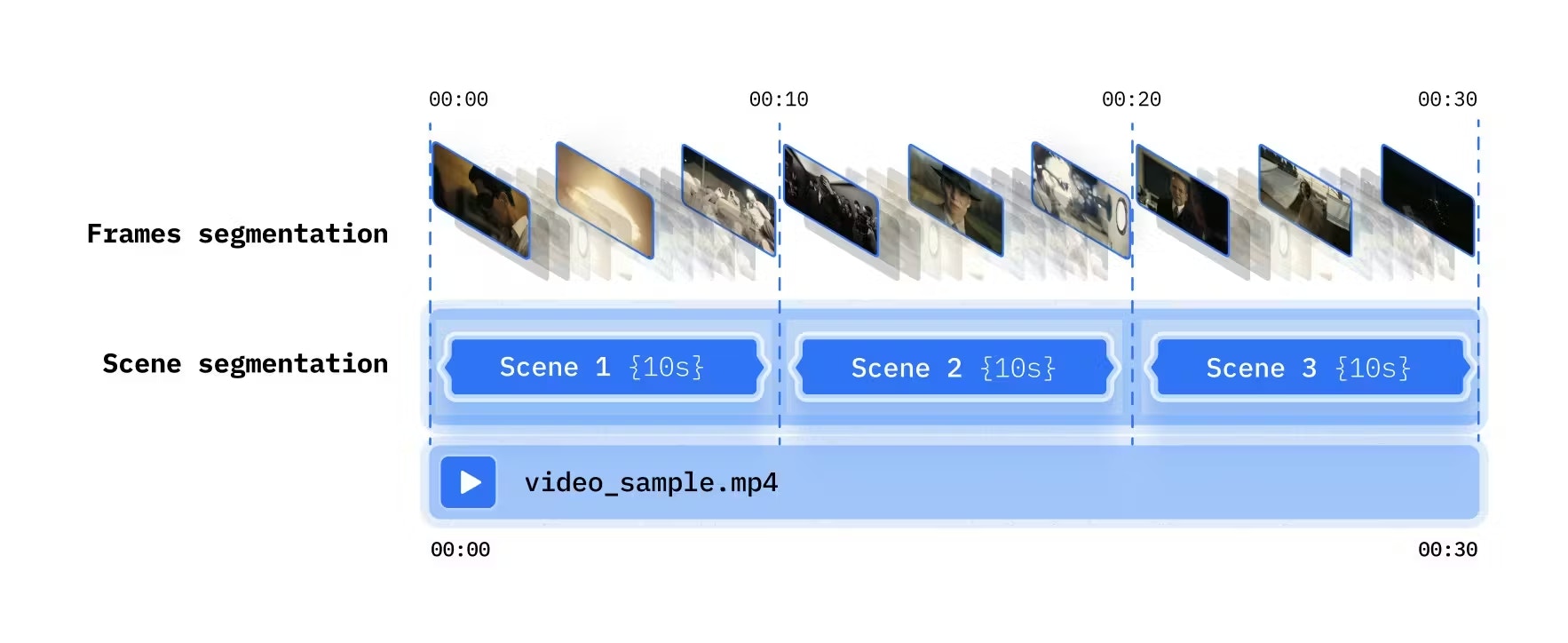
Control how frames are sampled - choose between frame segmentation (regular intervals) and scene segmentation (automatic transitions):
 ```python Python theme={null}
from videodb import SceneExtractionType
# Time-based: every N seconds
video.index_scenes(
extraction_type=SceneExtractionType.time_based,
extraction_config={"time": 10, "frame_count": 2},
prompt="Describe the scene"
)
```python Python theme={null}
from videodb import SceneExtractionType
# Time-based: every N seconds
video.index_scenes(
extraction_type=SceneExtractionType.time_based,
extraction_config={"time": 10, "frame_count": 2},
prompt="Describe the scene"
)
 # Shot-based: detect visual transitions
video.index_scenes(
extraction_type=SceneExtractionType.shot_based,
extraction_config={"threshold": 20, "frame_count": 1},
prompt="Describe the scene"
)
```
```javascript Node.js theme={null}
// Time-based: every N seconds
await video.indexScenes({
extractionType: 'time',
extractionConfig: { time: 10, frame_count: 2 },
prompt: "Describe the scene"
});
// Shot-based: detect visual transitions
await video.indexScenes({
extractionType: 'shot',
extractionConfig: { threshold: 20, frame_count: 1 },
prompt: "Describe the scene"
});
```
| Method | Best For |
| :--------- | :------------------------------------- |
| Time-based | Consistent sampling, dynamic content |
| Shot-based | Edited videos with clear scene changes |
***
## Managing Indexes
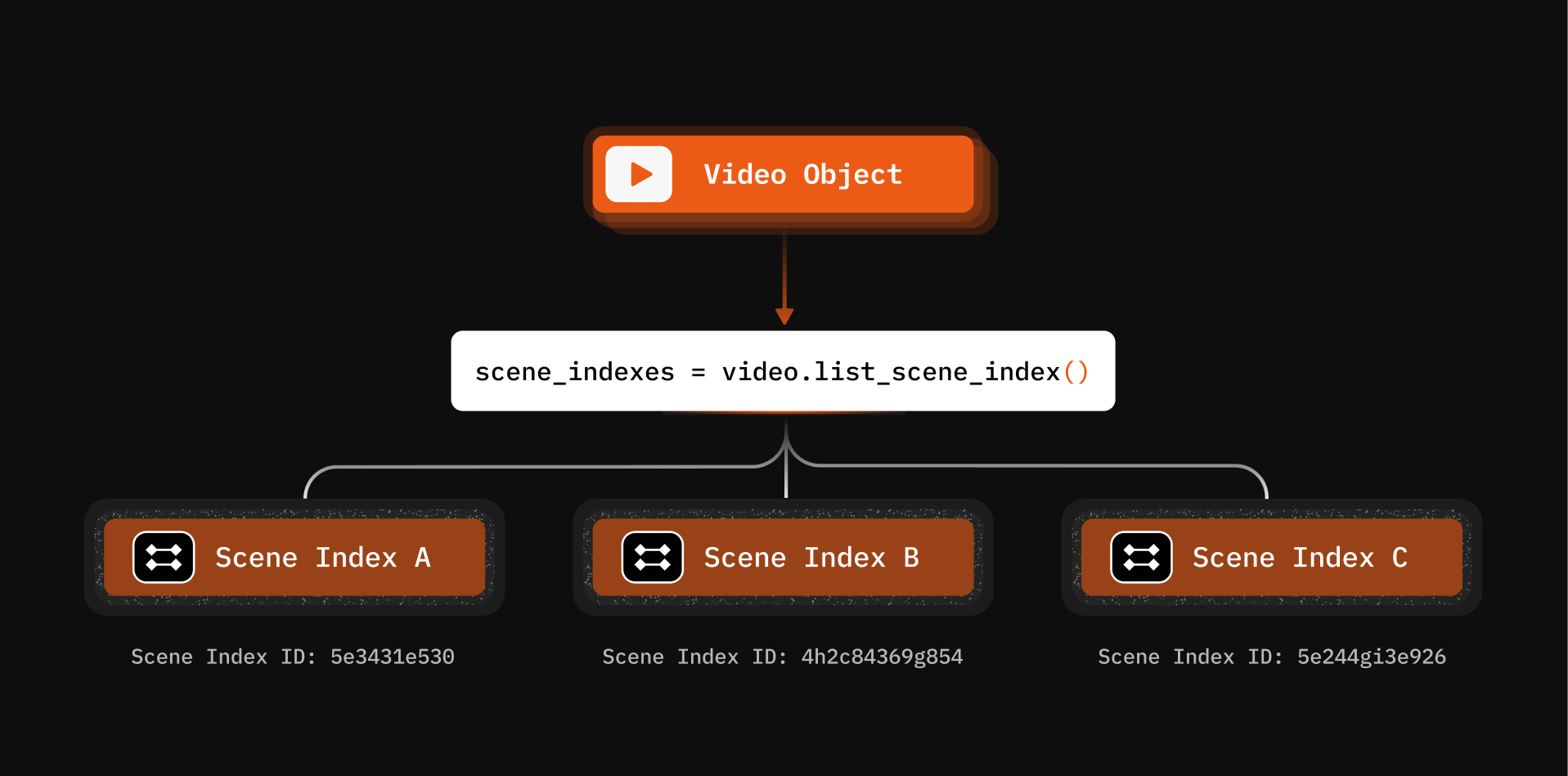
### List All Scene Indexes
```python Python theme={null}
indexes = video.list_scene_index()
for idx in indexes:
print(f"{idx.id}: {idx.name} - {idx.status}")
```
```javascript Node.js theme={null}
const indexes = await video.listSceneIndex();
for (const idx of indexes) {
console.log(`${idx.id}: ${idx.name} - ${idx.status}`);
}
```
# Shot-based: detect visual transitions
video.index_scenes(
extraction_type=SceneExtractionType.shot_based,
extraction_config={"threshold": 20, "frame_count": 1},
prompt="Describe the scene"
)
```
```javascript Node.js theme={null}
// Time-based: every N seconds
await video.indexScenes({
extractionType: 'time',
extractionConfig: { time: 10, frame_count: 2 },
prompt: "Describe the scene"
});
// Shot-based: detect visual transitions
await video.indexScenes({
extractionType: 'shot',
extractionConfig: { threshold: 20, frame_count: 1 },
prompt: "Describe the scene"
});
```
| Method | Best For |
| :--------- | :------------------------------------- |
| Time-based | Consistent sampling, dynamic content |
| Shot-based | Edited videos with clear scene changes |
***
## Managing Indexes
### List All Scene Indexes
```python Python theme={null}
indexes = video.list_scene_index()
for idx in indexes:
print(f"{idx.id}: {idx.name} - {idx.status}")
```
```javascript Node.js theme={null}
const indexes = await video.listSceneIndex();
for (const idx of indexes) {
console.log(`${idx.id}: ${idx.name} - ${idx.status}`);
}
```
 ### Get Index Details
```python Python theme={null}
scene_index = video.get_scene_index(scene_index_id)
for scene in scene_index:
print(f"{scene.start}-{scene.end}: {scene.description}")
```
```javascript Node.js theme={null}
const sceneIndex = await video.getSceneIndex(sceneIndexId);
for (const scene of sceneIndex) {
console.log(`${scene.start}-${scene.end}: ${scene.description}`);
}
```
### Delete an Index
```python Python theme={null}
video.delete_scene_index(scene_index_id)
```
```javascript Node.js theme={null}
await video.deleteSceneIndex(sceneIndexId);
```
***
## Async Processing with Callbacks
For long videos, use callbacks to get notified when indexing completes:
```python Python theme={null}
scene_index_id = video.index_scenes(
prompt="Describe the scene",
callback_url="https://your-backend.com/webhooks/index-complete"
)
```
```javascript Node.js theme={null}
const sceneIndexId = await video.indexScenes({
prompt: "Describe the scene",
callbackUrl: "https://your-backend.com/webhooks/index-complete"
});
```
***
## What You Can Build
Index spoken words, then search to create highlight reels
Combine spoken word and scene indexes for powerful queries
Scene indexing enables real-time infant monitoring
Index camera feeds to detect unauthorized access
***
## Next Steps
Extraction strategies for video + audio
Layer different perspectives on the same media
### Get Index Details
```python Python theme={null}
scene_index = video.get_scene_index(scene_index_id)
for scene in scene_index:
print(f"{scene.start}-{scene.end}: {scene.description}")
```
```javascript Node.js theme={null}
const sceneIndex = await video.getSceneIndex(sceneIndexId);
for (const scene of sceneIndex) {
console.log(`${scene.start}-${scene.end}: ${scene.description}`);
}
```
### Delete an Index
```python Python theme={null}
video.delete_scene_index(scene_index_id)
```
```javascript Node.js theme={null}
await video.deleteSceneIndex(sceneIndexId);
```
***
## Async Processing with Callbacks
For long videos, use callbacks to get notified when indexing completes:
```python Python theme={null}
scene_index_id = video.index_scenes(
prompt="Describe the scene",
callback_url="https://your-backend.com/webhooks/index-complete"
)
```
```javascript Node.js theme={null}
const sceneIndexId = await video.indexScenes({
prompt: "Describe the scene",
callbackUrl: "https://your-backend.com/webhooks/index-complete"
});
```
***
## What You Can Build
Index spoken words, then search to create highlight reels
Combine spoken word and scene indexes for powerful queries
Scene indexing enables real-time infant monitoring
Index camera feeds to detect unauthorized access
***
## Next Steps
Extraction strategies for video + audio
Layer different perspectives on the same media