> ## Documentation Index
> Fetch the complete documentation index at: https://docs.videodb.io/llms.txt
> Use this file to discover all available pages before exploring further.
# PromptClip
> AI-powered video editing with natural language prompts - find perfect moments in videos instantly using spoken and visual content analysis.
Open source repo for AI-driven video editing
PromptClip is your new superpower for video editing with prompts. While editing, we all wanted to find that perfect moment in a video with ease. Say goodbye to manually skimming and seeking through video, and say hello to instant, AI-driven video consumption and creation.
LLMs are great with text, but they don't help you consume or create video clips. We've built [PromptClip](https://github.com/video-db/PromptClip), an open source repo to get you started on AI driven video editing. For example, you can just say:
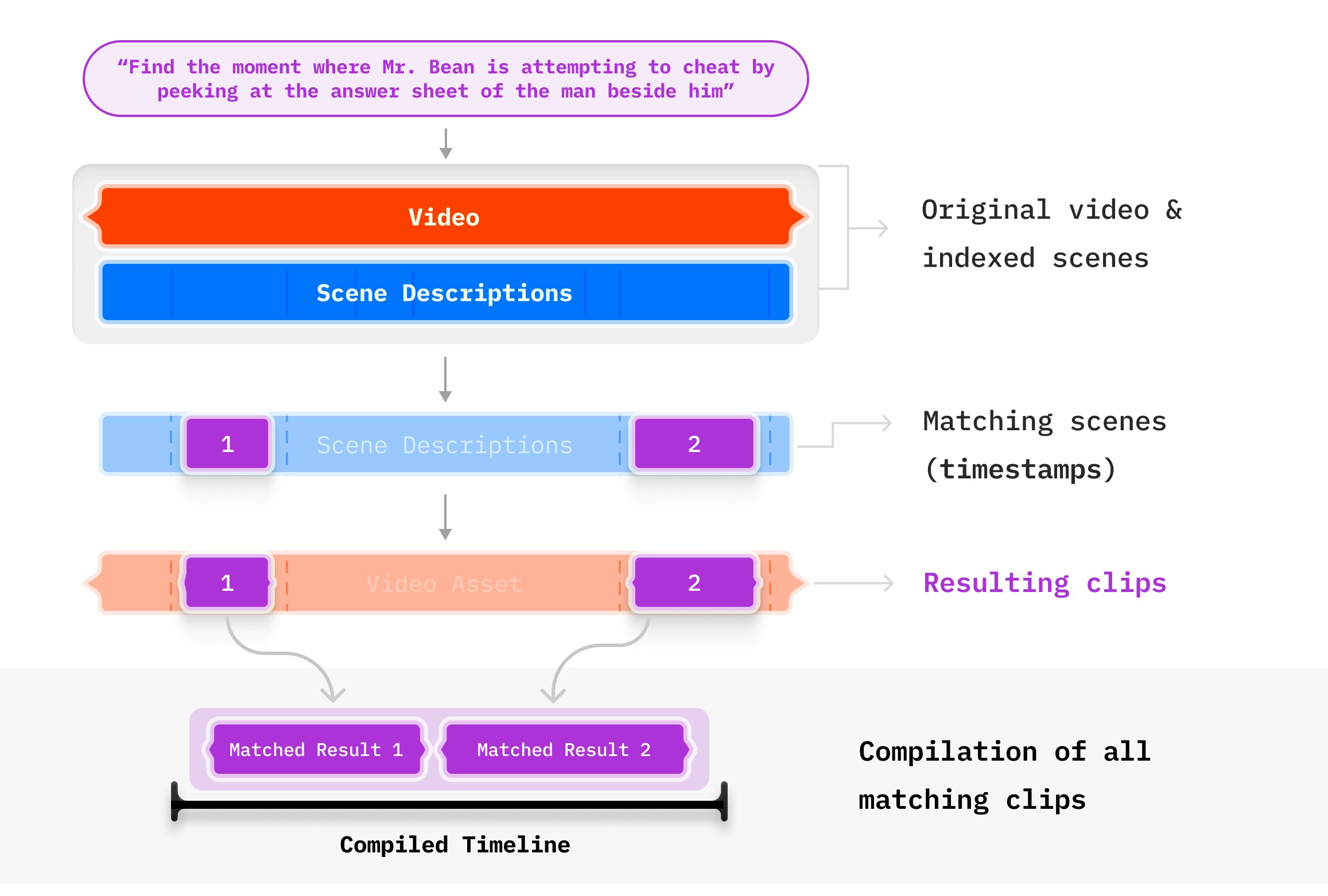
"*Find the moment where Mr. Bean is attempting to cheat by peeking at the answer sheet of the man beside him*"
### Process
Use natural language to describe the what you want.
Run prompts on the visual scenes and spoken content with the choice of your LLM.
Instantly get video compilation stream from VideoDB.
## Download PromptClip
Get your API key from the [VideoDB console](https://console.videodb.io/) (Free for first 50 uploads, no credit card required)
* Add your `VIDEO_DB_API_KEY` to the `.env` file
* Include your preferred LLM API key (`OPENAI_API_KEY` or `ANTHROPIC_KEY`) in `.env`
Run `pip install -r requirements.txt`
Launch the Jupyter notebooks to start experimenting:
* Create clips using only spoken content: [PromptClip Spoken Notebook](https://github.com/video-db/PromptClip/blob/scene-support/PromptClip_spoken.ipynb)
* Create clips by analysing visual content: [PromptClip Visual Notebook](https://github.com/video-db/PromptClip/blob/scene-support/PromptClip_visual.ipynb)
* Using combined audio-visual analysis: [PromptClip Multimodal Notebook](https://github.com/video-db/PromptClip/blob/scene-support/PromptClip_multimodal.ipynb)
## PromptClip in Action
### 1. Spoken Content Analysis
**Prompt: Find every moment where a deal was offered**
**Source:** [Shark Tank](https://www.youtube.com/watch?v=HpUR7-Oe1ss)
**Prompt: Show me moments in the video where the host discusses or reveals the pricing of the gadgets.**
**Source:** [Useful Gadgets](https://www.youtube.com/watch?v=bGmXrMW9ucU)
### 2. Visual/Scene Analysis
**Prompt: Find the moment where Mr. Bean is attempting to cheat by peeking at the answer sheet of the man beside him**
### 3. Using both Visual and Spoken
**Prompt: Find scenes explaining cricket rules using infographics**
### Why PromptClip Will Transform Your Work
Reduce hours of manual video searching to mere seconds.
Generate fresh perspectives and ideas from your existing content.
Extract exactly what you need, not just approximate matches.
Works with various video types, topics, and [languages](/pages/understand/indexing-pipelines/multimodal-indexing).
PromptClip is more than a tool; it's a new way of content interaction — The natural language way! Whether you're a content creator, researcher, or developer, PromptClip empowers you to unlock the full potential of your video content.
## Watch PromptClip in Action
Here you can check more PromptClip examples
**Prompt: "Find details about every sponsor"**
**Prompt: "Find sentences where anxiety is discussed"**
**Prompt: "How to control sugar cravings"**
## The Magic Behind PromptClip: VideoDB's Indexing Methods
PromptClip leverages VideoDB's advanced indexing techniques and Large Language Models (LLMs) to analyze and manipulate video content with unmatched power.
* **Process**: VideoDB transcribes the audio content and creates a searchable index of spoken words.
* **Implementation**: Uses advanced speech recognition algorithms to generate accurate transcripts.
* **Process**: Analyzes video frames to identify objects, actions, and scene compositions.
* **Implementation**: Employs sophisticated scene extraction algorithms and vision models for comprehensive visual understanding.
* **Customization**: Allows for different extraction algorithms and custom prompts for scene description. Find detailed documentation in our [Scene Indexing Guide](/pages/understand/indexing-pipelines/create-an-index).
## Join the VideoDB Community
Your ideas drive PromptClip's evolution. Get involved:
Report issues, suggest features, or contribute code via pull requests
Share your innovative use cases and connect with the community
For more information and support, refer to the [VideoDB documentation](https://docs.videodb.io/)
 ## Download PromptClip