> ## Documentation Index
> Fetch the complete documentation index at: https://docs.videodb.io/llms.txt
> Use this file to discover all available pages before exploring further.
# Overview
> Edit and compose videos with code - no manual editing tools required
## Programmatic Editing
**Edit videos with code, not clicks.** Compose, overlay, trim, and transform videos using the Timeline API.
### When to Use This
* You need to add intros/outros to hundreds of videos
* You want to insert dynamic ads based on viewer data
* You're building a tool that adds branded elements automatically
* You need multi-version output (different aspect ratios, subtitles)
### What You'll Build
Automatically add opening/closing sequences
Overlay logos, watermarks, and graphics
Add background music and sound effects
Insert personalized ads per viewer
Generate multiple versions from one source
Add analytical text overlays
Auto-compile highlight reels from long videos
## Timeline Architecture
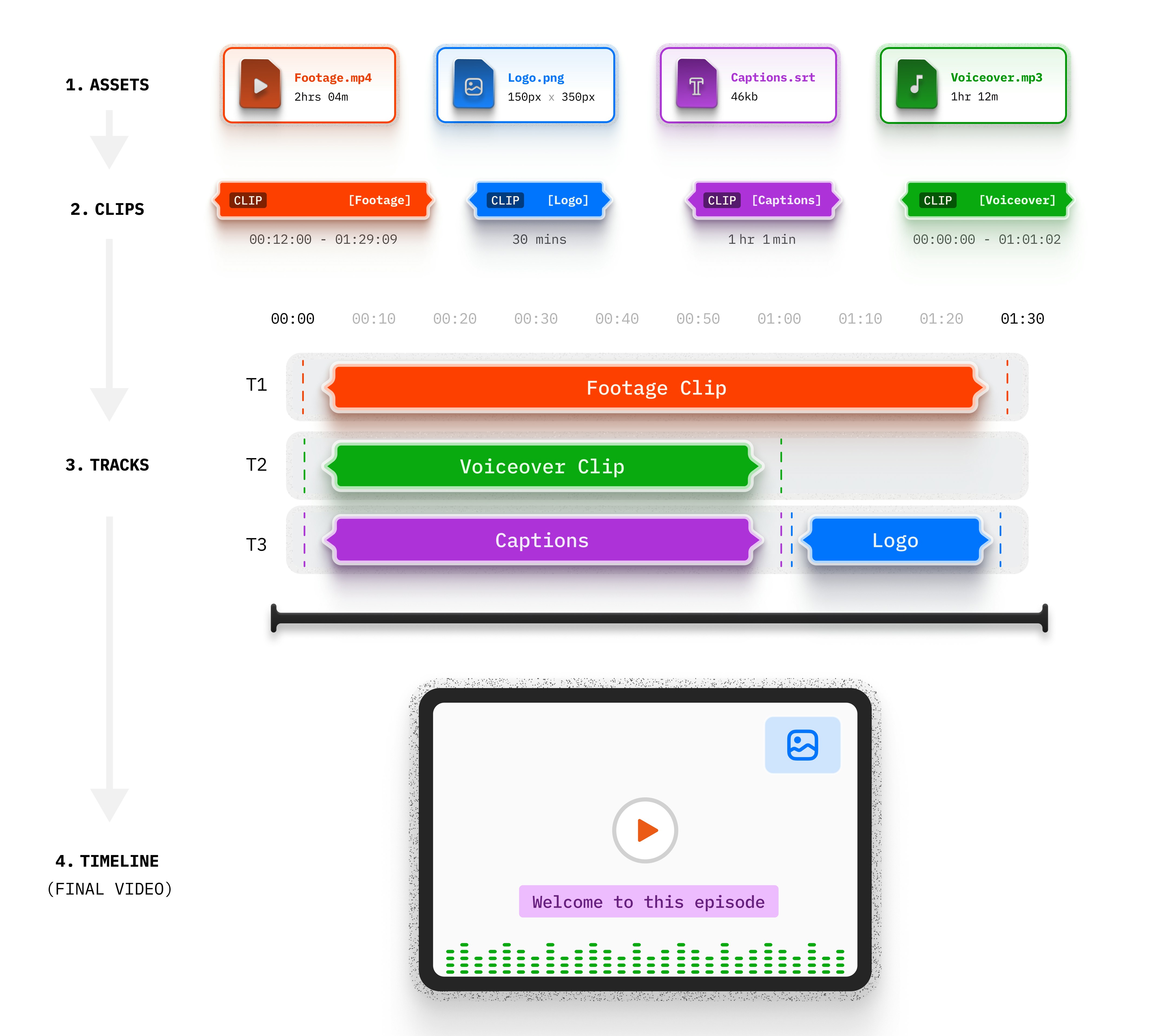 **4 Layers:**
* **Asset** - The media file (video, audio, image)
* **Clip** - A segment with timing and parameters
* **Track** - A layer in the composition
* **Timeline** - The complete output
## How It Works
```python theme={null}
from videodb.editor import Timeline, Track, Clip, VideoAsset
timeline = Timeline(conn)
track = Track()
track.add_clip(0, Clip(asset=VideoAsset(id=video.id), duration=30))
timeline.add_track(track)
stream_url = timeline.generate_stream() # Instant, no rendering
```
## Related Documentation
Deep dive into the 4-layer model
All available clip options
Handle different video dimensions
Add text overlays and subtitles
## Explore Use Cases by Category
### Video Enhancement
Auto-add opening and closing sequences
Add logos, watermarks, and graphics
Add background music and sound effects
### Dynamic Content
Insert personalized ads per viewer
Generate multiple versions from one source
### Analysis & Compilation
Add analytical text overlays
Auto-compile highlight reels from videos
**4 Layers:**
* **Asset** - The media file (video, audio, image)
* **Clip** - A segment with timing and parameters
* **Track** - A layer in the composition
* **Timeline** - The complete output
## How It Works
```python theme={null}
from videodb.editor import Timeline, Track, Clip, VideoAsset
timeline = Timeline(conn)
track = Track()
track.add_clip(0, Clip(asset=VideoAsset(id=video.id), duration=30))
timeline.add_track(track)
stream_url = timeline.generate_stream() # Instant, no rendering
```
## Related Documentation
Deep dive into the 4-layer model
All available clip options
Handle different video dimensions
Add text overlays and subtitles
## Explore Use Cases by Category
### Video Enhancement
Auto-add opening and closing sequences
Add logos, watermarks, and graphics
Add background music and sound effects
### Dynamic Content
Insert personalized ads per viewer
Generate multiple versions from one source
### Analysis & Compilation
Add analytical text overlays
Auto-compile highlight reels from videos