> ## Documentation Index
> Fetch the complete documentation index at: https://docs.videodb.io/llms.txt
> Use this file to discover all available pages before exploring further.

# Traffic Violation Detection

> Detect and report real-time traffic rule violations

<a href="https://colab.research.google.com/github/video-db/videodb-cookbook/blob/main/real_time_streaming/Roadcam.ipynb" target="_blank">
  <img src="https://colab.research.google.com/assets/colab-badge.svg" alt="Open In Colab" noZoom />
</a>

## The Viral Inspiration

You've seen the post. A guy got so fed up with daily traffic chaos that he automated his helmet camera to snap violations and send them straight to the traffic police - no manual intervention needed.
<Card title="View the inspiration" icon="twitter" href="https://x.com/the2ndfloorguy/status/2007411050984157452?s=20">
  Check out the original post that sparked this idea
</Card>

The internet loved it. And we thought - why not make this accessible to everyone?

With **VideoDB RTStream**, you can do exactly this. Connect your dashcam or helmet cam, let AI monitor for violations, and auto-report them. Let's see how it works.

## How It Works

```
Helmet Cam / Dashcam
        ↓
🔗 RTSP Stream → VideoDB RTStream
        ↓
🤖 AI Scene Analysis (every 5 sec, 5 frames)
        ↓
🚨 Violation Detected? → Webhook Alert
        ↓
📧 n8n Workflow → Email to Traffic Police
```

Simple pipeline. Powerful impact.

## The Setup

### 1. Connect Your Stream

<CodeGroup>
  ```python theme={null}
  import videodb

  conn = videodb.connect()
  coll = conn.get_collection()

  rtsp_url = "rtsp://your-camera-stream-url"
  roadcam_stream = coll.connect_rtstream(
      name="RoadCam Violation Stream",
      url=rtsp_url,
      store=True,
  )
  ```

  ```javascript Node.js theme={null}
  import { connect } from "videodb";

  const conn = connect();
  const coll = await conn.getCollection();

  const rtspUrl = "rtsp://your-camera-stream-url";
  const roadcamStream = await coll.connectRTStream(
      rtspUrl,
      "RoadCam Violation Stream",
      ["video"],
      30,
      true,
  );
  ```
</CodeGroup>

### 2. Create the Violation Detection Index

This is where the magic happens. We tell the AI exactly what to look for:

<CodeGroup>
  ```python theme={null}
  violation_prompt = """
  Focus on vehicles visible on the road and monitor them for the following traffic rule violations:

  1. NO HELMET: Two-wheeler (motorcycle/scooter) rider or pillion not wearing a helmet
  2. MOBILE PHONE USE: Driver using mobile phone while operating the vehicle
  3. WRONG SIDE DRIVING: Vehicle traveling against the designated traffic flow direction
  4. RED LIGHT VIOLATION: Vehicle crossing the stop line or intersection when traffic signal is red
  5. TRIPLE RIDING: More than two people riding on a single two-wheeler
  6. NO SEATBELT: Driver or front passenger in a four-wheeler not wearing seatbelt

  Analyze the frames carefully. If you detect one or more violations from the above list, respond EXACTLY in this format:

  Traffic Rule Violated
  Vehicle: [vehicle type and color, e.g., "Black motorcycle", "White sedan"]
  Plate Number: [license plate number if visible, otherwise "Not Visible"]
  Violation: [specific violation(s) from the list above]
  Description: [brief description of what you observed]

  If NO violation is detected, respond ONLY with:
  No Traffic Rule Violation Detected
  """

  violation_understanding = roadcam_stream.understand(
      segmentation={"type": "time", "window": "7s"},
      analyzers=[{
          "type": "vlm",
          "name": "traffic_violations",
          "sampling": {"frame_count": 5},
          "config": {"prompt": violation_prompt},
      }],
      store=True,
  )
  traffic_violations_output = violation_understanding.outputs.get("traffic_violations")

  violation_index = roadcam_stream.index(
      source=traffic_violations_output,
      name="Traffic_Violation_Index_7_5",
      use_for=["semantic"],
  )
  ```

  ```javascript Node.js theme={null}
  const violationPrompt = `
  Focus on vehicles visible on the road and monitor them for the following traffic rule violations:

  1. NO HELMET: Two-wheeler (motorcycle/scooter) rider or pillion not wearing a helmet
  2. MOBILE PHONE USE: Driver using mobile phone while operating the vehicle
  3. WRONG SIDE DRIVING: Vehicle traveling against the designated traffic flow direction
  4. RED LIGHT VIOLATION: Vehicle crossing the stop line or intersection when traffic signal is red
  5. TRIPLE RIDING: More than two people riding on a single two-wheeler
  6. NO SEATBELT: Driver or front passenger in a four-wheeler not wearing seatbelt

  Analyze the frames carefully. If you detect one or more violations from the above list, respond exactly in this format:

  Traffic Rule Violated
  Vehicle: [vehicle type and color, e.g., "Black motorcycle", "White sedan"]
  Plate Number: [license plate number if visible, otherwise "Not Visible"]
  Violation: [specific violation(s) from the list above]
  Description: [brief description of what you observed]

  If no violation is detected, respond only with: No Traffic Rule Violation Detected.
  `;

  const violationUnderstanding = await roadcamStream.understand({
      segmentation: { type: "time", window: "7s" },
      analyzers: [{
          type: "vlm",
          name: "traffic_violations",
          sampling: { frame_count: 5 },
          config: { prompt: violationPrompt },
      }],
      store: true,
  });

  const violationIndex = await roadcamStream.index({
      source: {
          understanding_id: violationUnderstanding.id,
          output: "traffic_violations",
      },
      name: "Traffic_Violation_Index_7_5",
      useFor: ["semantic"],
  });
  ```
</CodeGroup>

### 3. Set Up Event & Alert

<CodeGroup>
  ```python theme={null}
  violation_event_id = conn.create_event(
      event_prompt="""
      Detect when a traffic rule violation occurs, such as no helmet, mobile phone use, wrong side driving, red light violation, triple riding, or no seatbelt.
      Your 'explanation' should not include any commentary, and should clearly mention the following things:
      Traffic Rule Violated
      Vehicle: [vehicle type and color, e.g., "Black motorcycle", "White sedan"]
      Plate Number: [license plate number if visible, otherwise "Not Visible"]
      Violation: [specific violation(s) from the list above]
      Description: [brief description of what you observed]
      """,
      label="traffic_violation",
  )
  violation_alert_id = violation_index.create_alert(
      event_id=violation_event_id,
      callback_url="https://your-webhook-url.com",
  )
  ```

  ```javascript Node.js theme={null}
  const violationEventId = await conn.createEvent(
      `Detect when a traffic rule violation occurs, such as no helmet, mobile phone use, wrong side driving, red light violation, triple riding, or no seatbelt.
      Your 'explanation' should not include any commentary, and should clearly mention the following things:
      Traffic Rule Violated
      Vehicle: [vehicle type and color, e.g., "Black motorcycle", "White sedan"]
      Plate Number: [license plate number if visible, otherwise "Not Visible"]
      Violation: [specific violation(s) from the list above]
      Description: [brief description of what you observed]`,
      "traffic_violation",
  );
  const violationAlertId = await violationIndex.createAlert(
      violationEventId,
      "https://your-webhook-url.com",
  );
  ```
</CodeGroup>

## What You Get

Inspect the server payload before forwarding an event to your automation:

```javascript Node.js theme={null}
app.post("/traffic-violations", (req, res) => {
    const alert = req.body?.data;

    if (req.body?.channel === "alert" && alert?.triggered) {
        console.log({
            eventId: alert.event_id,
            label: alert.label,
            confidence: alert.confidence,
            start: alert.start,
            end: alert.end,
        });
    }

    res.sendStatus(204);
});
```

Use the fields present in your event payload when formatting a report or attaching evidence.

## Automated Enforcement Pipeline: From Video to Inbox

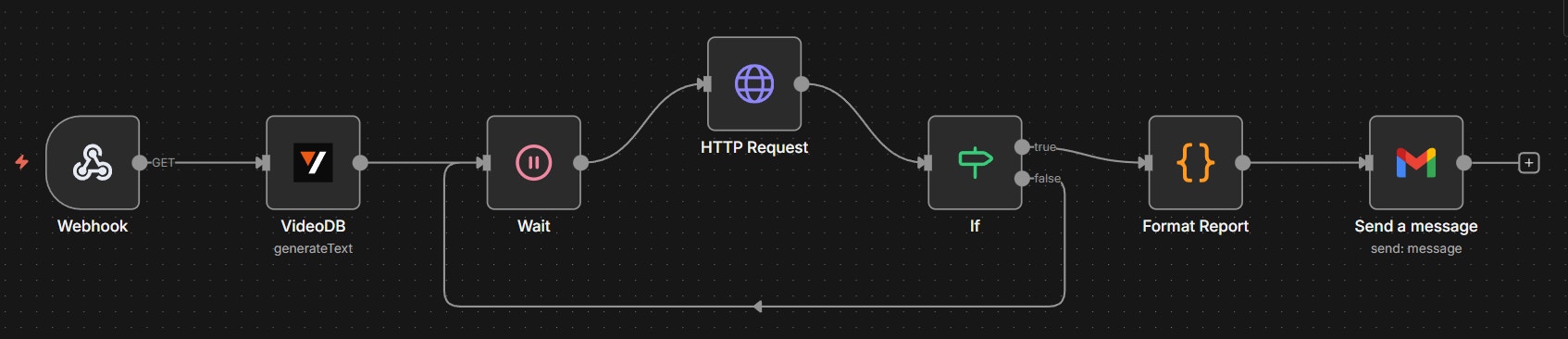
This n8n workflow acts as the **Digital Dispatch Center**, transforming raw AI detections into professional traffic reports in real-time.

1. **Webhook Trigger**: Receives the raw event payload from the VideoDB Safety Agent immediately upon violation detection.
2. **AI Data Extraction**: A dedicated VideoDB node parses the unstructured explanation string into a structured JSON object containing the License Plate, Vehicle Description, and Violation Type.
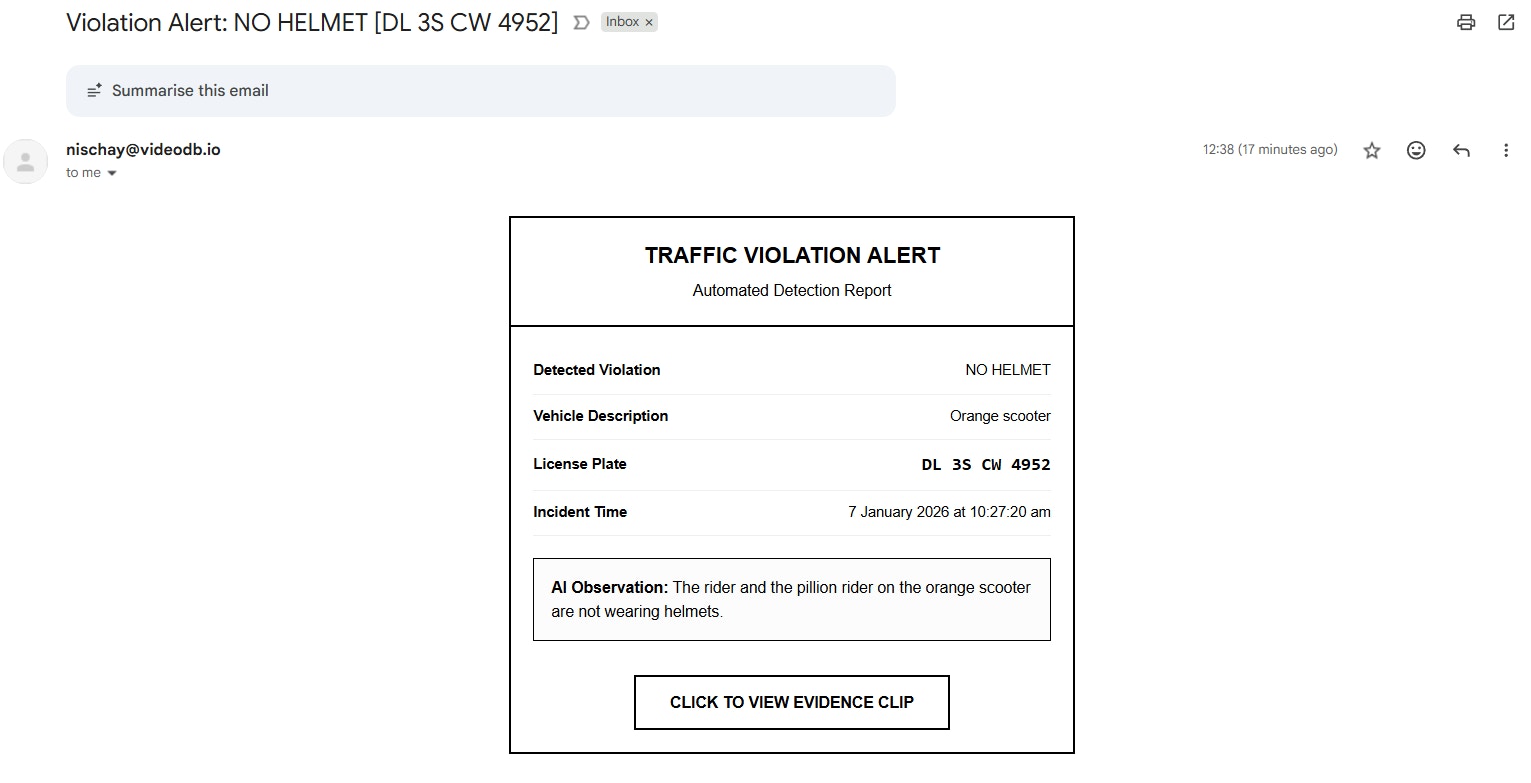
3. **Report Formatting**: A code node generates a high-contrast, professional HTML email template that maps the AI observations to a formal report structure.
4. **Official Delivery**: The finalized report - complete with the dynamic subject line and a direct link to the video evidence - is dispatched instantly via the Gmail node to the Traffic Control Room.

<img src="https://mintcdn.com/videodb/6KL5X6-sIPSRpEUt/assets/examples/roadcam-n8n-workflow.webp?fit=max&auto=format&n=6KL5X6-sIPSRpEUt&q=85&s=292401a689cceae02be2367379c13ba2" style={{width: "auto", height: "auto"}} alt="N8N workflow automation showing the steps for traffic violation detection and email delivery" width="1694" height="366" data-path="assets/examples/roadcam-n8n-workflow.webp" />

No more manual reporting. Just set it and forget it.

## Email received via N8N Automation
<img src="https://mintcdn.com/videodb/6KL5X6-sIPSRpEUt/assets/examples/roadcam-email.webp?fit=max&auto=format&n=6KL5X6-sIPSRpEUt&q=85&s=3179e04ac261441f9133132ae5f74be3" style={{width: "auto", height: "auto"}} alt="Email received via N8N automation showing the professional report format" width="1531" height="783" data-path="assets/examples/roadcam-email.webp" />

## Try It Yourself

<Card title="Open the Notebook" icon="notebook" href="https://colab.research.google.com/github/video-db/videodb-cookbook/blob/main/real_time_streaming/Roadcam.ipynb">
  Run the complete implementation in Google Colab with step-by-step examples
</Card>

n8n workflow JSON attached below, simply copy the code and paste in your N8N instance, and set up the credentials to get the automation running!

<Accordion title="n8n Workflow JSON (Click to expand)">
  ```json theme={null}
  {
    "nodes": [
      {
        "parameters": {
          "path": "traffic-violation-webhook",
          "options": {}
        },
        "type": "n8n-nodes-base.webhook",
        "typeVersion": 2.1,
        "position": [0, 80],
        "id": "34895f49-bcde-43cd-9112-60bbee8147a0",
        "name": "Webhook"
      },
      {
        "parameters": {
          "operation": "generateText",
          "prompt": "=You are a data extraction specialist. Your task is to parse a raw traffic violation string into a strict JSON format.|INPUT: \"{{ $json.explanation }}\" TASK:Extract the following fields. If a field is missing or unclear, use \"N/A\" as the value.1. vehicle_details2. license_plate: (The alpha-numeric plate number)3. violation_type: (The specific rule broken like no helmet, mobile phone use, wrong side driving, red light violation, triple riding, or no seatbelt)4. observation: (A short, clean summary of the evidence)STRICT RULES:- Output ONLY valid JSON.- No markdown formatting, no backticks, no preamble.- If the input is empty or invalid, return an object with all values set to \"Unknown\".JSON STRUCTURE:{  \"vehicle_type\": \"\",  \"license_plate\": \"\",  \"violation_type\": \"\",  \"observation\": \"\"}",
          "response_type": "json"
        },
        "type": "@videodb/n8n-nodes-videodb.videoDb",
        "typeVersion": 1,
        "position": [224, 80],
        "id": "5a16a040-9ab9-4001-9281-8e6963cf5d6b",
        "name": "VideoDB"
      },
      {
        "parameters": {},
        "type": "n8n-nodes-base.wait",
        "typeVersion": 1.1,
        "position": [448, 80],
        "id": "d04dff57-2b8b-4d5f-b96f-364349623c49",
        "name": "Wait"
      },
      {
        "parameters": {
          "url": "={{ $('VideoDB').item.json.data.output_url }}",
          "authentication": "predefinedCredentialType",
          "nodeCredentialType": "videoDBApi",
          "options": {}
        },
        "type": "n8n-nodes-base.httpRequest",
        "typeVersion": 4.3,
        "position": [672, 0],
        "id": "0048b380-50ac-4da0-a949-35d7ae0f3fe3",
        "name": "HTTP Request"
      },
      {
        "parameters": {
          "conditions": {
            "options": {
              "caseSensitive": true,
              "leftValue": "",
              "typeValidation": "loose",
              "version": 2
            },
            "conditions": [
              {
                "id": "0ab68efa-a4ba-4235-b3e8-6c3967880aef",
                "leftValue": "={{ $json.status }}",
                "rightValue": "complete",
                "operator": {
                  "type": "string",
                  "operation": "equals"
                }
              }
            ],
            "combinator": "and"
          },
          "looseTypeValidation": true,
          "options": {}
        },
        "type": "n8n-nodes-base.if",
        "typeVersion": 2.2,
        "position": [896, 80],
        "id": "74645a4a-4ab0-4efe-84e9-052457fb2cb2",
        "name": "If"
      },
      {
        "parameters": {
          "sendTo": "={{ $json.to }}",
          "subject": "={{ $json.subject }}",
          "message": "={{ $json.html }}",
          "options": {}
        },
        "type": "n8n-nodes-base.gmail",
        "typeVersion": 2.1,
        "position": [1344, 80],
        "id": "17d26012-f389-40e9-be75-dcce6640d0dc",
        "name": "Send a message"
      },
      {
        "parameters": {
          "jsCode": "const webhookData = $('Webhook').first().json;\nconst llmResult = $input.first().json.response.data.output;\n\nconst eventDate = new Date(webhookData.start_time).toLocaleString('en-IN', {\n  timeZone: 'Asia/Kolkata',\n  dateStyle: 'long',\n  timeStyle: 'medium'\n});\n\nconst htmlBody = `<div style=\"max-width:500px;margin:20px auto;border:2px solid #000;font-family:Arial,sans-serif;color:#000;padding:0;\"><div style=\"padding:20px;border-bottom:2px solid #000;text-align:center;\"><h2 style=\"margin:0;text-transform:uppercase;\">Traffic Violation Alert</h2><p style=\"margin:5px 0 0 0;font-size:14px;\">Automated Detection Report</p></div><div style=\"padding:20px;\"><table style=\"width:100%;border-collapse:collapse;color:#000;\"><tr><td style=\"padding:10px 0;border-bottom:1px solid #eee;\"><strong>Detected Violation</strong></td><td style=\"padding:10px 0;border-bottom:1px solid #eee;text-align:right;\">${llmResult.violation_type}</td></tr><tr><td style=\"padding:10px 0;border-bottom:1px solid #eee;\"><strong>Vehicle Description</strong></td><td style=\"padding:10px 0;border-bottom:1px solid #eee;text-align:right;\">${llmResult.vehicle_type}</td></tr><tr><td style=\"padding:10px 0;border-bottom:1px solid #eee;\"><strong>License Plate</strong></td><td style=\"padding:10px 0;border-bottom:1px solid #eee;text-align:right;\"><code style=\"font-size:16px;font-weight:bold;\">${llmResult.license_plate}</code></td></tr><tr><td style=\"padding:10px 0;border-bottom:1px solid #eee;\"><strong>Incident Time</strong></td><td style=\"padding:8px 0;border-bottom:1px solid #eee;text-align:right;\">${eventDate}</td></tr></table><div style=\"margin-top:20px;padding:15px;border:1px solid #000;background-color:#fcfcfc;\"><p style=\"margin:0;font-size:14px;\"><strong>AI Observation:</strong> ${llmResult.observation}</p></div><div style=\"margin-top:30px;text-align:center;\"><a href=\"${webhookData.player_url}\" style=\"display:inline-block;padding:12px 30px;border:2px solid #000;color:#000;text-decoration:none;font-weight:bold;text-transform:uppercase;font-size:14px;\">Click to View Evidence Clip</a></div></div></div>`;\n\nreturn {\n  to: \"control.room@dtp.nic.in\",\n  subject: `Violation Alert: ${llmResult.violation_type} [${llmResult.license_plate}]`,\n  html: htmlBody\n};"
        },
        "type": "n8n-nodes-base.code",
        "typeVersion": 2,
        "position": [1120, 80],
        "id": "342feeb0-a5b6-4e20-a4eb-e4e962539439",
        "name": "Format Report"
      }
    ],
    "connections": {
      "Webhook": {
        "main": [[{"node": "VideoDB","type": "main","index": 0}]]
      },
      "VideoDB": {
        "main": [[{"node": "Wait","type": "main","index": 0}]]
      },
      "Wait": {
        "main": [[{"node": "HTTP Request","type": "main","index": 0}]]
      },
      "HTTP Request": {
        "main": [[{"node": "If","type": "main","index": 0}]]
      },
      "If": {
        "main": [
          [{"node": "Format Report","type": "main","index": 0}],
          [{"node": "Wait","type": "main","index": 0}]
        ]
      },
      "Format Report": {
        "main": [[{"node": "Send a message","type": "main","index": 0}]]
      }
    }
  }
  ```
</Accordion>

**Small cameras. Smart AI. Big change.**

**Built with [VideoDB](https://videodb.io)**

## Related Tutorials

<CardGroup cols={2}>
  <Card title="Road Monitoring System" icon="map" href="/examples-and-tutorials/live-intelligence/road-monitoring">
    Multi-use road monitoring for accidents and congestion
  </Card>

  <Card title="Automated Traffic Violation Detection" icon="car" href="/examples-and-tutorials/live-intelligence/roadcam-monitoring">
    Dashcam-based violation detection and enforcement
  </Card>
</CardGroup>
