> ## Documentation Index
> Fetch the complete documentation index at: https://docs.videodb.io/llms.txt
> Use this file to discover all available pages before exploring further.
# Overview
> Plug video understanding into your agents — meetings, recordings, tutorials, cameras, and desktop perception
## The Context Transfer Problem
You are surrounded by videos — meetings, recordings, tutorials, channels, cameras, and even your desktop. The real bottleneck isn't processing power or model capability. It's **context transfer**.
Your agents are blind to the visual world you navigate every day. They can't see your Zoom calls, understand your Loom recordings, or follow along as you watch a tutorial. VideoDB changes that.
## Built for Agents
VideoDB is built from the ground up for agents. Your AI assistants can now acquire context from:
* **Meetings** — Understand discussions, decisions, and action items
* **Recordings** — Search and reference Loom-style videos, demos, and walkthroughs
* **Desktop perception** — See what you see in real-time
* **Tutorials** — Watch and learn alongside you
* **Cameras** — Monitor physical environments and events
Real-time understanding of your environment changes how you act in the real world.
## What's Possible
Imagine **Claude Code** with complete understanding of your meetings and Loom recordings. Start a sharing session and watch a tutorial together — your agent follows along, ready to help implement what you're learning.
Imagine **OpenClaw-style agents** recording demos of any app, capturing their autonomous workflows for review and debugging.
Imagine **research agents** navigating the internet, producing informative video summaries that cut through the noise — saving you from misinformation and clickbait.
## Install VideoDB Skills
Add video capabilities to your agent in seconds:
```bash theme={null}
npx skills add video-db/skills
```
Then run the setup command in your agent:
```
/videodb setup
```
The setup guides you through obtaining a VideoDB API key (includes \$20 free credits, no credit card required), installing the SDK, and verifying the connection.
Complete installation guide and skill documentation
## Example Workflows
AI coding assistant with real-time screen and audio context
CCTV for AI agents — monitor, record, and search autonomous agent activity
Real-time AI meeting assistant with dual-channel transcription
Local-first screen recorder with AI processing and natural language search
Productivity tracking with automatic session summaries
## Architecture
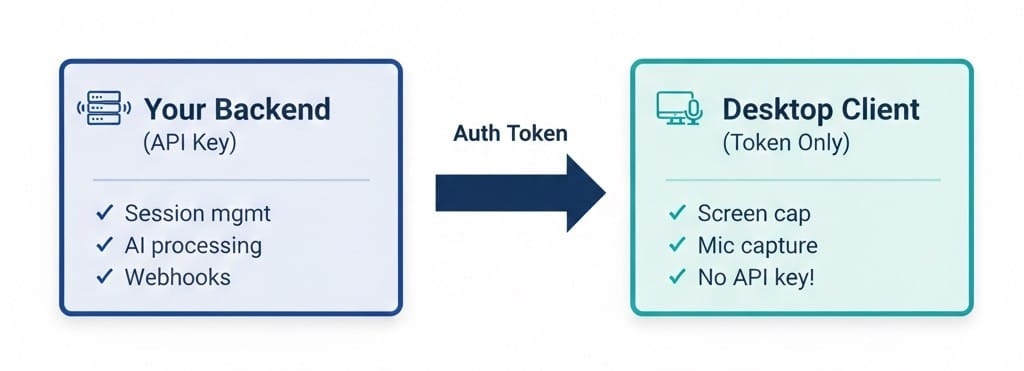 API keys never touch the desktop. Tokens are short-lived. Enterprise-ready security.
## Related Documentation
Full architecture and capabilities
How real-time AI context works
User consent and data protection
Persist and search captured content
Connect VideoDB to Claude and other agents
Build custom AI agents with VideoDB
API keys never touch the desktop. Tokens are short-lived. Enterprise-ready security.
## Related Documentation
Full architecture and capabilities
How real-time AI context works
User consent and data protection
Persist and search captured content
Connect VideoDB to Claude and other agents
Build custom AI agents with VideoDB